


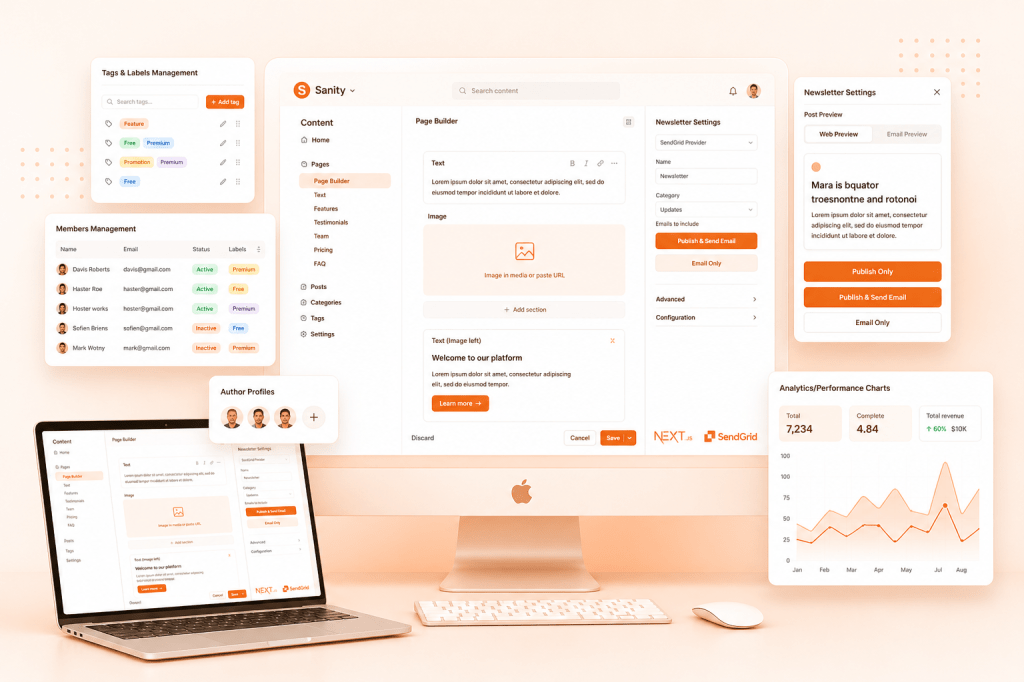
Modern publishing teams need more than a CMS. They need a content operating system — one that unifies writing, publishing, email, audience management, and performance into a single workflow.
We built a full-featured newsletter platform inside Sanity that mirrors the core publishing and newsletter experience of Ghost — and we delivered the entire system in approximately 100 hours.
Our goal was simple: combine the power of modern publishing with the flexibility of a fully programmable content platform.
This blog breaks down how we built a full Ghost-style publishing + newsletter platform inside Sanity, using Next.js and SendGrid and Vercel for hosting, in approximately 100 hours.
Why we looked at Ghost and what inspired us

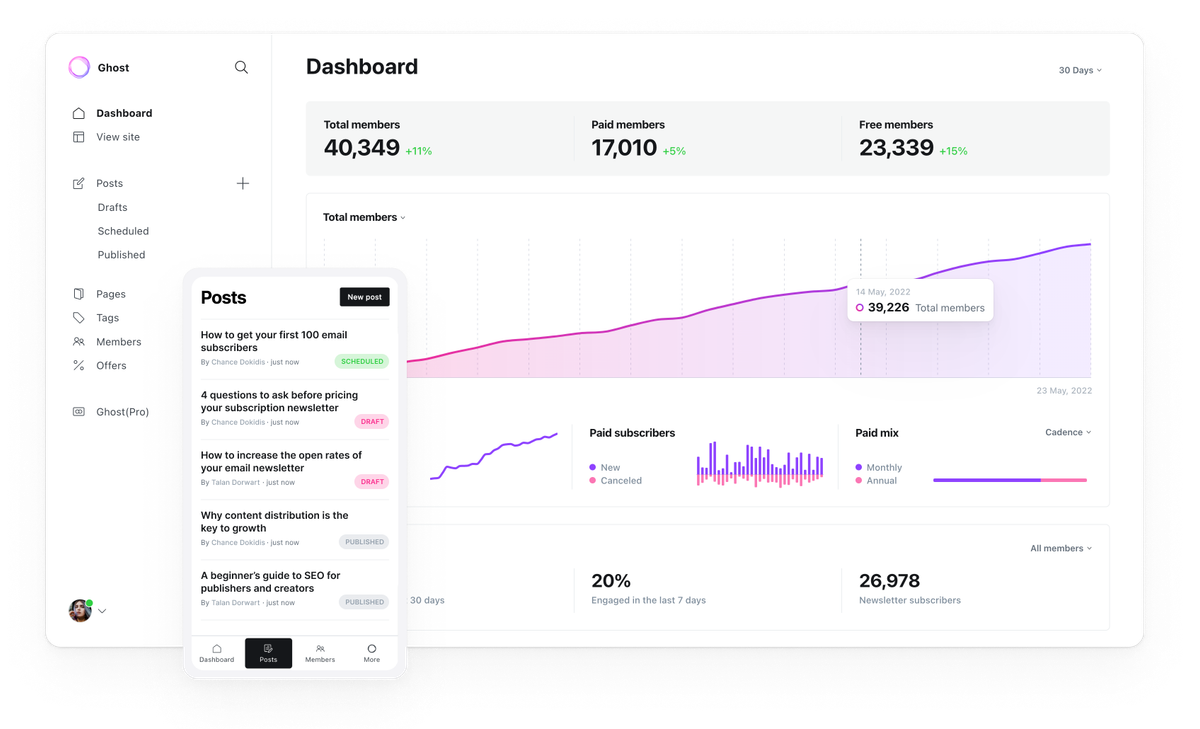
Before building our current system, our marketing team has been using the Ghost newsletter platform for a couple of years. which gave us valuable hands-on experience with what makes a strong publishing product. Its clean writing tools, built-in newsletters, membership management, and monetization features showed us how powerful an all-in-one platform for publishers can be.
That experience shaped our thinking and became a key reference point as we set out to build our own solution — one that keeps the best of the Ghost model while offering greater flexibility, control, and deep integration with our long-term goals.
Why We Built This in Sanity
Ghost is a great platform, especially for quickly launching newsletters and content sites. However, for our use case, we needed something more flexible, scalable, and deeply integrated with our product and business goals.
What We Needed
- More flexibility: We required a system that fits seamlessly into our current infrastructure and can grow with our custom workflows — while staying deeply aligned with our long-term goals.
- Fully custom content structure: With Sanity, we design our own content models. This allows us to shape newsletters, articles, campaigns, and internal tools exactly the way our team works, ensuring the platform supports our objectives instead of constraining them.
- Complete control over the front end: Rather than working inside a fixed editor or theme, we control the entire user experience: website layout, subscription flows, email rendering, performance optimizations — all built to serve our product vision and business outcomes.
- One unified backend: We already use Sanity extensively. Building Ghost-like newsletter tools inside Sanity keeps everything in one ecosystem, making the platform not just a tool, but a core part of how we execute our strategy.
Sanity is a programmable content platform that lets developers build custom content workflows and applications while giving teams a unified system for all digital experiences — ensuring technology stays closely connected to our goals, users, and growth plans.
The Sanity Content Operating System

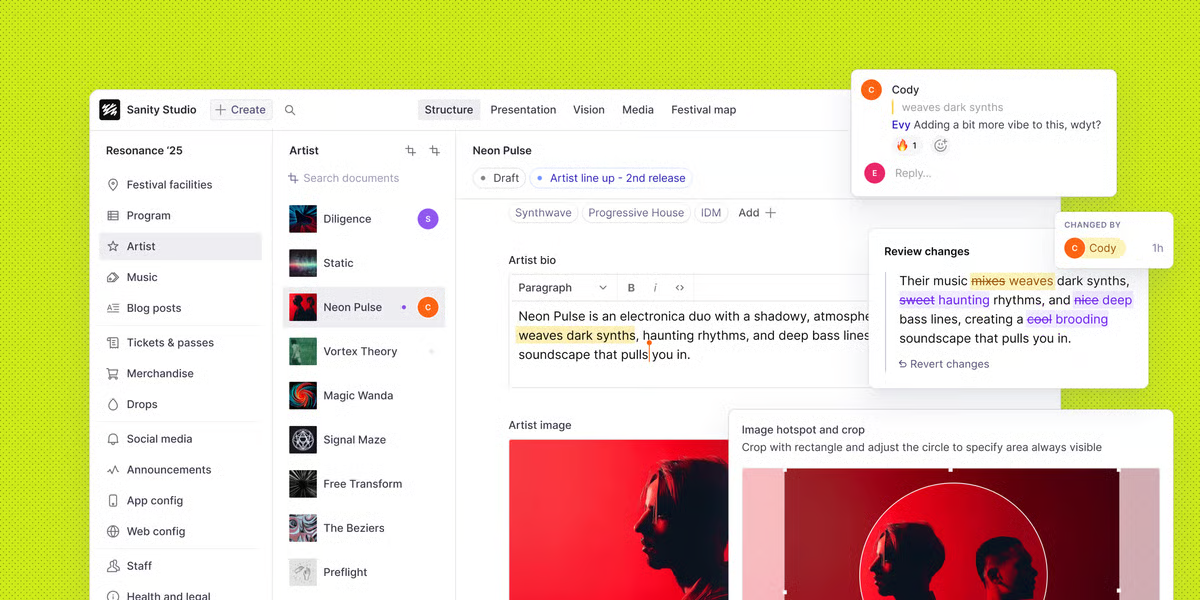
Sanity provides three interconnected layers:
- Content Lake — a real-time, structured content database
- Compute & AI — business logic, automation, and intelligent workflows
- APIs & SDKs — powerful developer tools to integrate content everywhere

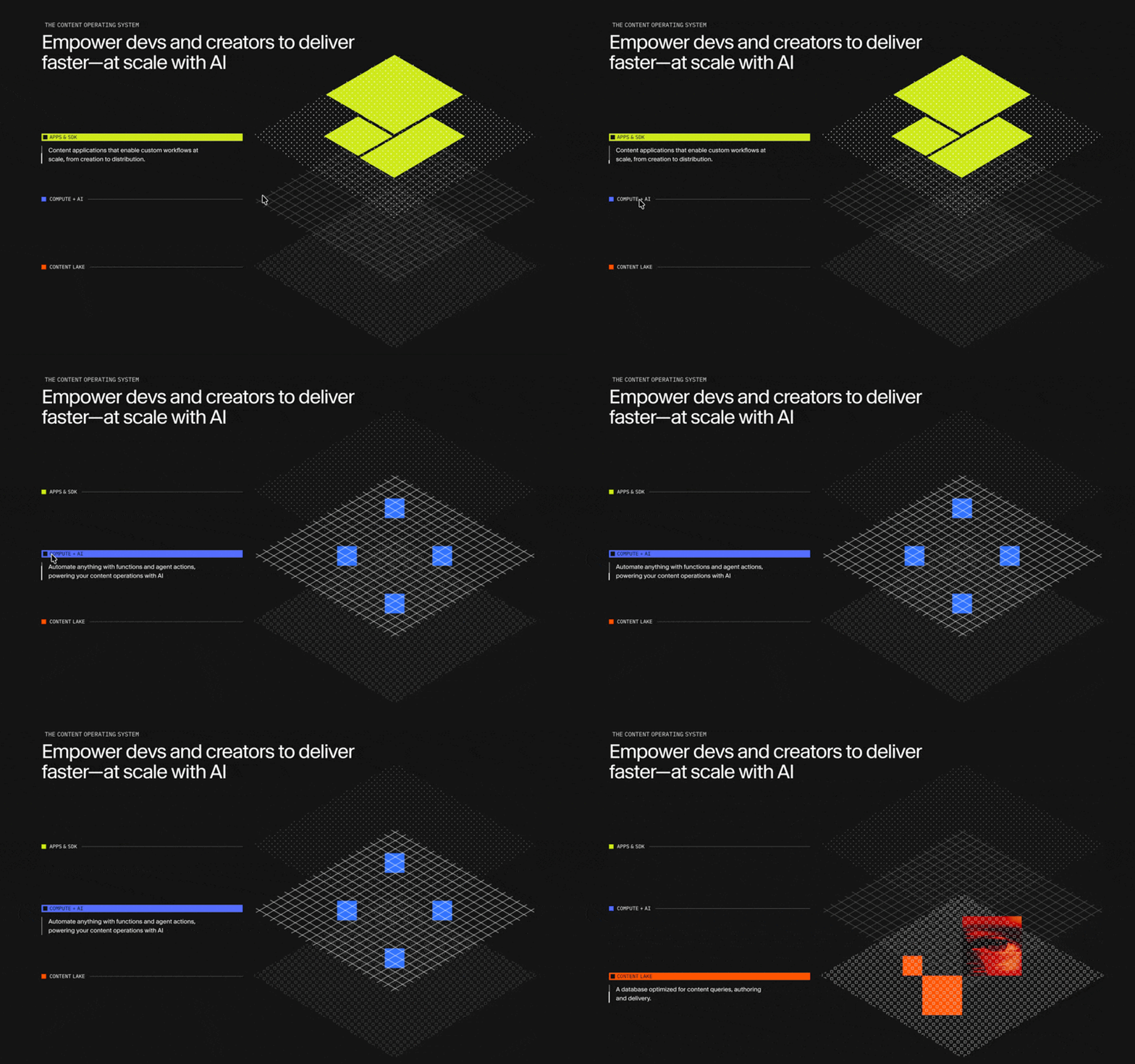
On top of this runs the Sanity Dashboard, where teams manage their operations through:
- Studio — a fully customizable CMS
- Media Library — centralized asset management
- Custom-built apps — developed using the App SDK for internal workflows
What This Enables for Us
Using Sanity, we can:
- Build custom content workflows that match our business processes
- Create structured content reusable across websites, newsletters, email campaigns, apps, and future platforms
- Develop specialized internal tools that give each team exactly what they need
Unlike traditional or even most headless CMS platforms, Sanity gives us a foundation for the entire content lifecycle — from creation and collaboration to delivery and optimization — with the freedom to evolve as our product and business grow.
How We Broke Down Ghost’s Newsletter Functionality
Before writing a single line of code, we spent time carefully studying how Ghost handles newsletters. Not just at the surface level, but at the workflow level — what an editor experiences, what the system manages behind the scenes, and how everything stays connected.
Instead of copying features, we deconstructed the product into simple building blocks.
Here’s how that breakdown looked.
1. Members Login & Profile Management
- Member login system
- User profile management
- Email preferences & notifications
- Subscription status (free / paid / active)
This turns your audience into a real community instead of just an email list.
2. Tags & labels Management
- Create and manage tags & labels
- Assign tags to posts/newsletters
- Assign labels to members/subscribers.
- Organize content by topics
- Use tags for filtering and audience targeting
Tags form the backbone of content organization.
3. Author Management
- Author profiles
- Roles & permissions
- Assign authors to posts
- Display author details on content
This keeps collaboration structured and transparent.
4. Pages & Posts Management
- Create, edit, and manage pages
- Create, edit, and manage posts
- Draft, scheduled, and published states
- Content updates & revisions
This keeps the website organized and scalable.
5. Newsletter Management
- Create newsletters from posts
- Manage subscriber lists
- Segment audiences
- Email previews
- Schedule or send newsletters
This connects content creation with audience communication.
6. Post Working Flow
Ghost’s core publishing flow:

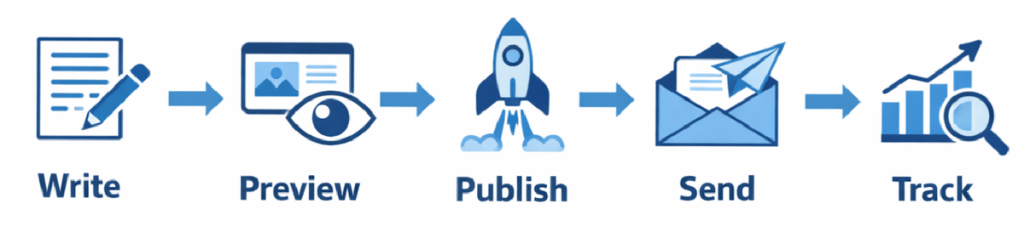
A simple process that keeps everything consistent.
7. Writing → Preview (Web + Email) → Send / Schedule
From one piece of content, you can:
- Write it once
- Preview it on the website
- Preview it in the email
- Choose the audience
- Send now or schedule for later
This is the heart of Ghost’s experience.
8. Settings & Customization
This is where Ghost becomes your own platform.
- Website appearance settings (branding, colors, layout)
- Theme customization
- Navigation & page structure controls
- Email branding & layout settings
- Sender details & email configuration
- Newsletter defaults & delivery preferences
These settings allow you to fully control how your site and emails look and behave — without touching code.
Core Components & Building Blocks Used in Sanity
Sanity provides a modular architecture made up of powerful building blocks that allow us to design highly customized content systems and workflows.
1. Content Lake (The Foundation)
A real-time, structured content database that stores all content in a single source of truth.
What it gives us:
- Structured content with strong schemas
- Real-time collaboration and updates
- Versioning, history, and references between content
- Content is reusable across websites, newsletters, email, apps, and APIs
2. Sanity Studio (Custom CMS Interface)
A fully customizable editing environment where teams manage and produce content.
Key building blocks inside Studio:
- Schemas — define content types, fields, validation, and relationships
- Desk Structure — custom navigation & editorial workflows
- Input Components — custom UI components for specific business needs
- Document Actions & Badges — publishing logic, status indicators, approvals
3. APIs & Developer Toolkit
Core APIs:
- GROQ — Sanity’s query language for structured content
- Content API — fetch content for any frontend
- Write API — create, update, and automate content
- Realtime API — listen to content changes instantly
SDKs & Tools:
- JavaScript client
- CLI
- App SDK
- Migration tooling
- Image & asset pipeline
4. Asset & Media Infrastructure
- Global CDN for images & files
- Dynamic image transformations
- Media Library for centralized management
- Optimized delivery for performance
5. Dashboard & Application Layer
Where operational tools live:
- Studio — CMS interface
- Media Library — asset management
- Custom apps — internal tools built with App SDK
6. Frontend Integration Layer
How everything connects to our product:
- Framework Support — Next.js, React
- Content Fetching — Data using GROQ
- Live Preview — See drafts instantly
- Fast Delivery — CDN and caching
Step-by-Step Implementation Overview
Step 1 – System Architecture Planning
We built the platform using a modern, flexible architecture that gives us full control over both content management and the user experience.
| Layer | Technology |
|---|---|
| Backend / Content OS | Sanity: Sanity serves as our core content and data platform. It acts as the single source of truth for all structured content, including:Posts & PagesTags & LabelsAuthorsMembersSite configuration and global settingsSanity’s schema-driven approach allows us to define precise content models and enforce validation rules, ensuring consistency across all channels. |
| Frontend | Next.js powers the entire front-end experience:Public website and landing pagesSubscription flowsNewsletter/posts archive and reading experienceSEO and analytics integrationThis separation allows us to evolve the UI and product experience independently from the content layer. |
| Admin & Internal Tools | We built a custom admin interface using Sanity’s App SDK to support our editorial and operational workflows.Through this interface, our team can manage:Posts and pagesTags and labelsMembersGlobal site settingsPreview & custom website viewsThis gives non-technical users powerful, purpose-built tools while keeping the system aligned with our product goals and publishing workflows. |
| Email Infrastructure | For email delivery and campaign management, we use SendGrid as our primary email infrastructure. It handles all transactional and marketing communications |
This stack gives us:
- Full ownership of data and workflows
- Complete freedom over UI and product design
- A single unified backend
- The ability to scale and extend without platform limitations
Together, Sanity + Next.js + App SDK form a flexible foundation that supports our current needs while remaining adaptable for future growth.
Step 2 – Content Modeling in Sanity
We designed a fully structured content system in Sanity using custom schemas that define how every piece of content is created, validated, and connected.
- Posts
- Pages
- Authors
- Tags
- Labels
- Subscribers / Members
- Site Settings
- Navigation
- Email Settings
- Page Builder Blocks
Each schema was carefully structured with strong validation rules and document relationships to ensure consistency, reliability, and long-term scalability across the platform.
Custom Page Builder with Reusable Blocks
To give editors complete flexibility while maintaining design control, we built a custom page builder system for both Posts and Pages using modular blocks. These blocks allow non-technical teams to assemble rich pages and posts without breaking layout or design standards, while developers retain full control over how each block renders on the frontend.
Here is the code for the post schema:
import { defineField, defineType } from "sanity";
import { StickyNote } from "lucide-react";
export default defineType({
  name: 'post',
  title: 'Posts',
  type: 'document',
  fields: [
    defineField({
      name: 'title',
      title: 'Title',
      type: 'string',
      validation: rule => rule.required()
    }),
    defineField({
      name: 'slug',
      title: 'Slug',
      type: 'slug',
      options: {
        source: 'title',
      },
      validation: rule => rule.required()
    }),
    defineField({
      name: 'excerpt',
      title: 'Subtitle (Excerpt)',
      description: 'The subtitle of the post. This will be used to display the subtitle of the post on the post page.',
      type: 'text',
      rows: 4
    }),
    defineField({
      name: 'pageBuilder',
      title: 'Content',
      type: 'pageBuilder',
    }),
    defineField({
      name: 'image',
      title: 'Image',
      type: 'image',
      fields: [
        defineField({
          name: 'altText',
          title: 'Alternative Text',
          type: 'string'
        }),
        defineField({
          name: 'caption',
          title: 'Caption',
          type: 'string'
        }),
      ],
    }),
    defineField({
      name: 'author',
      title: 'Author',
      type: 'array',
      description: 'The authors of the post. This will be used to display the authors of the post on the post page.',
      of: [
        {
          type: 'reference',
          to: [{ type: 'author' }],
        },
      ],
      options: {
        layout: 'tags',
      },
      validation: rule => rule.required()
    }),
    defineField({
      name: 'tag',
      title: 'Tags',
      type: 'array',
      description: 'The tags for the post.',
      of: [
        {
          type: 'reference',
          to: [{ type: 'tag' }],
        },
      ],
      options: {
        layout: 'tags',
      },
      validation: rule => rule.required()
    }),
	  defineField({
      name: 'isFeatured',
      title: 'Feature this post',
      type: 'boolean',
      initialValue: false,
    }),
    defineField({
      name: "seo",
      title: 'SEO',
      type: "seoObject",
    }),
  ],
  icon: StickyNote,
  // ✅ Custom Preview Section
  preview: {
    select: {
      title: "title",
      media: "image",
      author0: "author.0.name", // first author name
      author1: "author.1.name", // optional if multiple authors
    },
    prepare(selection) {
      const { title, media, author0, author1 } = selection;
      let subtitle = "";
      if (author0 && author1) subtitle = `By ${author0}, ${author1}`;
      else if (author0) subtitle = `By ${author0}`;
      else subtitle = "By Unknown";

      return {
        title: title || "Untitled Post",
        subtitle,
        media: media || StickyNote, // default icon if no image
      };
    },
  },

})
You can find the full code in our GitHub repository.
Step 3 – Building the Custom Admin Experience

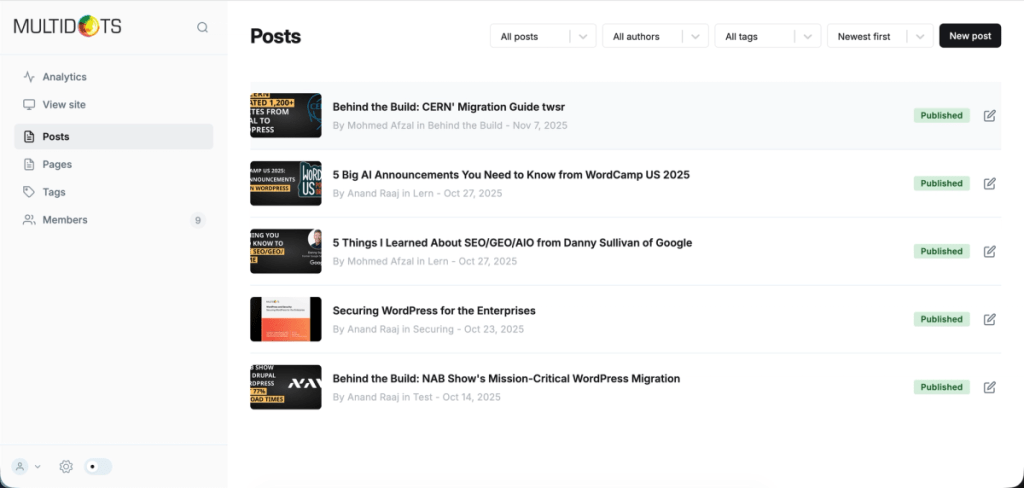
Using the Sanity App SDK, we built a fully customized admin interface tailored to our editorial and operational workflows.
Through this custom admin UI, our editors and administrators can:
- Create and manage posts and pages
- Manage members and subscribers
- Configure site layout and global settings
- Preview content and control publishing states
This purpose-built interface gives non-technical users powerful, easy-to-use tools while ensuring that publishing remains consistent, efficient, and aligned with our product goals.

Key Complex Features Implemented within the custom admin
1. Posts & Pages Editor
We built a powerful and flexible editor that allows content teams to create and structure content exactly as required. Editors have full control over the content layout through a rich text editing experience combined with custom page builder blocks.
This approach enables them to design rich, engaging pages while maintaining consistent UI and UX across the platform — without requiring developer involvement.
To further support content quality and confidence before publishing, we added a comprehensive preview system:
- Website Preview — available for both pages and posts, allowing editors to see exactly how the content will appear on the live site before publishing
- Email Preview — available for posts, allowing editors to review how the content will look when sent as an email newsletter

2. Advanced Email Functionality
We implemented a custom email workflow tightly integrated with the publishing process. When creating a post, editors can choose between multiple publishing actions:
- Publish Only — publishes the post to the website
- Publish & Send Email — publishes the post and automatically sends it as a newsletter to subscribers
- Email Only — sends the content as a newsletter without publishing it on the website
This flexible workflow allows the editorial team to manage website content and email campaigns from a single interface, streamlining operations and improving efficiency.

3. Site Configuration & Global Settings
We developed a centralized configuration system where administrators can manage all global website settings, including:
- Branding and layout options with live preview
- Navigation structure
- Email configurations
- SEO defaults and metadata
- Feature toggles and platform-wide behavior
This ensures consistency across the platform and enables rapid updates without code changes.

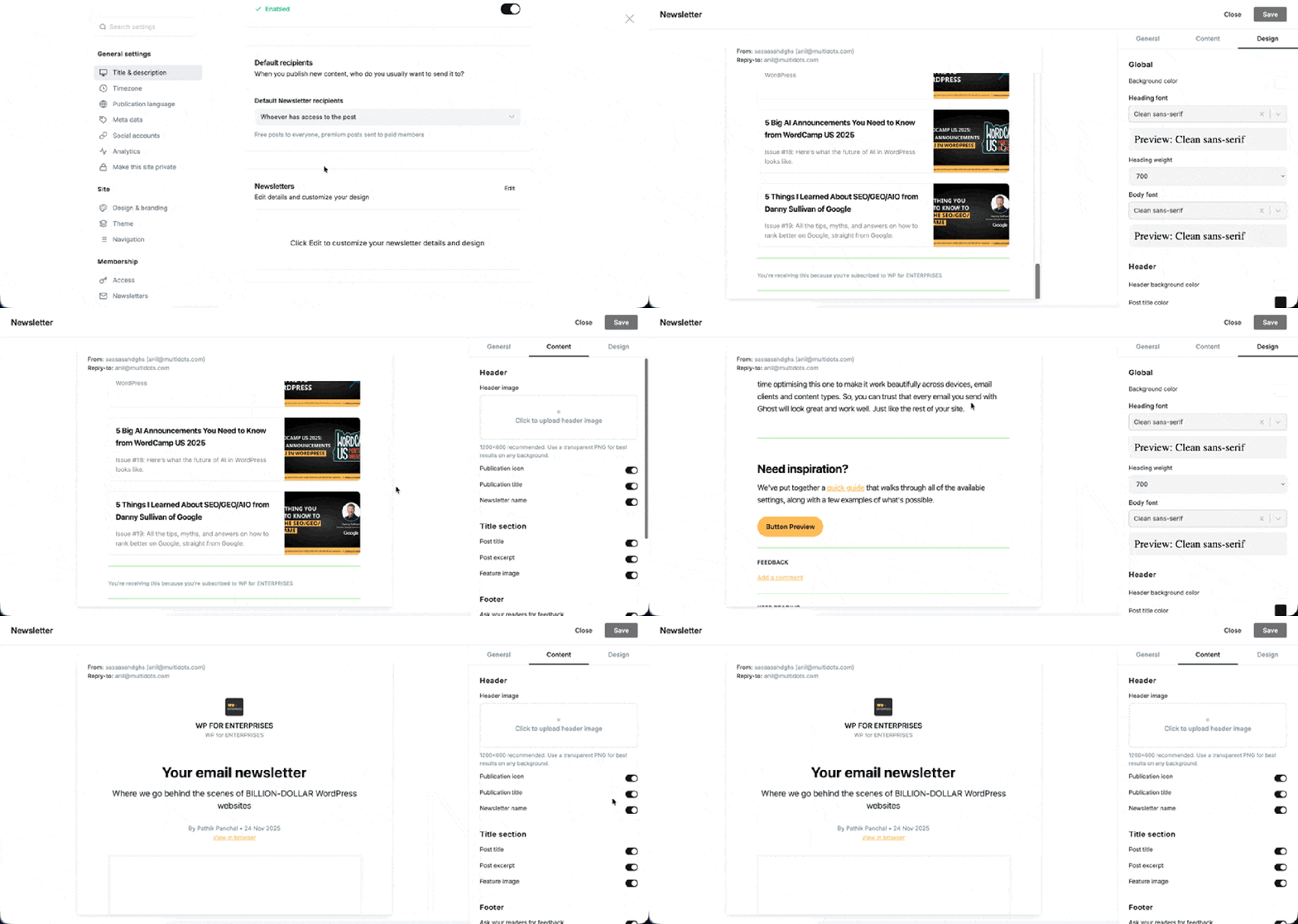
3.1 Email settings
Allows administrators to manage all email-related configurations from a single place, including sender details, templates, and delivery options.
This ensures consistent branding and reliable communication across the platform without code changes.

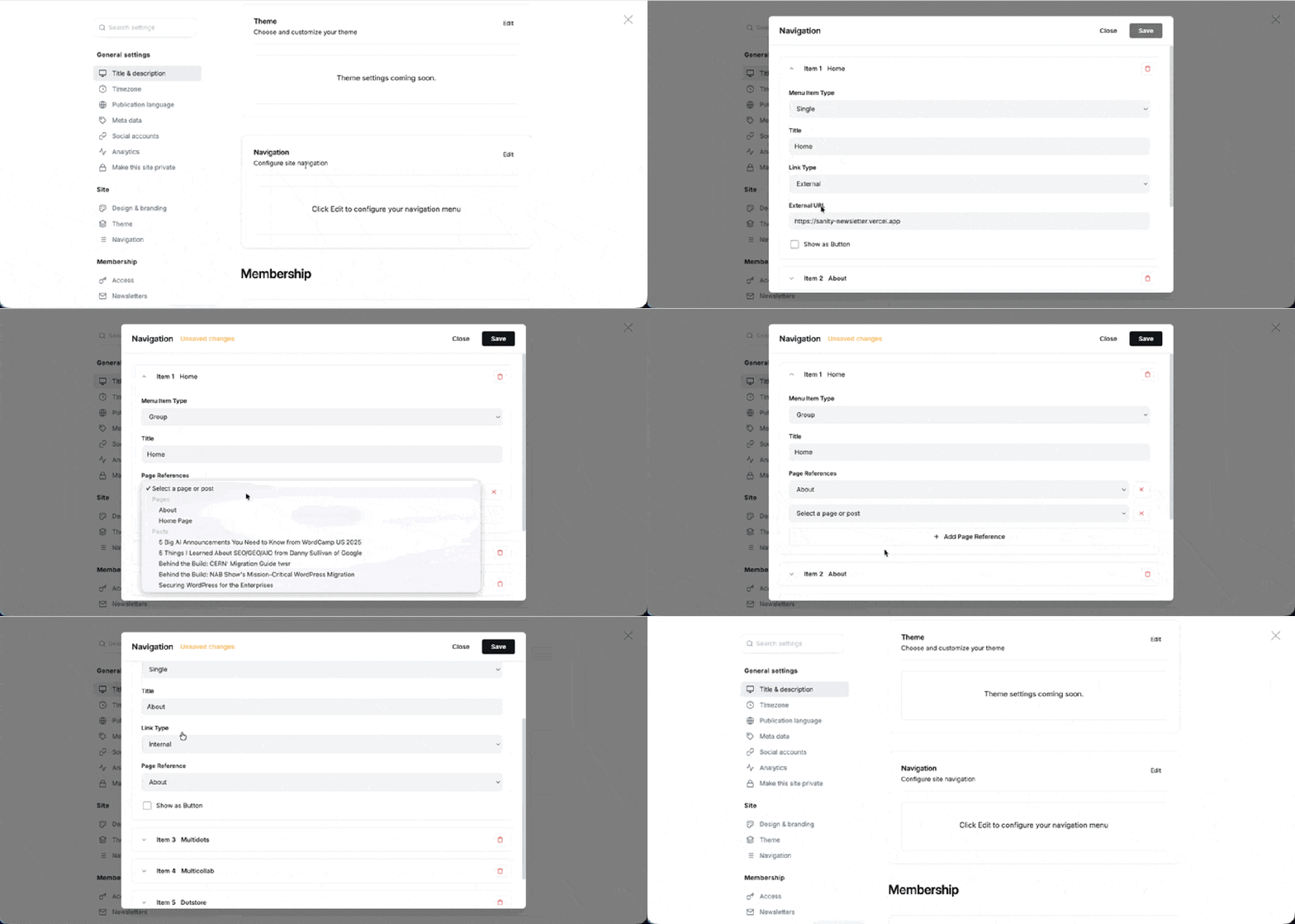
3.2 Navigation settings
Provides a centralized way to define and manage the site’s navigation structure.
Admins can create, update, and reorder menus easily, ensuring consistent navigation across pages and quick updates as content evolves.
Step 4 – Frontend Development with Next.js
We built the entire frontend experience using Next.js, focusing on performance, flexibility, and seamless integration with the Sanity backend.
Key implementations include:
- Setting up all core website pages
- Implementing a dynamic navigation system connected directly to the Sanity navigation schemas
- Designing and developing the visual components for all custom page builder blocks and Portable Text blocks
- Building a post listing block with a smooth “Load More” experience
- Implementing full member signup and sign-in flows including profile management.
- Developing tag archive and author archive pages.
- Building the single post page with support for all custom content blocks and layouts.
- Adding a global search feature that allows users to search across posts, tags, and authors
This frontend architecture ensures a fast, scalable, and highly customizable reading and publishing experience.
Key Decisions, Tradeoffs, and Learnings
1. Build vs Buy: Choosing Sanity Over a Turnkey Platform
- Decision: We chose to build our own Ghost-like system inside Sanity instead of extending Ghost or adopting a third-party newsletter service.
- Tradeoff: This increased our upfront engineering effort but eliminated long-term constraints around customization, ownership, and integration.
- Learning: Owning the platform is significantly more valuable than optimizing for short-term speed when the product is core to your business.
2. Structured Content Over Freeform Flexibility
- Decision: We enforced strong content schemas for posts, newsletters, members, and settings.
- Tradeoff: Editors had to adapt to structured workflows instead of total freeform writing.
- Learning: Structure dramatically reduces bugs, improves content reuse, and enables automation at scale.
3. Custom Page Builder Instead of Generic Editor
- Decision: We built a custom block-based page builder on top of Sanity’s Portable Text.
- Tradeoff: More development work initially compared to using a default editor.
- Learning: This preserved long-term design consistency while giving editors real creative control.
Final Thoughts
Building a Ghost-like newsletter tool doesn’t require years of work.
It requires clear content structure, strong fundamentals, and disciplined execution.
We built this tool in ~100 hours to prove a simple point: when your content model is right, everything else moves faster.
Instead of obsessing over features, focus on signal:
- clear, intentional content modeling
- portable schemas that scale
- editor-first workflows
- performance-ready architecture
- clean separation between content and presentation
At Multidots, we’re an official Sanity Enterprise Agency Partner. We help teams turn structured content into real platforms—not demos or prototypes, but production systems that scale.
If you want to explore this in practice:
- see it live with a personal 1:1 walkthrough
- fork the code from our GitHub repo