The Ultimate Step-by-Step Guide to Migrate from AEM to WordPress
Learn how to seamlessly migrate from Adobe Experience Manager to WordPress with our comprehensive enterprise migration guide

Okay, you're thinking about migrating from Adobe Experience Manager to WordPress.
Maybe your AEM license renewal is coming up, and you're wondering whether another year of six- or seven-figure fees actually makes sense. Maybe your content team is exhausted by complex workflows that turn a simple blog post into a multi-step ordeal. Or maybe you've realized you're paying premium prices for an entire Adobe ecosystem you barely use.
Whatever brought you here, you're in the right place.
But let's be honest about something upfront: this isn't a simple platform swap. Your AEM implementation has years of customizations, integrations, and content workflows baked in. Your production environment runs on custom components, Adobe-specific integrations, and that "temporary" workaround your predecessor built three years ago. None of that shows up in vendor demos.
The gap between "it works in the demo" and "it works in production" is where migrations fail, budgets explode, and platforms get blamed for implementation decisions.
This guide gives you practical frameworks to plan a migration that still makes sense six months after launch—not just on day one. Drawing on 300+ enterprise migrations, we'll help you navigate the real challenges: hidden costs that surface mid-project, complexity factors that double timelines, and the critical decisions that determine whether you're set up for long-term success or expensive do-overs.
Here's a quick roadmap to help you navigate this guide and get straight to the answers you're looking for:
- Start here if you need to validate whether WordPress is actually the right fit for your organization.
- Start here for a deep dive into the ROI and comprehensive cost comparison between WordPress and AEM.
- Start here if you want to address common objections people often have about AEM to WordPress migration.
- Start here for a step-by-step guide on how to handle the migration yourself.
- Start here if you have specific questions about your unique migration needs.
- Start here to download this guide as a PDF—perfect for your next flight or to share with your team.
Or skip all of that and schedule a free 30-minute consultation with us. Let's cut to the chase and tackle your questions head-on.
Ready? Let's start by making sure this migration actually makes sense for your business.
PART 1: SHOULD YOU REALLY MIGRATE? THE DECISION FRAMEWORK
Before you commit to a multi-month migration project, let's pressure-test the decision. Not every AEM frustration means WordPress is the answer. This framework helps you validate whether migration makes strategic sense for your specific situation.
1.1 The 5 Critical Questions
Answer these honestly. If you're unsure about more than two, you need more discovery before moving forward.
Question 1: How many people manage content daily?
- 1-5 editors → WordPress or headless CMS make sense. AEM's complexity and cost are overkill.
- 6-20 editors → Any platform could work, but governance and workflow matter more than the platform itself.
- 20+ editors across departments → WordPress excels here with multisite, role management, and editorial workflows. AEM's advantages diminish at this scale unless you're deeply embedded in Adobe's personalization and analytics suite.
Question 2: What content types do you mainly publish?
- Marketing pages and campaigns → WordPress dominates. Faster deployment, easier A/B testing, better integration with marketing tools.
- News, articles, and editorial content → WordPress was built for this. The Gutenberg editor makes AEM's authoring experience feel clunky by comparison.
- Complex product catalogs with frequent updates → Both can handle it, but WordPress with WooCommerce or custom post types offers more flexibility at lower cost.
- Highly personalized, multi-channel experiences using Adobe Target and Adobe Analytics → If you're actively using AEM's personalization engine combined with 4+ Adobe products and have the team to maintain it, this is one area where AEM's premium might still be justified.
Question 3: What systems must integrate seamlessly?
- CRM only (Salesforce, HubSpot) → Both platforms handle this easily. WordPress often integrates faster.
- Marketing automation, analytics, PIM, DAM → WordPress has mature integrations for all of these. AEM's native Adobe connectors aren't worth the license premium unless you're using 5+ Adobe products together.
- Custom enterprise applications → WordPress's REST API makes custom integrations straightforward. If your AEM integrations are working well, factor in rebuild time and cost.
- Everything in the Adobe ecosystem (Analytics, Target, Campaign, Marketo Engage) → If you're using the full Adobe Experience Cloud suite and it's delivering measurable ROI, migration costs may not justify the switch.
Question 4: What's your realistic total budget for year one?
- Under $200K → WordPress is your only realistic option. AEM licensing alone exceeds this—often by multiples.
- $200K-$500K → WordPress with enterprise hosting fits comfortably and leaves room for custom development. AEM as a Cloud Service would consume your entire budget on licensing alone.
- $500K+ → All options are technically accessible, but question whether AEM's premium is delivering proportional value.
Question 5: When do you absolutely need to launch?
- Under 3 months → Only WordPress is achievable (with an experienced partner and limited scope).
- 3-6 months → WordPress is very doable. AEM to WordPress migration is realistic with proper planning.
- 6-12 months → Any migration path is achievable. Timeline isn't a constraint.
- 12+ months → Question why you're waiting. Unnecessary delays cost you in continued AEM licensing and delayed benefits.
1.2 Interpreting Your Answers
Strong signals to migrate to WordPress:
- Small to mid-size content team (under 50 editors)
- Primary focus on publishing (articles, marketing content, product information)
- Budget under $500K for year one
- Need to launch within 6 months
- Limited or no Adobe-certified development capability in-house
- Paying for Adobe Experience Cloud features you don't actively use
- AEM license renewal approaching in the next 3-6 months
Warning patterns that suggest more discovery needed:
- You're primarily frustrated with your current implementation, not the platform. (Bad implementations look the same on any CMS.)
- You're not clear on which Adobe ecosystem products your teams actually depend on daily.
- You haven't inventoried your current integrations and their complexity.
- You're planning to migrate "because WordPress is cheaper" without understanding total cost of ownership.
Situations where staying on AEM might make sense:
- You're actively using 5+ Adobe Experience Cloud products together (AEM, Analytics, Target, Campaign, Commerce) and they're delivering measurable ROI
- Your personalization engine drives significant, measurable revenue
- You have a strong in-house Adobe-certified development team that knows AEM deeply
- Your AEM implementation is working well, and the total cost of ownership is acceptable to leadership
1.3 The Go/No-Go Decision Tree
Use this to make your final call:
Is your AEM license renewal coming up in the next 6 months?
- YES → Strong timing to evaluate alternatives
- NO → Less urgency, but evaluate if costs justify waiting
Are you using fewer than 50% of Adobe Experience Cloud's features?
- YES → You're likely overpaying significantly
- NO → AEM might be appropriate for your complexity
Is your content team frequently blocked waiting for developer assistance?
- YES → WordPress's self-service model will dramatically improve velocity
- NO → Could be an implementation issue, not necessarily a platform issue
Do you have budget for both migration AND 12 months of WordPress hosting/support?
- YES → Proceed with migration planning
- NO → Budget properly or wait. Under-funded migrations create bigger problems than staying put.
Do you have an experienced WordPress VIP partner identified?
- YES → Risk is manageable
- NO → Finding the right partner is critical. Don't rush this step.
Decision: If you answered YES to 4+ of these questions, migration makes strategic sense. If not, dig deeper before committing.
PART 2: UNDERSTANDING YOUR MIGRATION COMPLEXITY
Migration timelines can swing 50-200% from initial estimates. That's not because teams can't plan—it's because migrations bring hidden issues to the surface. Legacy workarounds, undocumented decisions, and technical debt all reveal themselves when you try to move.
This section helps you understand what you're actually signing up for.
2.1 The Migration Complexity Scale
Every AEM to WordPress migration falls into one of three complexity levels. Your level determines timeline, budget, and the expertise you'll need.
Simple Migration (10-16 weeks, $100K-$250K)
Characteristics:
- Under 10,000 pages
- 3-5 main content types
- Straightforward content structure (mostly articles, pages, basic products)
- Limited custom AEM components (under 10 custom templates)
- Standard integrations (Google Analytics, basic CRM, email marketing)
- Single language
- Willing to simplify some legacy functionality rather than replicate exactly
What "simple" means: The systems share similar mental models. Most effort goes into moving content and lightly adapting it. You're not rebuilding complex features—you're finding WordPress equivalents for standard AEM functionality.
Example: A corporate marketing site with news, product pages, and lead capture forms. Content-heavy but functionally straightforward.
Moderate Migration (16-24 weeks, $250K-$500K)
Characteristics:
- 10,000-50,000 pages
- 5-10 content types with relationships between them
- Multiple subsites or regional brands
- Custom AEM workflows and approval chains
- 10-20 custom components requiring rebuild
- Multiple integrations (CRM, marketing automation, DAM, analytics)
- Multi-language (2-5 languages)
- Experience Fragments and Content Fragments in active use
- Custom user roles and permissions
What "moderate" means: You're translating different ways of structuring content and rebuilding custom features. Some AEM concepts—like Experience Fragments or Sling Models—don't map directly to WordPress, requiring rethinking rather than replicating.
Example: A multi-brand enterprise with complex editorial workflows, multiple author types, regional content variations, and marketing automation integrations.
High Complexity Migration (24-40 weeks, $500K-$1M+)
Characteristics:
- 50,000+ pages
- 10+ interconnected content types
- Heavy use of Adobe Target personalization
- Extensive custom functionality (20+ custom components)
- Complex integration ecosystem (10+ systems, including Adobe Experience Cloud products)
- Multi-language (5+ languages) with regional variations
- Advanced e-commerce with Adobe Commerce integration
- Complex user hierarchies and permissions
- Compliance requirements (HIPAA, GDPR, financial regulations)
- Real-time data synchronization needs
What "high complexity" means: This is effectively a new build. Architecture, code, and processes all change fundamentally. Almost nothing carries over directly—you're rebuilding the business logic on a different foundation.
Example: A global media or financial services company with multiple properties, regional variations, advanced personalization, subscription management, and deep Adobe ecosystem dependencies across properties.
2.2 What Adds Time and Cost
These factors compound. If you have three of them, don't just add the percentages—expect them to interact and multiply.
Content Volume (+20-40% to timeline)
- Over 50,000 pages
- 100,000+ media assets in AEM DAM
- Complex media structures (multiple renditions, Dynamic Media configurations, PDF libraries)
Why it matters: Each piece of content needs validation. Automated migration tools handle bulk work, but edge cases, broken links, and malformed content require manual attention. At scale, edge cases become the norm.
Custom AEM Features (+30-60% to timeline)
- More than 15 custom AEM components
- Heavy use of Experience Fragments and Content Fragments
- Custom Sling Models or OSGi configurations
- Adobe Target personalization rules in active use
- Custom AEM workflows or Launchers
Why it matters: These don't have direct WordPress equivalents. Each one requires analysis, redesign, and custom development. The more customization, the less you benefit from WordPress's out-of-the-box capabilities.
Integration Complexity (+20-50% to timeline)
- More than 5 active integrations
- Deep Adobe ecosystem dependencies (Analytics, Target, Campaign)
- Real-time data synchronization (not just API calls)
- Custom-built integrations (not standard connectors)
Why it matters: Each integration needs rebuilding and testing. Adobe ecosystem integrations are particularly complex to replace because they often share data in ways that aren't fully documented. Real-time integrations require careful coordination to avoid data loss during cutover.
Organizational Complexity (+15-30% to timeline)
- More than 3 stakeholder groups requiring sign-off
- No dedicated product owner
- Content team unfamiliar with migration projects
- Distributed decision-making across departments or regions
Why it matters: Technical work proceeds at the speed of decision-making. Slow approvals, scope debates, and stakeholder alignment issues kill timelines more than technical challenges do.
2.3 The 3 Hidden Costs That Wreck Budgets
These don't show up in initial scoping because vendors hope you won't ask. Every failed migration we've rescued had at least one of these.
Hidden Cost 1: Content Modeling and Retraining
What happens: Moving from AEM's component-based authoring (with its dialogs, parsys, and Experience Fragments) to WordPress's block editor changes how editors think, not just what buttons they press.
Real impact:
- Expect 40% productivity drop in month one as editors adjust
- 20% drop in month two as they build new habits
- 10% drop through month three as edge cases surface
What it actually costs:
- Training: $15K-$40K for comprehensive role-based training
- Temporary productivity loss: Equivalent of 2-3 FTE months
- Documentation and resources: $10K-$20K for custom guides
- Total: $50K-$100K you probably didn't budget
The good news? Most teams become more productive in WordPress within 8-12 weeks than they ever were in AEM. The Gutenberg editor is simply more intuitive for everyday content tasks.
Hidden Cost 2: SEO and Redirect Mapping
What vendors say: "We'll set up 301 redirects."
What actually happens: Your current site has years of SEO value built into URLs, metadata, and internal links. AEM's URL structure (often with /content/ paths, dispatcher rewrites, and Sling mappings) makes redirect mapping more complex than most platforms.
What breaks:
- Old campaign pages still getting traffic from email campaigns
- PDF links hardcoded in external sites
- AEM dispatcher rewrite rules that mask the true URL structure
- Canonical tags pointing to old URLs
- Structured data markup with old URL patterns
Real example: A media company migrated 50,000 articles with "all content preserved." They skipped comprehensive redirect mapping to save $30K. Traffic dropped 35% overnight. Recovery took 8 months and cost $180K in SEO remediation and content optimization.
What it actually costs:
- Comprehensive URL audit and mapping: $20K-$40K
- Redirect implementation and testing: $10K-$20K
- Post-launch monitoring and adjustments: $10K-$15K
- Total: $40K-$75K for proper execution
- Failure cost: $150K-$500K in lost traffic and emergency remediation
Hidden Cost 3: Asset Migration and DAM Integration
What vendors say: "We'll migrate your media library."
What "50,000 images in AEM DAM" actually means:
- Multiple renditions per asset (AEM auto-generates these)
- Complex metadata schemas and tagging structures
- Dynamic Media configurations and smart crop settings
- Duplicate versions scattered across content trees
- Asset relationships and usage tracking
- Missing or inconsistent metadata across years of uploads
What it actually costs:
- Asset audit and cleanup: $15K-$30K
- Metadata normalization: $10K-$25K
- Integration with WordPress media library or external DAM/CDN: $20K-$40K
- Responsive variant generation: $10K-$20K
- Total: $55K-$115K when done properly
- Budget typically allocated: $10K-$20K for "media migration"
2.4 Migration Readiness Checklist
Before signing any migration contract, verify these prerequisites. Missing any item adds 20-40% to timeline and budget.
Strategic Readiness
- Clear business case with measurable success criteria
- Executive sponsorship with authority to make decisions
- Dedicated product owner (minimum 50% time allocation)
- Budget approved including 20% contingency
- Realistic timeline with runway before hard deadlines
Content Readiness
- Complete content inventory (all pages, posts, media assets)
- Content types identified and documented
- High-value content identified for priority migration
- Content quality assessment completed
- Decision made on what NOT to migrate
Technical Readiness
- Full AEM documentation (versions, customizations, integrations)
- Access to AEM backend (CRXDE Lite, Package Manager) for exports
- Current hosting environment documented (on-premise, Managed Services, or AEMaaCS)
- Integration list with technical specifications
- Custom components and workflows documented with business requirements
Team Readiness
- Subject matter experts identified for each content type
- IT stakeholders engaged and supportive
- Training plan created with time allocated
- Internal champions identified for WordPress adoption
- Communication plan for stakeholders during migration
Risk Management
- Backup strategy tested and verified
- Rollback plan documented
- Content freeze plan and communication
- Contingency budget allocated (minimum 15-20%)
- Post-launch support plan in place
2.5 Timeline Reality Check
Here's what each complexity level actually takes when properly executed:
Simple Migration: 10-16 weeks
- Discovery and planning: 2 weeks
- Content model design: 1-2 weeks
- Development and configuration: 3-4 weeks
- Content migration and QA: 2-3 weeks
- Training and launch prep: 1-2 weeks
- Buffer for issues: 1-2 weeks
Moderate Migration: 16-24 weeks
- Discovery and planning: 3-4 weeks
- Content model and architecture: 2-3 weeks
- Development and custom features: 6-8 weeks
- Integration development: 2-3 weeks
- Content migration and QA: 3-4 weeks
- Training and launch prep: 2-3 weeks
- Buffer for issues: 2-3 weeks
High Complexity Migration: 24-40 weeks
- Discovery and deep planning: 4-6 weeks
- Architecture and content modeling: 3-4 weeks
- Development (phased): 10-16 weeks
- Integration development and testing: 4-6 weeks
- Content migration (phased): 4-6 weeks
- QA and validation: 3-4 weeks
- Training and launch prep: 3-4 weeks
- Buffer for issues: 3-6 weeks
Add 20-30% if:
- This is your first major CMS migration
- You have more than 5 stakeholder groups
- Decision-making typically takes more than 1 week
- Your team is unfamiliar with WordPress
- You're migrating from AEM on-premise with heavy custom OSGi configurations
Organizations that completed their checklist before signing contracts: 87% stayed within 10% of original timeline and budget.
Organizations that skipped pre-work: 68% exceeded timeline by 40%+ and budget by 30%+.
The checklist isn't bureaucracy. It's the difference between a successful migration and an expensive cautionary tale.
PART 3: CHOOSING THE RIGHT MIGRATION PARTNER
Choosing the right migration partner is the 80% of migration success that has nothing to do with platforms. The best platform becomes a disaster with the wrong implementation team. A challenging migration succeeds with the right partner.
Here's how to separate genuine expertise from polished sales pitches.
3.1 Red Flags in Vendor Evaluation
These warning signs appear early—you just need to know what to watch for:
Warning Sign 1: Overly Polished Demos with Generic Data
- What you see: Beautiful demo running on perfectly structured sample content.
- What it means: They're showing you the happy path, not your messy reality.
- What to do: Ask them to build a proof of concept using YOUR actual content structure and a complex content type from your AEM implementation. Watch how they work through your requirements. Do they ask smart questions or make assumptions?
Warning Sign 2: Vague Answers About Integration Complexity
- What you hear: "We'll figure that out during discovery" or "Integrations are straightforward."
- What it means: They don't know, or they're sandbagging to keep the proposal price low.
- What to do: Ask for ballpark estimates for each integration—especially for Adobe ecosystem replacements. Experienced partners can give you rough ranges even without full technical specs. If they won't provide estimates, they're either inexperienced or planning to hit you with change orders later.
Warning Sign 3: No Questions About Your AEM Content Model
- What happens: They jump straight to talking about WordPress features and plugins.
- What it means: They're selling WordPress, not solving your problem.
- What to do: Strong partners ask detailed questions about how your content is structured in AEM—what components you use, how Experience Fragments are deployed, what your DAM taxonomy looks like, and what workflows exist. If they're not curious about your specific AEM setup, walk away.
Warning Sign 4: Timeline Seems Too Good to Be True
- What you hear: "We can have this done in 8 weeks."
- What it means: They're either wildly underestimating or planning a bare-minimum implementation that leaves you with problems later.
- What to do: Compare against the complexity timelines in Part 2. If their estimate is 40%+ faster than those ranges without a compelling explanation, be skeptical.
Warning Sign 5: Team Composition Is Unclear
- What you hear: "We have a team of experts who will work on your project."
- What you need: Names, roles, specific people assigned—ideally with AEM migration experience, not just WordPress development experience.
- What to do: Ask specifically: Who's the lead developer? Who's the project manager? Who handles content migration? Will these same people be with you post-launch? If they can't or won't tell you, it's because they assign teams only after contract signing, and you have no control over who you get.
3.2 Questions to Ask Every Vendor
Don't just listen to their pitch. Ask these specific questions and evaluate the quality of their answers:
About Experience:
"How many AEM to WordPress migrations have you completed in the past 24 months?"
- Strong answer: Specific number (5+), with ability to provide references
- Weak answer: "We've done many enterprise migrations" (non-specific)
"Can you walk me through a migration that went wrong and how you handled it?"
- Strong answer: Honest about a challenge, specific about the resolution and what they learned
- Weak answer: "Our migrations don't have problems" (dishonest) or can't recall one (inexperienced)
"What's the most complex AEM content model you've migrated, and what made it challenging?"
- Strong answer: Technical details about Experience Fragments, Content Fragments, custom components, or Adobe ecosystem dependencies
- Weak answer: Vague description without AEM-specific details
About Methodology:
"Walk me through your migration methodology step-by-step."
- Strong answer: Clear phases with specific deliverables, decision points, and AEM-specific considerations (like handling dispatcher configurations and Sling mappings)
- Weak answer: High-level description without detail
"How do you handle AEM content structures that don't map cleanly to WordPress?"
- Strong answer: Specific process for content model conflicts, examples of how they've handled Experience Fragments, parsys components, or AEM's content tree hierarchy
- Weak answer: "We figure it out" or "WordPress can handle everything"
"What's your approach to replacing Adobe ecosystem integrations?"
- Strong answer: Specific alternatives for Adobe Analytics, Target, Campaign, and a clear methodology for evaluating and implementing replacements
- Weak answer: "We'll just use Google Analytics" without understanding what you're currently tracking
About Team and Support:
"Who specifically will be working on our project, and what's their AEM experience?"
- Strong answer: Names, roles, LinkedIn profiles, and specific AEM migration projects they've worked on
- Weak answer: Team roles without names or AEM-specific experience
"What happens if a key team member leaves during our project?"
- Strong answer: Documentation practices, knowledge transfer processes, team backup plans
- Weak answer: "That won't happen" or no clear answer
"What does your post-launch support look like?"
- Strong answer: Specific timeframe (30-90 days), response time SLAs, what's included vs. additional cost
- Weak answer: "We'll be available" (no structure or commitments)
About Risk Management:
"What could go wrong with our specific migration, and how do you mitigate those risks?"
- Strong answer: Specific risks based on your AEM setup (e.g., "Your heavy use of Experience Fragments means content mapping will take longer"), concrete mitigation strategies
- Weak answer: Generic risks that apply to any migration
"What's your policy on scope changes and change orders?"
- Strong answer: Clear change control process, transparent pricing for changes
- Weak answer: Vague or defensive about the topic
3.3 The Reference Check That Actually Matters
Case studies tell you what the agency wants you to know. References tell you how they perform when things get difficult.
Ask references these specific questions:
"What took longer than expected during implementation, and what caused the delay?"
Why this matters: This reveals whether delays came from platform complexity, vendor capability, or client readiness.
- Strong reference response: "Content modeling took 2 weeks longer than planned because our AEM taxonomy was more complex than initial discovery revealed. The team was transparent about it, adjusted the timeline, and the extra time was worth it."
- Weak reference response: "Everything took longer. They kept running into issues and asking for more time."
"How did the vendor handle scope changes, timeline slips, or budget overruns?"
- Strong reference response: "We added a content type mid-project. They gave us options with time and cost implications for each. We made an informed decision together."
- Weak reference response: "They hit us with change orders for everything. The budget spiraled out of control."
"What percentage of the original team stuck with you through launch and post-launch support?"
- Strong reference response: "Same project manager and lead developer from kickoff through 90 days post-launch."
- Weak reference response: "The team changed twice during the project. Each time we had to re-explain our requirements."
"Were there any surprises in terms of functionality or costs after launch?"
- Strong reference response: "No major surprises. Minor bug fixes in the first week, which they handled quickly."
- Weak reference response: "We discovered several features didn't work as promised. Fixing them cost an additional $40K."
"Would you hire them again for a similar project, and what would you do differently?"
The pause before answering tells you everything. Genuine enthusiasm sounds different from diplomatic politeness.
Pro tip: Ask for 3 references. Call all 3. If they only provide 1 reference or resist giving references, that's a red flag.
3.4 The WordPress VIP Partner Advantage
For enterprise migrations, WordPress VIP partnership status matters—a lot.
What WordPress VIP Partnership Means:
- Vetted technical capability: Automattic (WordPress parent company) audits code quality, security practices, and performance optimization
- Enterprise experience: Must demonstrate successful large-scale WordPress implementations
- Performance standards: Partners must meet strict performance benchmarks
- Security standards: Enhanced security practices and compliance expertise
- Direct support channel: VIP partners get direct access to WordPress.com VIP engineering team for complex technical challenges
Partnership Tiers:
- Gold Partners (like Multidots): Highest tier, extensive VIP experience, proven track record at enterprise scale
- Silver Partners: Solid VIP experience, growing enterprise practice
- Bronze Partners: Emerging VIP capability, fewer enterprise references
When VIP Partnership Matters Most:
- Sites handling 10M+ page views monthly
- Multi-site enterprise implementations
- Complex integrations with enterprise systems
- High-security or compliance requirements (HIPAA, PCI, GDPR)
- Global organizations needing performance at scale
How to verify: Search the WordPress VIP Agency Partner Directory to confirm claimed partnership status and tier.
3.5 Build vs. Buy vs. Partner Decision Matrix
| Factor | Build (Internal) | Buy (New Hire) | Partner (Agency) |
|---|---|---|---|
| Best When | Strong WordPress skills in-house | Long-term need for WP expertise | Need expertise fast, limited internal capacity |
| Timeline | Can be fast if team has capacity | Slow (2-4 months to hire + ramp) | Fast (start within 2-4 weeks) |
| Cost | Lowest direct cost, highest opportunity cost | Mid-range ongoing, but permanent capacity | Highest direct cost, lowest opportunity cost |
| Risk | High if no prior AEM migration experience | Medium, depends on quality of hire | Lowest with experienced partner |
| Knowledge Transfer | Already internal | Builds permanent internal capability | Requires intentional knowledge transfer |
| Post-Launch | Team available for ongoing needs | Permanent resource | Requires ongoing engagement or transition |
The Hybrid Approach (Often Best):
Many successful migrations use a hybrid model:
Migration partner handles:
- Architecture decisions
- Custom development
- Content migration execution
- Adobe ecosystem replacement strategy
- Complex integration development
- Launch and immediate post-launch stabilization
Internal team handles:
- Requirements and business logic
- Content strategy and taxonomy
- Stakeholder management
- Training and adoption
- Ongoing content management post-launch
Transition period (30-90 days post-launch):
- Partner provides "on-call" support
- Internal team gradually takes over
- Knowledge transfer completed
- Documentation finalized
3.6 What Great Partners Do Differently
After 300+ migrations, we've identified what separates successful partnerships from disasters:
They Challenge Your Assumptions
What average partners do: "You want to replicate all 35 custom AEM components? Sure, we can do that."
What great partners do: "Let's talk about what these components actually accomplish. Several of these solve problems that WordPress handles out-of-the-box with Gutenberg blocks. Others could be simplified. Let's prioritize the ones that truly differentiate your business."
They're Honest About Complexity and Timelines
What average partners do: Give optimistic timelines to win the project, then manage scope and expectations down later.
What great partners do: "Based on your AEM content model complexity, your Adobe ecosystem dependencies, and your integration needs, this is realistically a 22-week project, not 14 weeks. Here's why, and here's what we can do to compress the timeline if needed."
They Document Obsessively
What average partners do: Migrate content, ship the site, move on.
What great partners do: Provide detailed documentation on content model decisions and rationale, custom code and plugin architecture, integration specifications, content migration scripts (for future reference), maintenance procedures, and common troubleshooting scenarios.
They Plan for You to Leave Them
What average partners do: Create dependencies that keep you locked in for ongoing work.
What great partners do: "Here's everything documented so your team can own this. We're happy to provide ongoing support, but you shouldn't be dependent on us for basic content management or minor enhancements."
3.7 Red Flags vs. Green Lights: Quick Reference
🚩 Red Flags (Walk Away):
- Can't provide 3+ references for similar AEM to WordPress migrations
- Team composition unclear or changes after contract signing
- Vague about Adobe ecosystem replacement complexity
- Timeline is 40%+ faster than industry norms without clear justification
- Defensive about questions regarding past project challenges
- No clear methodology or process documentation
- Promise "no downtime" for complex migrations
- Won't commit to specific people on your project
- No AEM-specific experience (only generic "enterprise CMS" migration claims)
✅ Green Lights (Strong Candidate):
- Multiple verifiable AEM→WordPress migrations in past 24 months
- WordPress VIP Gold or Silver Partner status
- Can articulate specific risks for YOUR migration
- Honest about past challenges and lessons learned
- Clear, documented methodology with phase gates
- Team members specified by name with LinkedIn profiles
- Strong references who speak enthusiastically
- Transparent about what could go wrong
- Asks detailed questions about your AEM content model, Adobe ecosystem usage, and workflows before proposing solutions
3.8 Making the Final Decision
After evaluating 3-5 vendors, score them on these criteria (1-5 scale):
Technical Capability (25%)
- AEM→WordPress experience
- WordPress VIP partnership tier
- Technical architecture strength
- Custom development capability
Methodology & Process (20%)
- Clear, documented approach
- Risk management practices
- QA and testing procedures
- Change management process
Team & Communication (20%)
- Specific team members assigned
- Communication style fit
- Project management capability
- Responsiveness during sales process
References & Track Record (20%)
- Quality of reference feedback
- Similarity to your project
- Client retention rate
- Problem resolution examples
Value & Transparency (15%)
- Clear, detailed proposal
- Transparent pricing
- Value for investment
- Post-launch support terms
Total Score: ____ / 25
Decision Criteria:
- 22-25 points: Strong partner, proceed with confidence
- 18-21 points: Solid partner, address any weak areas in contracting
- 14-17 points: Concerns exist, may be viable with risk mitigation
- Below 14: Look elsewhere
The right partner will tell you what you need to hear, not what you want to hear. They'll point out complexity early rather than minimize it. They'll provide realistic timelines and budgets with clear reasoning. And they'll demonstrate they've solved problems like yours before.
Choose the partner who makes you smart, not the one who makes you feel good.
PART 4: WHY YOU SHOULD MIGRATE FROM AEM TO WORDPRESS
If you're already convinced to migrate from AEM to WordPress, feel free to jump ahead to the section — How to Migrate.
However, if you want to explore the compelling reasons and benefits for making this strategic move, read on.
4.1 The Business Case for Migration
Migrating from AEM to WordPress isn't just a platform switch—it's a strategic business decision that impacts your bottom line, team productivity, and digital agility. Let's look at why enterprise organizations are increasingly choosing WordPress over AEM.
Here's an approximate side-by-side cost comparison between AEM and WordPress for a large-scale enterprise website:
| Cost | WordPress | AEM (On-Premise) | AEM Managed Services | AEM as Cloud Service (AEMaaCS) |
|---|---|---|---|---|
| License Cost (Annual) | $0 | $250,000 to $350,000 | $300,000 to $500,000 | $500,000 to $700,000 |
| Design and Build (One-time) | $50,000 to $100,000 | $400,000 to $600,000 | $300,000 to $500,000 | $300,000 to $500,000 |
| Cloud and Hosting (Annual) | $25,000+ | $200,000 | $0 | $0 |
| Average Cost of 5 Premium Add-ons (Annual) | $25,000+ | $200,000+ | $100,000+ | $100,000+ |
| Support and Maintenance (Annual) | $12,000 to $24,000 | $150,000 to $300,000 | $100,000 to $200,000 | $50,000 to $150,000 |
| Non-Production Installations (Annual) | $0 | $50,000 to $75,000 | $0 | $0 |
| Total Cost (1st Year) | $100K to $180K | $1.25M to $1.75M | $800K to $1.25M | $1M to $1.5M |
| Total Cost (3 Years) | 🏆 $200K to $350K | $3.25M to $4M | $2M to $3M | $2.5M to $4M |
Note: These estimates are based on a website with approximately 1 million monthly visitors. All amounts are in USD, reflecting pricing data as of October 2024.
The numbers speak for themselves. WordPress delivers enterprise-grade capabilities at a fraction of AEM's cost, freeing up resources for innovation and growth initiatives.

4.2 Benefits of Migrating from AEM to WordPress
When you migrate from AEM to WordPress, you're not just changing platforms—you're transforming how your teams work. Here's how different departments benefit:
| Benefits | Technical Teams | Editorial Teams | Marketing Teams |
|---|---|---|---|
| Productivity | Faster development with extensive plugin ecosystem and familiar PHP stack | Intuitive Gutenberg editor speeds up content creation and reduces training time | Built-in SEO tools and marketing integrations accelerate campaign deployment |
| Customization | Flexible architecture with thousands of plugins and unlimited customization potential | Custom content blocks and templates without developer dependency | Advanced personalization through dynamic content and marketing automation |
| Cost-Effectiveness | No licensing fees, abundant developer talent, and lower infrastructure costs | Minimal training required with user-friendly interface | Cost-effective marketing tools with better ROI tracking |
| Flexibility | Open-source freedom, multiple hosting options, and vendor independence | Easy collaboration with role-based permissions and approval workflows | Seamless integration with CRMs, analytics, and marketing platforms |
| Innovation | Rapid feature deployment and access to cutting-edge web technologies | Modern editing experience with real-time collaboration features | Advanced marketing capabilities through WordPress's extensive ecosystem |
4.3 Why AEM Might Be Holding You Back
Don't get us wrong, Adobe Experience Manager is a powerful platform. But for many organizations, its complexity and cost structure create more challenges than solutions.
1. High Total Cost of Ownership
AEM's enterprise pricing goes beyond licensing fees. You're looking at specialized developer costs (those Adobe-certified developers don't come cheap), complex infrastructure requirements, and ongoing maintenance expenses that can spiral quickly. Many organizations find themselves paying for capabilities they rarely use while struggling to justify the ROI.
2. Vendor Lock-in Challenges
Once you're in the Adobe ecosystem, every additional feature comes with an Adobe-level price tag. Need form functionality? That's AEM Forms. Want better analytics? Hello, Adobe Analytics. This creates a dependency that limits your flexibility and inflates costs over time.
3. Complexity That Slows You Down
AEM's architecture, while robust, often introduces unnecessary complexity for everyday content management tasks. Your content teams shouldn't need a computer science degree to publish a blog post, and your developers shouldn't spend hours configuring simple features.
4.4 If You Still Have Any Concerns on Switching From AEM to WordPress? Let’s Address Them:
Migrating from one enterprise CMS to another is a significant decision, and naturally, you have questions and concerns. If you're considering moving from AEM to WordPress, you might be wondering if it's the right fit for your organization's complex needs.
Let's address the most common concerns we hear from enterprise teams:
1. "Can WordPress handle our enterprise scale and traffic volumes?"
Absolutely! WordPress powers some of the world's highest-traffic websites, including The New York Times, CNN, and Microsoft News. With proper architecture and enterprise hosting solutions like WordPress VIP, your site can handle millions of visitors without breaking a sweat.
The key is pairing WordPress with the right infrastructure. Enterprise hosting providers offer auto-scaling, global CDNs, and performance optimization that rivals or exceeds what most AEM implementations can achieve. Plus, you'll have more flexibility in choosing hosting solutions that fit your specific performance and budget requirements.
2. "What about AEM's advanced Digital Asset Management capabilities?"
While AEM's DAM is sophisticated, WordPress offers robust media management that meets most enterprise needs. Through plugins like WP Media Folder, FileBird, and integration with external DAM solutions like Cloudinary or ImageKit, you can replicate and often improve upon AEM's asset management capabilities.
For organizations with complex DAM requirements, WordPress integrates seamlessly with dedicated DAM solutions, giving you the flexibility to choose best-in-class tools rather than being locked into Adobe's ecosystem.
3. "How will WordPress replicate our complex content workflows?"
WordPress excels at editorial workflows through plugins like PublishPress, Edit Flow, and custom workflow solutions. You can create approval processes, editorial calendars, and collaborative editing environments that often surpass AEM's workflow capabilities in terms of user experience and flexibility.
The beauty of WordPress workflows is their adaptability—you can modify and scale them as your organization evolves without requiring expensive developer resources or lengthy implementation timelines.
4. "Can WordPress support our multi-site, multi-language setup?"
WordPress Multisite functionality, combined with plugins like WPML, Polylang or MultilingualPress, provides robust multi-site and multilingual capabilities. Many enterprise organizations successfully manage dozens or even hundreds of sites through WordPress Multisite networks.
The centralized management, shared resources, and simplified maintenance often make WordPress multisite implementations more efficient than managing multiple AEM instances.
5. "What happens to our Adobe ecosystem integrations?"
While you might lose direct Adobe ecosystem integration, WordPress offers superior flexibility in choosing best-of-breed solutions. Instead of being locked into Adobe Analytics, you can choose from Google Analytics, Adobe Analytics (still possible), or specialized analytics platforms that better fit your needs.
WordPress's open architecture and extensive API capabilities mean you can integrate with virtually any third-party service, often with better performance and lower costs than Adobe's bundled solutions.
6. "Is WordPress secure enough for enterprise requirements?"
When properly configured and maintained, WordPress is extremely secure. Enterprise hosting providers implement advanced security measures including DDoS protection, malware scanning, and automatic security updates. The platform's popularity also means security vulnerabilities are quickly identified and patched.
Many Fortune 500 companies trust WordPress with their most critical web properties, and with proper security protocols, it can meet the most stringent enterprise security requirements.
7. "How complex is the migration process and timeline?"
Migration complexity depends on your current AEM implementation, but most enterprise migrations can be completed in 12-16 weeks. The process involves careful planning, content mapping, and phased implementation to minimize disruption.
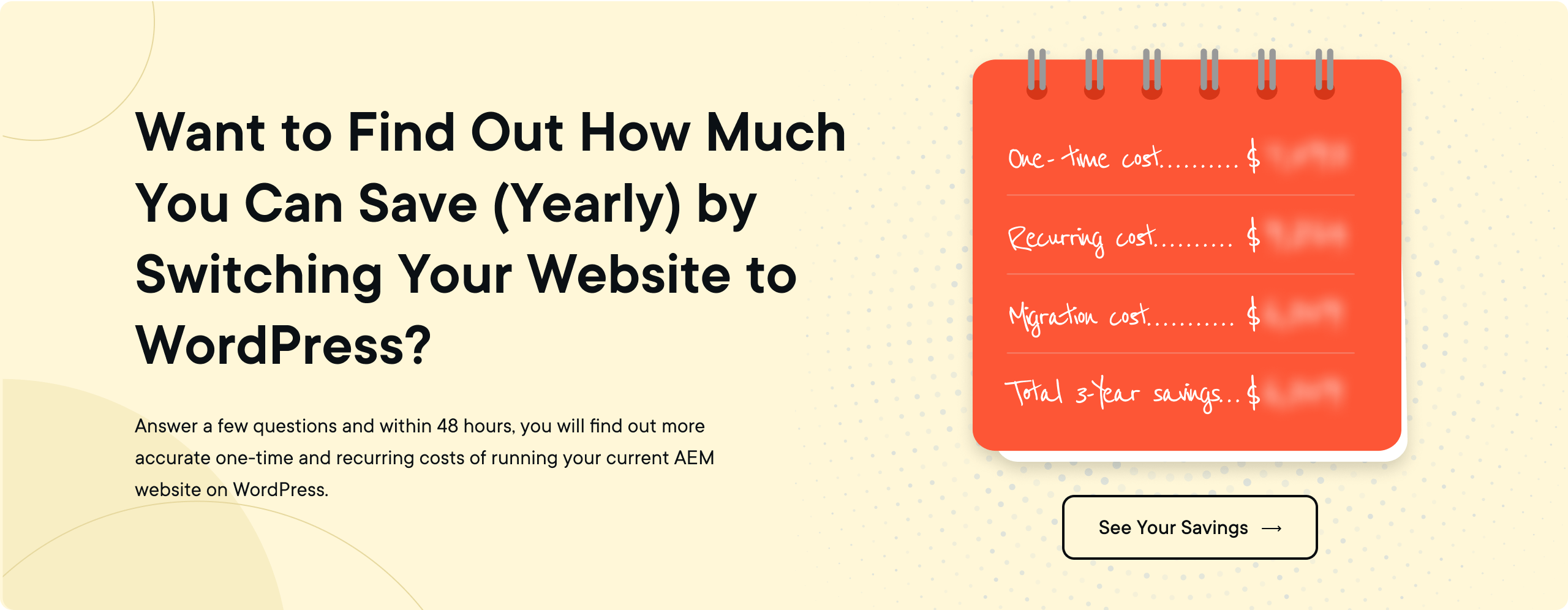
With experienced migration partners, you can maintain business continuity while transitioning to a more flexible and cost-effective platform. The investment in migration typically pays for itself within the first year through reduced licensing and operational costs.
8. "Will we lose our content personalization capabilities?"
WordPress offers sophisticated personalization through plugins and integrations that often exceed AEM's native capabilities. Solutions like Dynamic Content for Elementor, PersonalizeWP, or integration with marketing automation platforms can deliver highly targeted content experiences.
The advantage with WordPress is choice—you can select personalization tools that exactly match your needs and budget rather than paying for an entire suite of features you might not use.
PART 5: HOW TO MIGRATE FROM AEM TO WORDPRESS
You've made the decision to move from AEM to WordPress—excellent choice! Now comes the exciting part where we transform that decision into action.
In the following sections, we'll walk you through each step of the migration process, from initial strategy to post-launch optimization. Migration doesn't have to be intimidating. With the right approach and proper planning, you can ensure a smooth transition that preserves your content, maintains your SEO equity, and sets you up for success on your new WordPress platform.
Let's break down this process into manageable steps and get started with the most critical phase: strategy.
STEP 1: HIGH-LEVEL MIGRATION STRATEGY
Before diving into technical details, let's map out a strategic approach to ensure your migration is successful. A well-planned migration strategy will save you time, resources, and potential headaches down the road.
1.1 When should we migrate?
Timing is everything when it comes to migrating your enterprise website. The right moment isn't just about technical readiness—it's about business alignment too.

Here are clear signals that it's time to consider migrating from AEM to WordPress:
- License renewal approaching: If your AEM license is up for renewal in the next 3-6 months, it's the perfect time to evaluate alternatives before committing to another expensive year.
- Escalating maintenance costs: When your AEM implementation requires increasingly expensive Adobe-certified developers or consultants for routine tasks.
- Publishing bottlenecks: Content creators constantly waiting for developer assistance or facing workflow delays that impact time-to-market.
- Scalability challenges: Your business is growing, but your AEM implementation struggles to scale cost-effectively.
- Integration limitations: Difficulty integrating with non-Adobe tools or requiring expensive custom development for basic functionality.
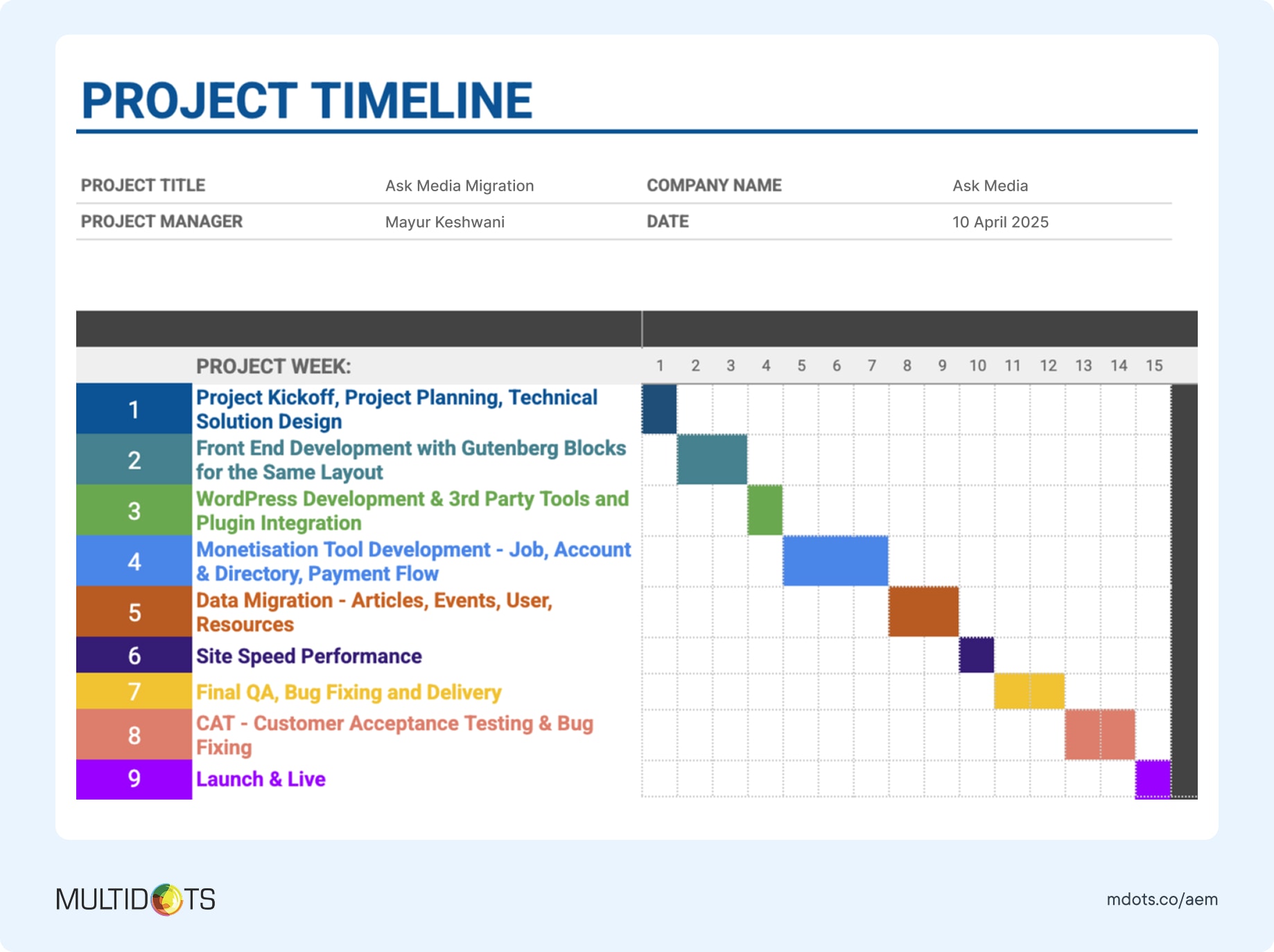
Enterprise-grade migrations typically take 12-16 weeks depending on your website's complexity, content volume, and customization needs. The key is to start planning well before you face critical deadlines or technical emergencies.
1.2 Which CMS should we migrate to?
While you're likely already considering WordPress since you're reading this guide, let's confirm why it's often the best choice for enterprises moving away from AEM.
WordPress powers over 43% of all websites on the internet, including enterprise sites for companies like Microsoft, Sony Music, The Walt Disney Company, and Bloomberg Professional. This massive adoption isn't accidental—it comes from delivering exceptional value and capabilities.
Here's a quick features comparison of WordPress vs AEM (and other CMS - Sanity and Sitecore):

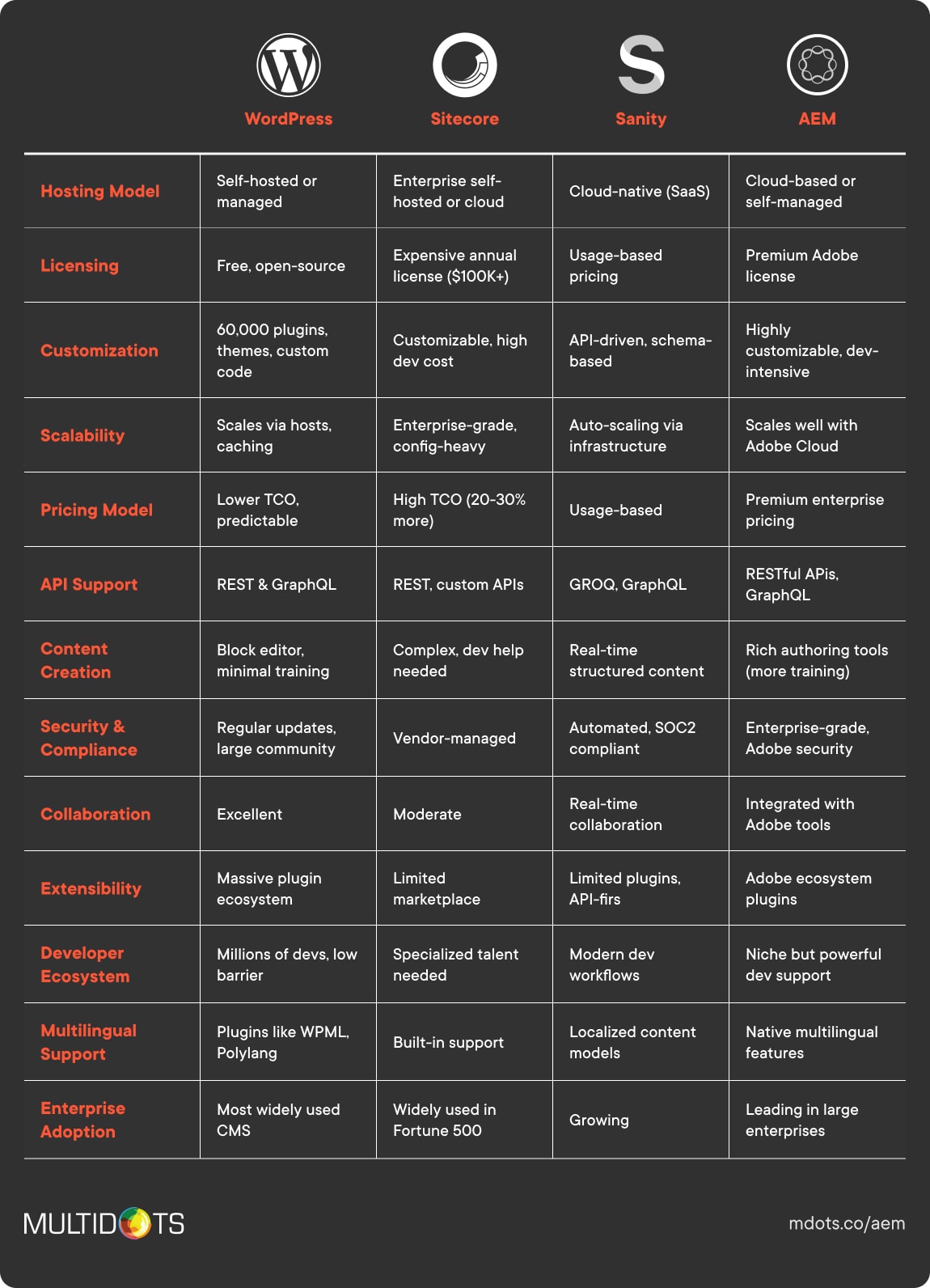
Here's why WordPress stands out as the top alternative to AEM:
- WordPress eliminates expensive licensing fees while providing enterprise-grade capabilities.
- You get the flexibility of open-source software with the reliability of enterprise hosting solutions.
- The vast talent pool means you're not dependent on specialized, expensive Adobe-certified developers.
- Plus, WordPress evolves rapidly with thousands of contributors ensuring you stay ahead of web technology trends.
1.3 Design strategy: refresh or replicate?
When migrating from AEM to WordPress, you have two primary design approaches: maintain your current design or take the opportunity to refresh it. Both have their merits depending on your circumstances.

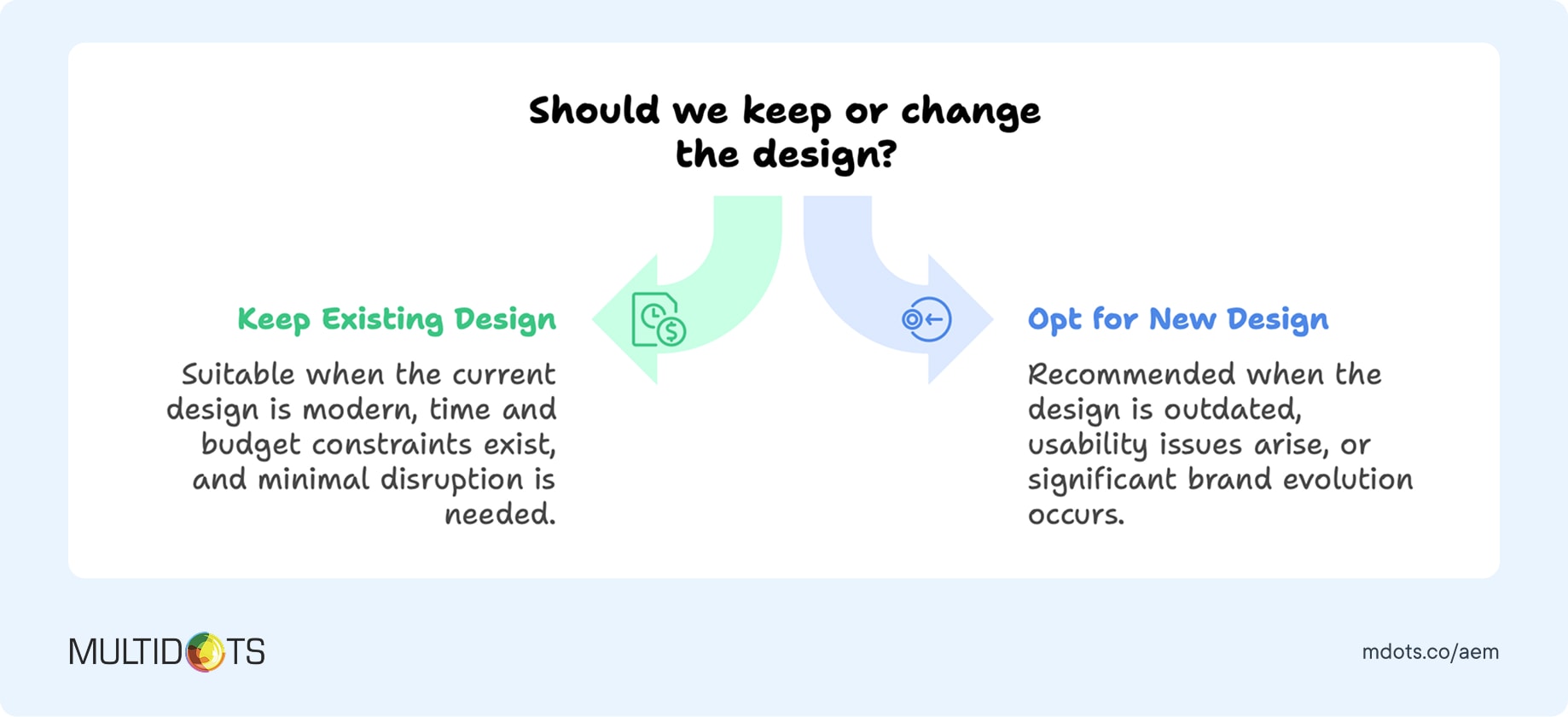
Keeping your current design makes sense when you have a recently updated design that performs well, want to minimize migration complexity, have tight timeline constraints, or need to maintain brand consistency during the transition. This approach typically reduces migration time by 20-30% and helps users adapt more easily to the new platform.
Refreshing your design is ideal when your current design is outdated, you want to improve user experience, you're planning to add new functionality, or you want to fully leverage WordPress's modern capabilities. A refresh can improve conversion rates, enhance mobile experience, and better align with current web standards.
Many successful migrations take a hybrid approach—keeping the overall brand identity while updating specific components for better performance and user experience.
1.4 AEM feature analysis and WordPress mapping
Understanding which AEM functionalities are essential to your business operations is crucial. This ensures you don't lose critical capabilities while avoiding unnecessary complexity in your WordPress implementation.
Let's map the most common AEM features to their WordPress alternatives:
- Digital Asset Management (DAM): WordPress Media Library combined with plugins like WP Media Folder or integration with Cloudinary provides robust asset management. For advanced DAM needs, WordPress integrates seamlessly with dedicated solutions.
- Experience Fragments: WordPress Gutenberg's reusable blocks and template parts offer similar functionality with even greater flexibility for content creators.
- Multi-site Management: WordPress Multisite provides centralized management for multiple sites with shared resources and simplified maintenance.
- Content Workflows: Plugins like PublishPress Pro and Edit Flow create sophisticated editorial workflows that often exceed AEM's capabilities in user experience.
- Forms Management: Gravity Forms, WPForms, or Contact Form 7 provide advanced form functionality without the additional licensing costs of AEM Forms.
- Personalization: Dynamic content plugins and marketing automation integrations deliver targeted experiences that rival AEM's personalization engine.
Before you begin the migration process, create a comprehensive list of AEM features you're actively using and prioritize them from "mission-critical" to "nice-to-have." This will help focus your migration efforts on the most important capabilities first.
1.5 Third-party integration planning
Your website doesn't exist in isolation—it's part of a broader technology ecosystem. Mapping your existing integrations ensures business continuity and seamless data flow between systems.
Here's how common AEM integrations translate to WordPress:
| Integration Category | Common AEM Tools | WordPress Solutions | Key Benefits |
|---|---|---|---|
| CRM Systems | Salesforce, HubSpot, Microsoft Dynamics | Dedicated WordPress plugins, REST API connections | Better performance than AEM integrations, more flexible data sync options |
| Marketing Automation | Marketo, Pardot, MailChimp, Adobe Campaign | WordPress plugins, native connectors | More flexibility in campaign management and lead tracking, easier setup |
| Analytics Platforms | Adobe Analytics, Google Analytics, Adobe Target | Enhanced WordPress integrations, specialized analytics tools | Deeper insights than AEM implementations, better reporting capabilities |
| E-commerce Solutions | Adobe Commerce, third-party platforms | WooCommerce, Shopify, BigCommerce integrations | Native WordPress e-commerce or flexible platform connections AEM can't match |
| Payment Gateways | Adobe bundled solutions, enterprise processors | Stripe, PayPal, Square, enterprise gateways | Lower transaction fees than Adobe's bundled solutions, more payment options |
| Content Delivery | Adobe CDN, enterprise CDNs | Cloudflare, AWS CloudFront, specialized CDNs | Better performance optimization, cost-effective global delivery |
| Email Marketing | Adobe Campaign, enterprise email tools | Mailchimp, Constant Contact, SendGrid | Simplified campaign creation, better automation workflows |
| Social Media | Adobe Social, third-party connectors | Native social plugins, API integrations | Easier social media management, real-time posting capabilities |
| Form Management | AEM Forms (additional license required) | Gravity Forms, WPForms, Contact Form 7 | No additional licensing fees, more form customization options |
| Search & Discovery | Adobe Search, enterprise search tools | WordPress native search, Elasticsearch, Algolia | Better search performance, more relevant results |
WordPress's open architecture provides several key benefits over AEM's integration approach:
- Lower Costs: No additional licensing fees for most integrations
- Faster Implementation: Plugins and APIs reduce development time
- Better Support: Large community provides extensive documentation and troubleshooting
- More Options: Choose best-of-breed solutions rather than being locked into Adobe ecosystem
- Easier Maintenance: Simpler integration architecture reduces ongoing maintenance complexity
- Better Performance: Optimized WordPress integrations often outperform AEM's complex integration layer
During your planning phase, inventory all current integrations, assess their importance to business processes, and identify WordPress alternatives. This preparation will streamline the migration process and ensure no critical connections are lost.
1.6 Enterprise hosting strategy
Selecting the right hosting provider is crucial for your WordPress website's performance, security, and reliability. For enterprises migrating from AEM, you need a solution that can handle high traffic volumes, complex functionality, and mission-critical reliability.
Here are a few top enterprise WordPress hosting options:
| Hosting Provider | Best For | Price Range (as of April 2025) | Key Features |
|---|---|---|---|
| WordPress VIP | Large enterprises with critical performance needs | Starting ~$25K/year | Highest-tier security, unlimited scaling, dedicated support team |
| WP Engine | Mid to large organizations balancing performance & cost | $600-$5K+/month | Excellent performance, dev/staging setup, automated backups |
| Pantheon | Organizations with active development needs | $500-$10K+/month | Google Cloud infrastructure, extensive global reach |
| Kinsta | Performance-focused businesses with moderate traffic | $400-$2K+/month | Excellent developer tools, git workflow, multi-environment testing |
| Pagely | Enterprise sites with custom needs | $500/month-custom pricing | VPS-based, highly customizable, excellent security |
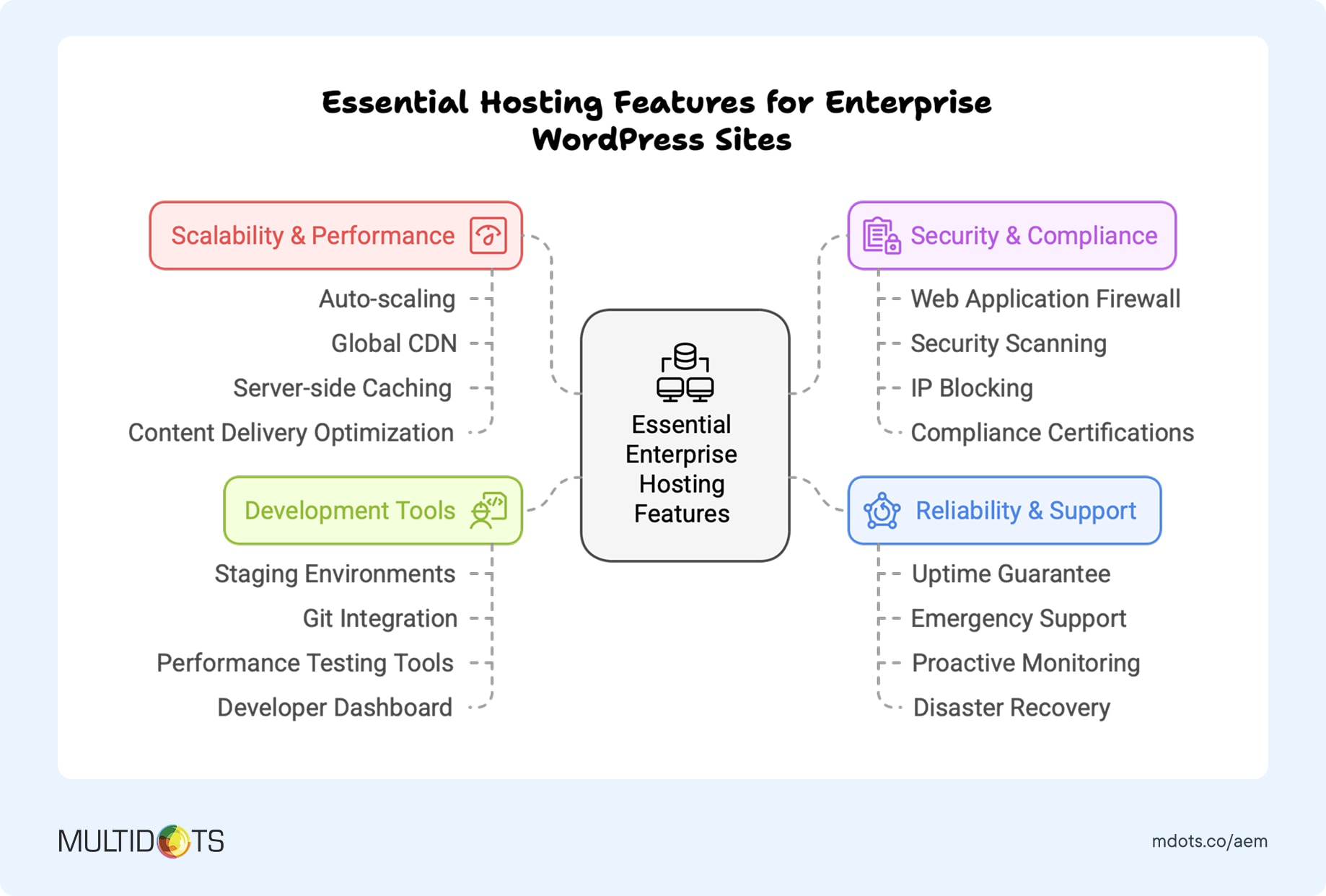
When evaluating hosting providers, consider both your current needs and future growth. Essential features for enterprise WordPress hosting include automated backups and disaster recovery, staging and development environments, enterprise-grade security measures, dedicated support teams, scalable infrastructure, and performance optimization tools.

1.7 Migration team: internal vs external expertise
Deciding whether to handle your AEM to WordPress migration internally or engage external experts depends on your team's expertise, available resources, project timeline, and the complexity of your current AEM implementation.
Here's how you can decide between DIY vs when to hire a WordPress migration expert:

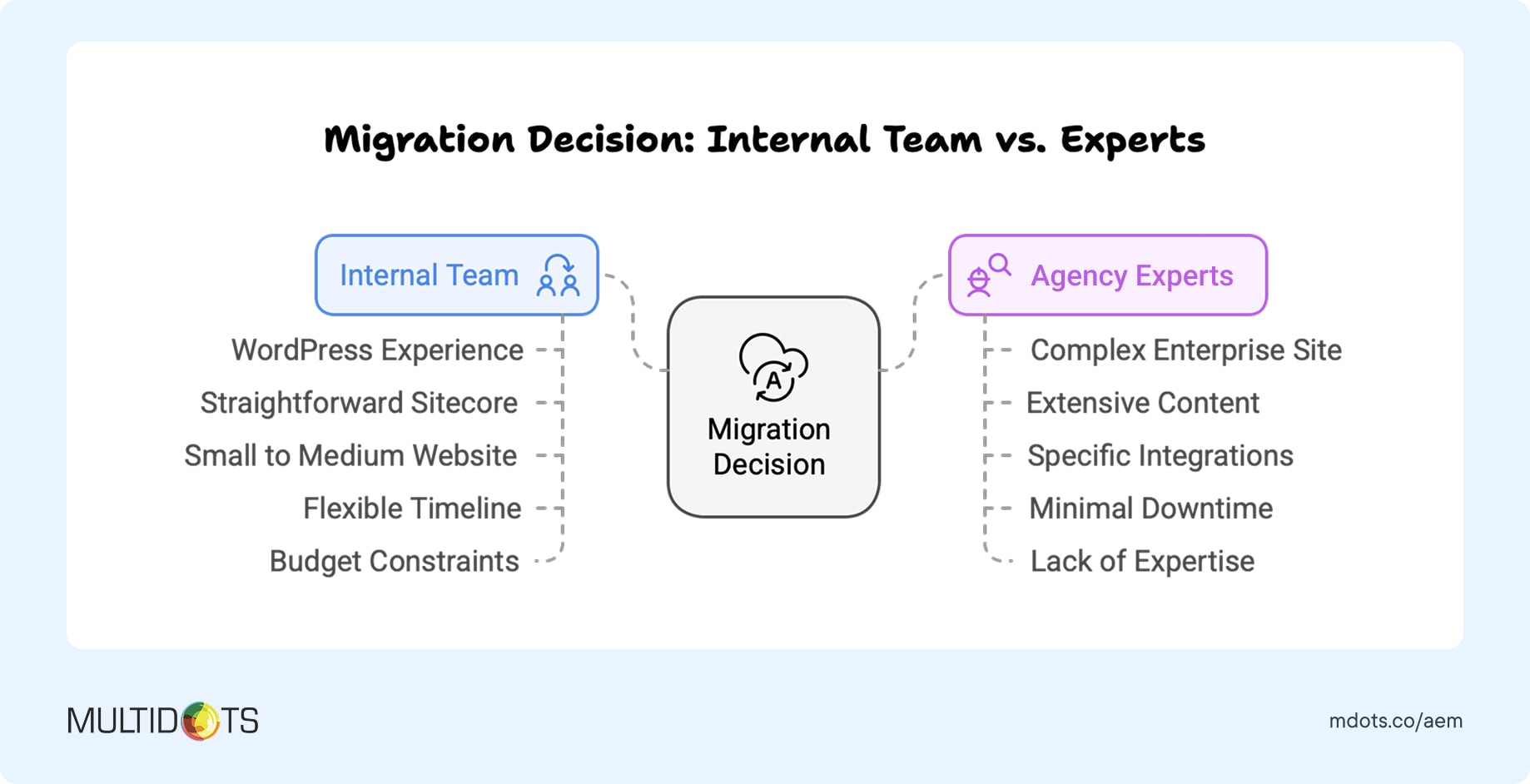
Internal migration makes sense when you have experienced WordPress developers on staff, have a relatively simple AEM implementation, can dedicate team members full-time to the project, and have flexibility in your timeline. However, consider that AEM migrations involve unique challenges that your team may not have encountered before.
External experts are recommended when you have a complex AEM implementation with custom components, are working with tight deadlines, lack WordPress expertise internally, or want to minimize business risk. Experienced migration partners can often complete projects faster and with fewer complications than internal teams.
Hybrid approach often provides the best results, where migration experts handle technical aspects and content transfer while your internal team contributes domain knowledge and specific requirements. This collaboration leverages outside expertise while building internal capabilities for long-term WordPress success.
If you decide to work with external experts, look for agencies with proven AEM to WordPress migration experience. At Multidots, we have extensive experience with complex AEM to WordPress migrations, specializing in enterprise organizations and large-scale digital transformations.
As a WordPress VIP Gold Partner, we adhere to the highest standards of WordPress development and security practices while bringing deep expertise in both AEM and WordPress platforms.

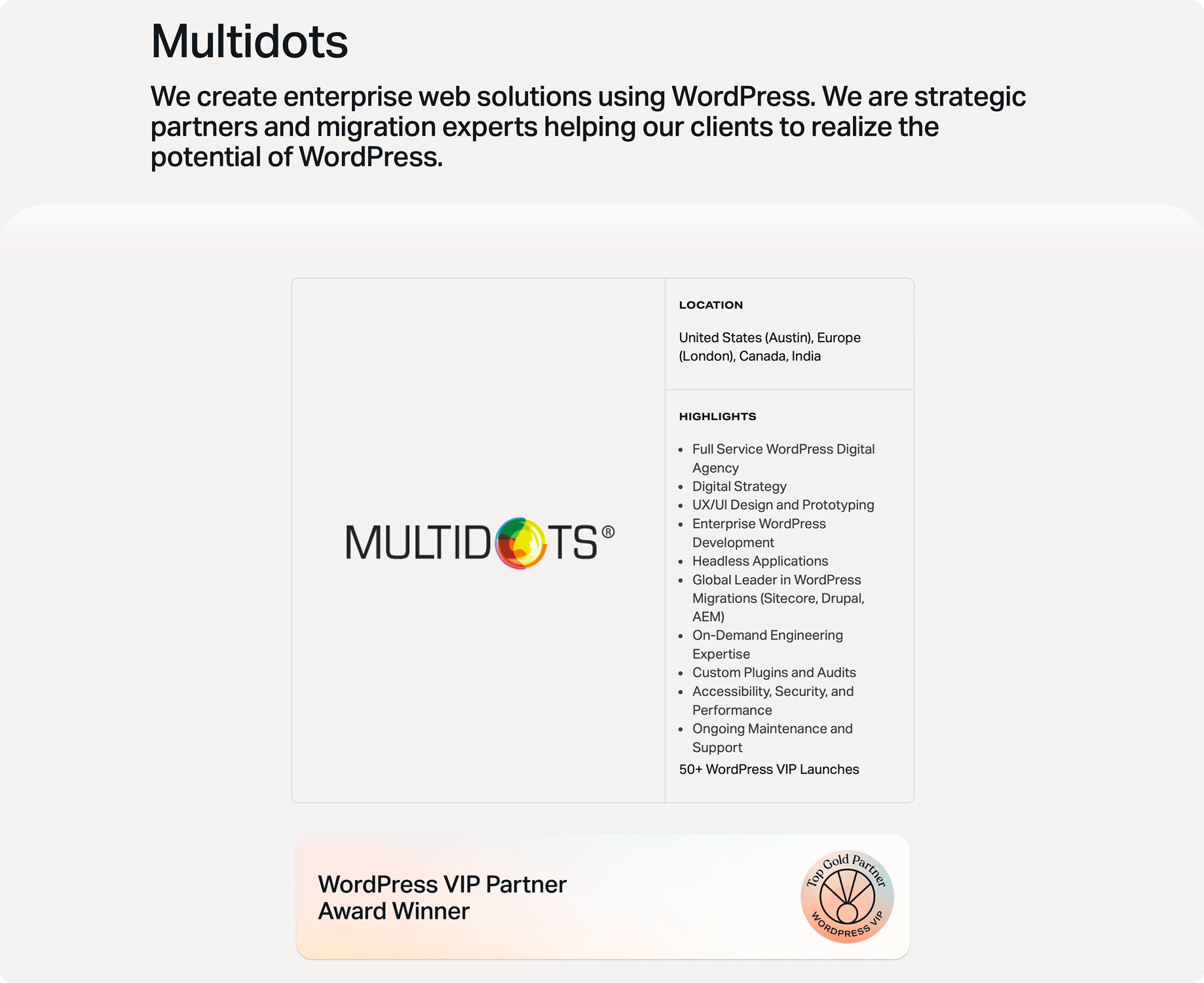
For a broader selection of qualified agencies, you can also explore the WordPress VIP partner directory, which lists vetted agencies with enterprise WordPress expertise.
STEP 2: PRE-MIGRATION PREPARATION
With your high-level strategy in place, it's time to prepare for the actual migration. This preparation phase is crucial for a smooth transition and helps prevent data loss, maintains SEO equity, and ensures all stakeholders are aligned.
2.1 Comprehensive back strategy
First things absolutely first—create comprehensive backups of your AEM environment. This is your safety net should anything go wrong during migration.
Here's how to create thorough backups of your AEM implementation:
- Content Backup: Use CRXDE Lite or AEM Package Manager to export all content including pages, assets, and configurations. Export your content in a structured format that can be parsed during migration.
- Digital Asset Management Backup: Export all media assets from AEM's DAM system along with their metadata, tags, and organizational structure. Ensure you capture asset relationships and usage tracking.
- Configuration Backup: Document and export all AEM configurations including workflows, user permissions, templates, and custom components. This information will be crucial for replicating functionality in WordPress.
- Integration Documentation: Document all current integrations, their configurations, and data flows. This ensures nothing is missed during the WordPress setup.
Remember to test your backups by restoring them to a development environment before proceeding with migration. Store backups in multiple locations including secure cloud storage with encryption enabled.
2.2 Content inventory and audit
A thorough content inventory is essential for understanding exactly what needs to be migrated and how it should be organized in WordPress.
Your content audit should include:
- Content Classification: Identify all content types including pages, blog posts, product information, downloadable resources, and multimedia assets. Understanding your content types helps map them to appropriate WordPress structures.
- Content Quality Assessment: Evaluate content relevance, accuracy, and performance. Migration is an excellent opportunity to clean up outdated or underperforming content rather than carrying it forward to WordPress.
- SEO Value Analysis: Identify your highest-performing content in terms of organic traffic, conversions, and engagement. These pages require special attention during migration to preserve their SEO value.
- Content Relationships: Document how content pieces relate to each other, including cross-references, content hierarchies, and taxonomical relationships. WordPress needs to replicate these relationships for optimal user experience.
- Custom Components: Identify any custom AEM components used in your content and plan how they'll be recreated as WordPress blocks or shortcodes.
Most importantly, use this audit to prioritize content for migration. Not everything needs to move immediately—you can phase migration based on content importance and business impact.
Looking to take control of your content migration?
Use our Content Audit Template to track all your content systematically. This template includes tabs for different content types and fields for organizing, prioritizing, and streamlining every step.


2.3 SEO and Performance Baseline
Before migrating, establish comprehensive benchmarks for your current site's performance and SEO metrics. This baseline helps you measure migration success and identify any issues that need addressing.
SEO Metrics to Capture:
- Organic traffic volumes and trends
- Keyword rankings for important terms
- Page load speeds and Core Web Vitals
- Backlink profiles and domain authority
- Search Console performance data
- Conversion rates and user engagement metrics
Tools for Baseline Creation: Use Google Analytics for traffic and behavior data, Google Search Console for search performance metrics, Screaming Frog for technical SEO audit, PageSpeed Insights for performance benchmarks, and SEMrush or Ahrefs for comprehensive SEO analysis.

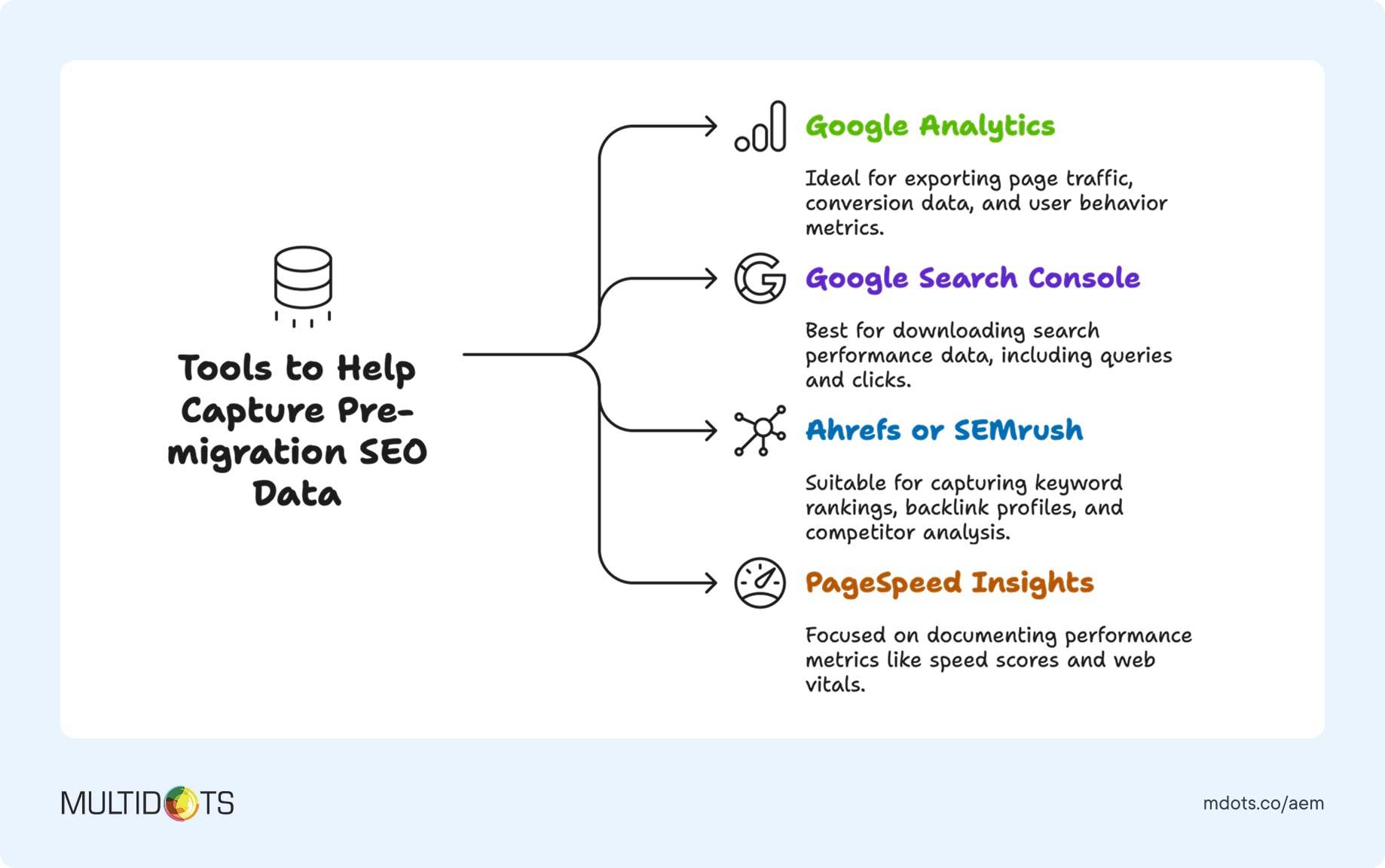
Export all this data before migration begins. Having concrete numbers makes it easier to demonstrate migration success and quickly identify any issues that need addressing post-launch.
2.4 AEM content structure analysis
Understanding how your content is organized in AEM is crucial for planning its WordPress structure. AEM's content architecture differs significantly from WordPress, so this mapping is essential for a successful migration.
- Content Hierarchy Mapping: Document how AEM's content tree structure will translate to WordPress's page hierarchy and navigation structure.
- Taxonomy Translation: Map AEM's tagging and categorization system to WordPress categories, tags, and custom taxonomies.
- Template Analysis: Identify which AEM templates correspond to which WordPress page templates or post types.
- URL Structure Planning: Plan how AEM URLs will map to WordPress URLs, considering SEO implications and user experience.
This analysis helps ensure your WordPress site maintains logical content organization while taking advantage of WordPress's more intuitive content management approach.
STEP 3: WORDPRESS ENVIRONMENT SETUP
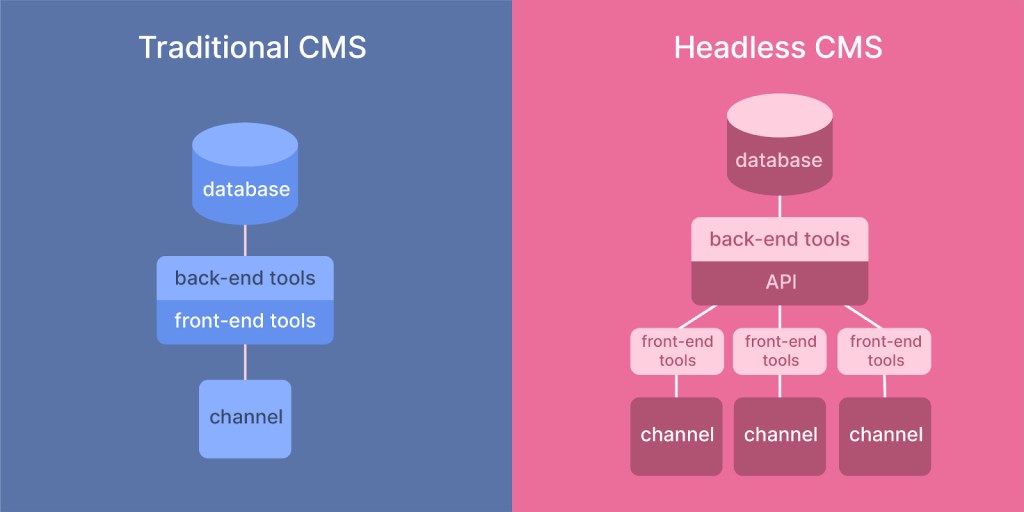
3.1 Architecture decision: traditional vs headless WordPress

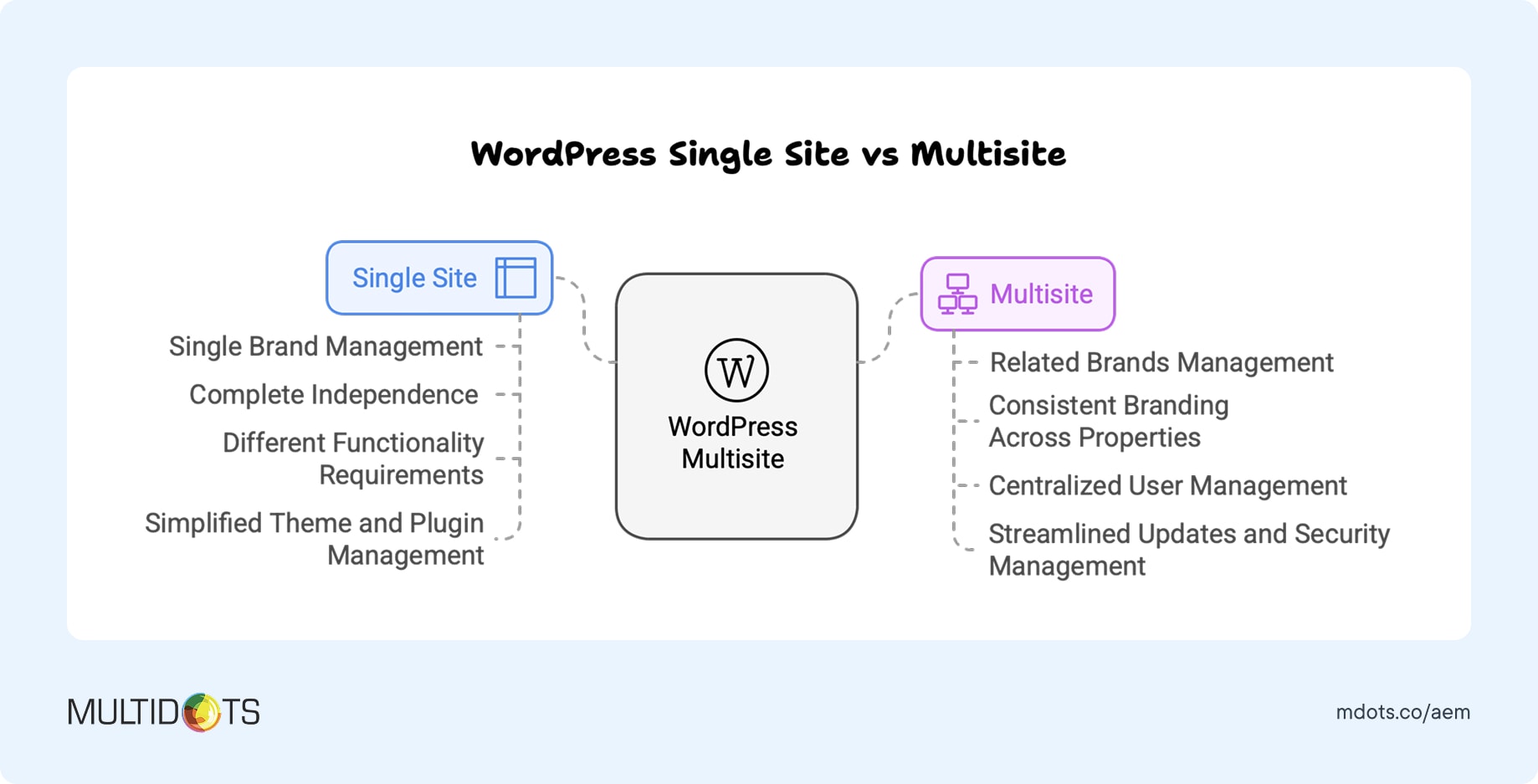
3.2 Multisite vs single site strategy

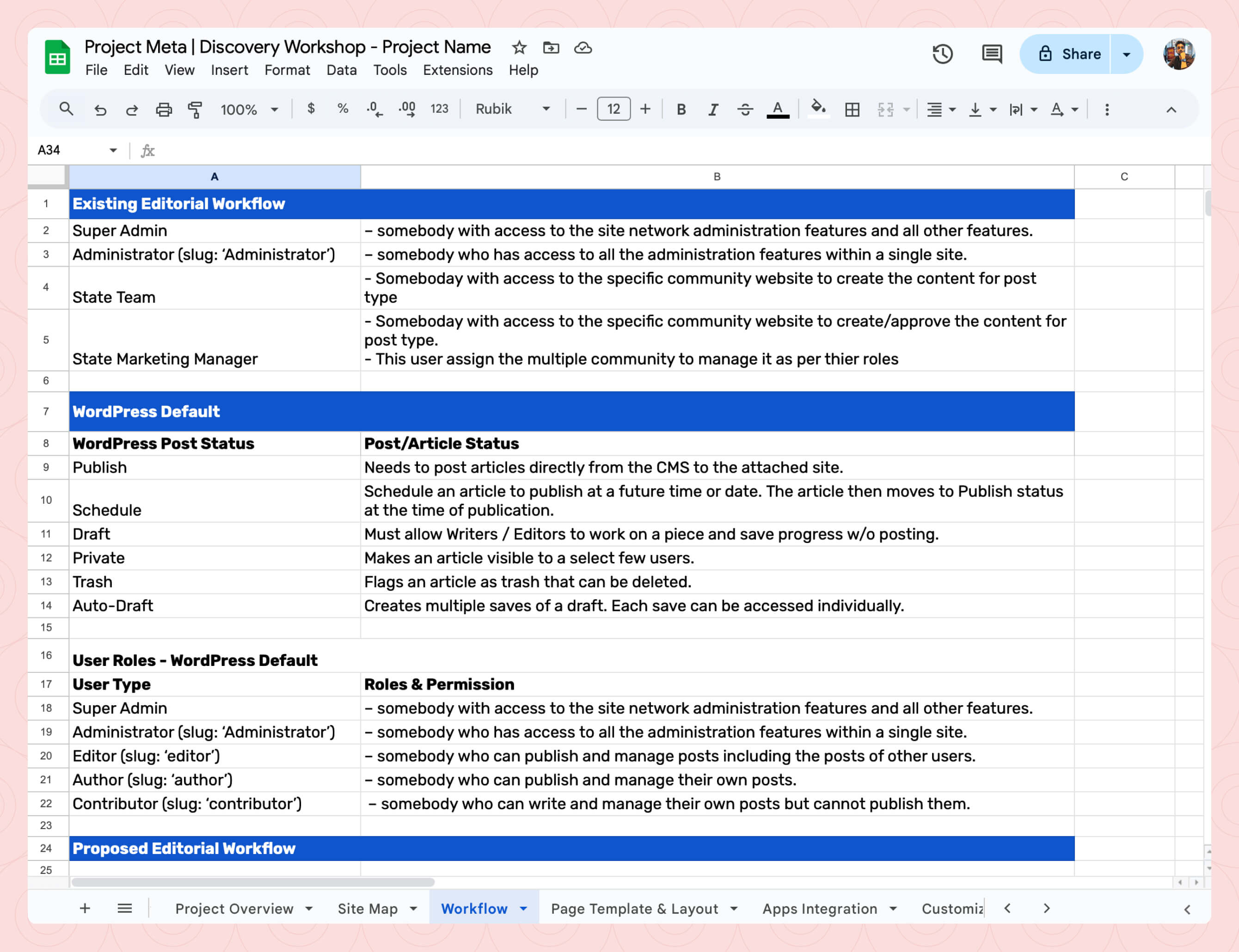
3.3 User roles and workflow configuration

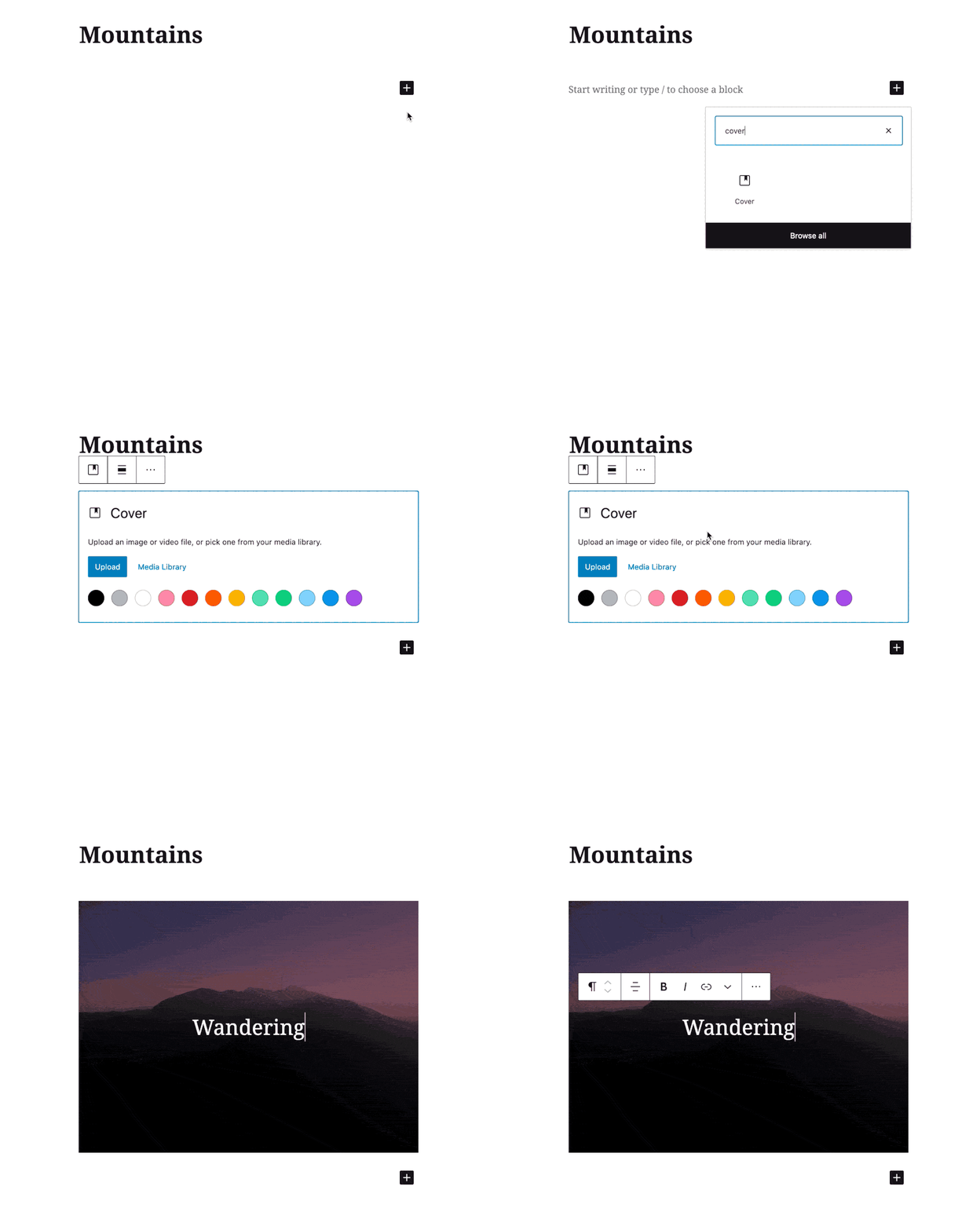
3.4 Custom Gutenberg blocks development

3.5 Essential plugin stack for enterprise
STEP 4: MIGRATION EXECUTION AND LAUNCH
Now comes the exciting part—actually migrating your content and launching your new WordPress site. This phase requires careful coordination and thorough testing to ensure everything works perfectly.
4.1 Content migration process
Content migration from AEM to WordPress involves several technical steps, but with proper planning, it can be surprisingly smooth.
- AEM Content Export: Use AEM's Content Transfer Tool or Package Manager to export content in XML or JSON format. Ensure you capture all metadata, relationships, and custom properties.
- Data Transformation: Convert AEM's content structure to WordPress-compatible format. This often requires custom scripts to map AEM content types to WordPress post types, pages, and custom fields.
- WordPress Import: Use WordPress's built-in import functionality or plugins like WP All Import for bulk content import. Import in phases to maintain control and allow for testing at each stage.
- Content Verification: Systematically verify that all content has been imported correctly, maintaining formatting, links, and media associations.
The key to successful content migration is doing it systematically rather than trying to move everything at once. Start with a small subset of content to refine your process before migrating the entire site.
4.2 Media and digital asset migration
Migrating from AEM's sophisticated DAM system to WordPress requires careful planning to maintain asset organization and accessibility.
- Asset Export and Organization: Export all media assets from AEM DAM with their metadata, tags, and folder structure. Organize assets logically for WordPress import.
- Asset Optimization: Optimize images for web delivery, compress videos for streaming, and ensure all assets meet WordPress requirements for size and format.
- WordPress Media Import: Use plugins like Media Library Assistant or custom scripts to import assets while maintaining organizational structure and metadata.
- CDN Integration: Implement a Content Delivery Network to ensure fast asset delivery globally, often improving performance over AEM implementations.
The goal is to maintain or improve asset discoverability and performance while simplifying management for your content teams.
4.3 URL mapping and SEO preservation
Maintaining SEO equity during migration is crucial for business continuity and requires careful URL mapping and redirect implementation.
- Comprehensive URL Mapping: Document every important URL on your AEM site and map it to the corresponding WordPress URL. Don't forget about assets, documents, and deep-linked content.
- 301 Redirect Implementation: Use plugins like Redirection or custom server-level redirects to ensure all old URLs point to their new WordPress equivalents.
- Metadata Transfer: Ensure all SEO metadata including title tags, meta descriptions, and schema markup transfers correctly to WordPress.
- Search Console Updates: Update your Google Search Console properties and submit new sitemaps to help search engines understand your site's new structure.
Proper SEO preservation often results in improved search performance because WordPress's SEO-friendly structure and faster loading times can boost rankings.
4.4 Pre-launch testing and quality assurance
Thorough testing is essential before taking your new WordPress site live. This comprehensive QA process helps identify and resolve issues before they impact users.

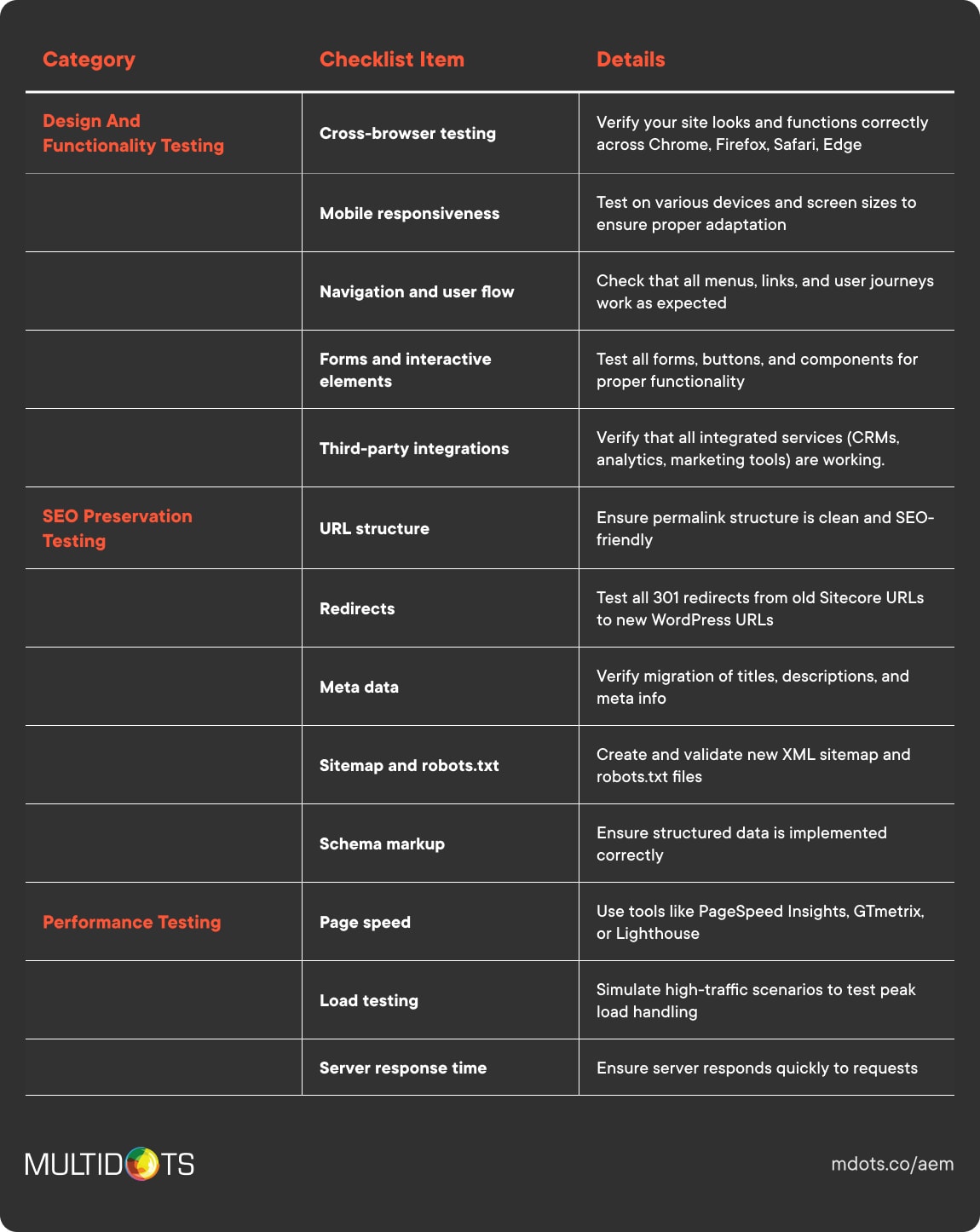
- Functionality Testing: Verify all interactive elements work correctly including forms, search functionality, user registration, and e-commerce features.
- Cross-Browser Compatibility: Test your site across different browsers and devices to ensure consistent experience for all users.
- Performance Testing: Use tools like GTmetrix and Google PageSpeed Insights to verify your WordPress site meets or exceeds your AEM site's performance.
- Security Testing: Run security scans to ensure your WordPress implementation meets enterprise security standards.
- Content Verification: Systematically check that all migrated content displays correctly with proper formatting, working links, and associated media.
- Integration Testing: Verify all third-party integrations function correctly in the WordPress environment.
Testing should involve not just technical verification but also user acceptance testing with actual content creators and end users to ensure the migration meets everyone's needs.
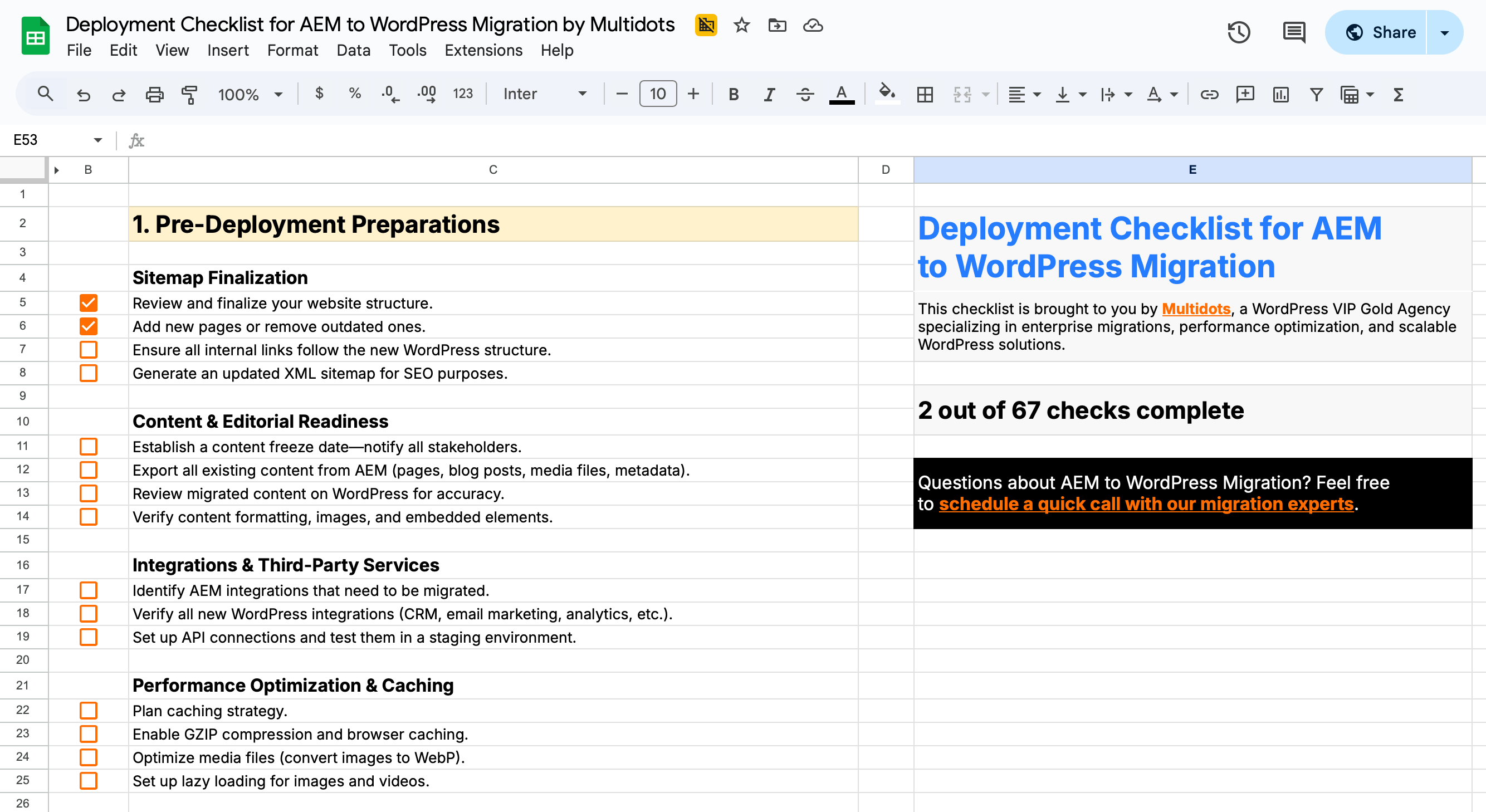
Prepping for launch day?
Here’s a comprehensive deployment checklist we’ve prepared to guide you through the final stages of your AEM to WordPress migration. This checklist ensures a smooth transition by covering everything from pre-deployment preparations, technical checks, SEO preservation, security measures, and post-launch monitoring.

4.5 Go-live strategy and monitoring
The actual launch requires careful coordination to minimize downtime and quickly address any issues that arise.
- Pre-Launch Checklist: Ensure all testing is complete, backups are current, monitoring tools are configured, and support teams are ready.
- DNS Cutover: Plan the switch from AEM to WordPress hosting during low-traffic periods to minimize impact on users.
- Real-Time Monitoring: Monitor site performance, user experience, and any error reports during the first 24-48 hours after launch.
- Issue Response Protocol: Have a clear escalation path for addressing any problems that arise during or immediately after launch.
- Success Metrics Tracking: Monitor key performance indicators to measure migration success including site performance, user engagement, and conversion rates.
Most successful launches are anticlimactic—users don't notice the change except for improved performance and functionality.
STEP 5: POST-MIGRATION OPTIMIZATION AND TEAM TRAINING
Your migration is complete, but the work doesn't stop there. Post-migration optimization and team training are crucial for maximizing your WordPress investment.
5.1 Performance optimization and monitoring
WordPress often performs better than AEM out of the box, but there's always room for optimization.
- Caching Implementation: Configure advanced caching strategies using plugins like WP Rocket or server-level caching to ensure optimal page load times.
- Image Optimization: Implement automated image compression and next-gen format delivery through plugins like ShortPixel or Smush.
- Database Optimization: Clean up your WordPress database regularly and optimize queries for better performance.
- CDN Configuration: Fine-tune your Content Delivery Network settings to ensure global users get the fastest possible experience.
- Monitoring Setup: Implement comprehensive monitoring using tools like New Relic, Pingdom, or WordPress-specific solutions to track performance metrics and identify optimization opportunities.
Most organizations see immediate performance improvements after migrating from AEM, but ongoing optimization ensures you maintain peak performance as your site grows.
5.2 Team training and workflow optimization
Your team's success with WordPress depends on proper training and workflow setup. The good news? Unlike AEM's steep learning curve, WordPress is designed to be intuitive, and most teams achieve proficiency much faster than they expect.
Content creators typically love the transition from AEM to WordPress. The Gutenberg editor feels familiar and responsive, much like working in a modern document editor. Focus training on block-based content creation, reusable components, and media management. Most content creators become more productive in WordPress within their first week, compared to the months of training typically required for AEM proficiency.
For editors and managers, WordPress opens up new possibilities for workflow management and content oversight. Training should cover advanced editorial workflows, user permission management, and content planning tools. The transparency and simplicity of WordPress workflows often surprise teams accustomed to AEM's complex approval processes.
Technical teams benefit from WordPress-specific training even if they're experienced developers. Cover WordPress coding standards, security best practices, and performance optimization techniques. The open-source nature of WordPress means your developers can learn from a vast community and aren't limited by proprietary documentation like they were with AEM.
Creating custom training materials that reference your specific WordPress setup, custom blocks, and organizational workflows accelerates adoption and reduces the support burden on your technical team.
5.3 Long-term success strategy
Your AEM to WordPress migration isn't just about moving platforms—it's about positioning your organization for long-term digital success.
- Content Strategy Evolution: Leverage WordPress's flexibility to experiment with new content formats, interactive elements, and user engagement strategies that weren't practical with AEM.
- Continuous Improvement Process: Establish regular review cycles to assess performance, identify optimization opportunities, and plan feature enhancements.
- Community Engagement: Take advantage of WordPress's massive community for ongoing learning, problem-solving, and staying current with platform developments.
- Scalability Planning: Plan for growth by establishing processes for adding new sites, expanding functionality, and managing increased traffic without the cost constraints of AEM.
The organizations that see the most success after migrating from AEM to WordPress are those that view the migration as a starting point for innovation rather than just a platform change.
STEP 6: ONGOING MAINTENANCE AND MONITORING
Congratulations! Your migration is complete, and your team is trained on the new WordPress platform. Now comes an equally important phase: ensuring your website stays secure, up-to-date, and performs optimally over time.
Unlike AEM's complex maintenance requirements that often demand specialized Adobe-certified professionals, WordPress maintenance is straightforward and cost-effective. However, enterprise sites still require systematic attention to maintain peak performance and security.
6.1 WordPress update management
One of WordPress's biggest advantages over AEM is how simple updates can be. No more waiting months for Adobe's update cycles or dealing with complex version upgrades that require extensive testing and specialized expertise.
Here's how to manage WordPress updates effectively:
- Create a staging environment for testing updates before applying them to your live site. This prevents any potential conflicts from affecting your users and gives you confidence in each update.
- Establish a regular update schedule by checking for updates weekly and applying them monthly during planned maintenance windows. WordPress core updates are typically seamless, but consistency prevents security vulnerabilities.
- Prioritize security updates by applying them immediately when released. WordPress's security team responds quickly to threats, and prompt updates keep your site protected.
- Document your plugin inventory so you know what each plugin does and can identify any redundancies. This prevents conflicts and keeps your site running efficiently.
- Test functionality after updates by running through critical site functions including forms, e-commerce features, and integrations to ensure everything works correctly.
The beauty of WordPress updates compared to AEM is their frequency and simplicity. Instead of major version upgrades that can take months to plan and execute, WordPress updates typically take minutes and rarely cause issues when properly managed.
6.2 Performance and security monitoring
Monitoring your WordPress site isn't just about knowing when it's down—it's about proactively identifying opportunities for improvement and potential security threats before they impact users.
Uptime Monitoring: Services like Pingdom, UptimeRobot, or Jetpack Monitor constantly check if your site is accessible and alert you immediately if issues arise. Most enterprise hosting providers include uptime monitoring, but additional monitoring provides redundancy and detailed reporting.
Performance Tracking: Tools like Google PageSpeed Insights, GTmetrix, and New Relic help track your site's speed and performance over time. WordPress sites typically perform better than AEM implementations, but ongoing monitoring ensures you maintain optimal speed as your content and traffic grow.
Security Monitoring: Solutions like Wordfence, Sucuri, or Jetpack Security provide real-time security monitoring, alerting you to potential threats, failed login attempts, and suspicious activities. Unlike AEM's complex security requirements, WordPress security monitoring is straightforward and highly automated.
Database Health: Regular database optimization prevents performance degradation over time. Plugins like WP-Optimize or WP Rocket include database cleaning features that keep your site running efficiently without the database complexity that often plagues AEM installations.
Analytics Review: Regular analysis of your Google Analytics and Search Console data helps identify performance trends, content opportunities, and technical issues that might need attention.
For enterprise WordPress sites, we recommend implementing a comprehensive monitoring strategy that combines automated tools with regular manual reviews. Set up alerts for critical issues while scheduling weekly reviews of performance metrics and monthly deep-dive analyses.
6.3 Maintenance service options
Even with WordPress's simplified maintenance requirements, having professional support provides peace of mind and access to specialized expertise when you need it most.
What to Look for in WordPress Maintenance Services:
- Proactive monitoring and maintenance rather than just reactive problem-solving. Your maintenance partner should identify and address potential issues before they impact your users.
- Regular performance optimization including caching configuration, database cleanup, and speed optimization to ensure your site continues performing better than your old AEM implementation.
- Security hardening and monitoring with real-time threat detection, malware scanning, and immediate response to security incidents.
- Content and functionality updates to keep your WordPress installation, themes, and plugins current with the latest features and security patches.
- Detailed reporting on work performed, site health metrics, and recommendations for improvements.
- Enterprise-level support with guaranteed response times and direct access to WordPress experts who understand enterprise requirements.
Multidots Maintenance Offerings
At Multidots, we offer comprehensive WordPress maintenance services designed specifically for enterprises that have migrated from complex platforms like AEM.
Our maintenance packages include proactive monitoring and optimization, security hardening and threat response, regular updates with testing protocols, performance optimization and reporting, and dedicated support from WordPress VIP certified experts.
Whether you need comprehensive managed maintenance or specific support for your internal team, we provide flexible options that scale with your needs and budget.
The goal is simple: ensure your WordPress investment continues delivering the performance, security, and reliability advantages that motivated your migration from AEM.
ADDITIONAL RESOURCES
Looking for quick answers or want to take this guide with you? We've got you covered with these helpful resources.
Frequently Asked Questions
-
Most organizations see positive ROI within 12-18 months through reduced licensing costs, lower maintenance expenses, and improved operational efficiency. The savings often accelerate in subsequent years as teams become more productive with WordPress.
-
Proper migration planning includes staging environments, comprehensive testing, and carefully coordinated launch procedures to minimize downtime. Most migrations experience less than 4 hours of actual downtime.
-
Absolutely. Phased migration is often the preferred approach for large enterprise sites. You can migrate sections of your site systematically while maintaining the AEM instance for remaining content until the full migration is complete.
-
WordPress maintenance is typically simpler and less expensive than AEM. The large developer community means abundant resources for support, and updates are generally straightforward with minimal business disruption.
-
When properly configured with enterprise hosting and security protocols, WordPress meets the most stringent security requirements. Many Fortune 500 companies trust WordPress with their most critical web properties.
-
WordPress offers superior integration flexibility, allowing you to choose best-of-breed solutions rather than being locked into Adobe’s ecosystem. Most integrations can be replicated with better performance and lower costs.
-
Custom AEM components are recreated as WordPress Gutenberg blocks or plugins. This often results in improved functionality and easier content creator adoption while maintaining all essential features.
-
Yes, WordPress powers some of the world’s highest-traffic websites. With proper hosting and optimization, WordPress can handle traffic volumes that exceed most AEM implementations while providing better performance and lower costs.
-
When done correctly, migration to WordPress often improves SEO performance due to WordPress’s SEO-friendly architecture and faster loading times. We implement comprehensive redirect strategies and preserve all metadata to maintain rankings during transition.
-
Enterprise AEM migrations typically take 12-16 weeks, depending on site complexity, content volume, and customization requirements. Simpler implementations can be completed in 8-10 weeks, while highly complex sites with extensive custom development may take 20+ weeks.

Download our in-depth guide as a PDF and move from AEM to WordPress with confidence

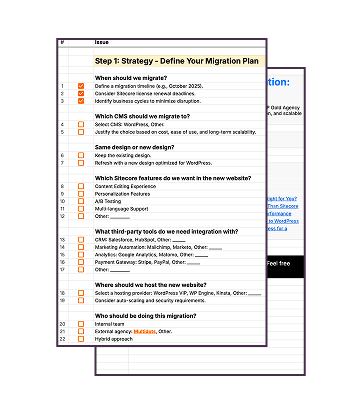
Grab our downloadable checklist to map out your AEM to WordPress transition

Find Out How Much You Can Save (Yearly) by Switching Your Website to WordPress?