
The Ultimate Step-by-Step Guide to Migrate from Arc XP to WordPress
A practical migration guide for media companies and publishers navigating Arc XP’s rising costs, platform uncertainty, and vendor lock-in.
Table of Contents
If you're running your digital operation on Arc XP and watching the layoffs, the restructuring, and the invoices pile up, you've probably started asking a difficult question: is it time to leave?
You're not the only one asking.
Over the last 16 years at Multidots, we've migrated over 300 enterprise websites to WordPress, including organizations moving from proprietary, high-cost CMS platforms with the same kind of lock-in that Arc XP creates. The pattern is familiar: a powerful platform with real editorial strengths, but one that becomes increasingly difficult to justify as costs rise, talent gets scarcer, and the vendor's own stability comes into question.
This guide gives you a practical framework for evaluating whether to migrate from Arc XP to WordPress, how complex your specific migration will be, how to choose the right partner, and exactly how the migration process works. Everything here is based on actual enterprise migration experience and publicly available data, not vendor marketing.
Let's be honest about something upfront: migrating from Arc XP is harder than most CMS migrations. The platform was designed to keep you in. Rate-limited export APIs, non-exportable password hashes, authenticated image URLs that break when you cancel your account. We'll address all of that directly.
Here's a quick roadmap to help you navigate this guide and get straight to the answers you're looking for:
- Start here if you're still deciding: Part 1 walks you through the decision framework.
- Already decided? Jump to Part 2 to understand your migration complexity, or Part 3 to evaluate partners.
- Ready to build the business case? Part 4 has the cost comparison and objection handling.
- Want the step-by-step process? Part 5 is your complete migration playbook.
- Have quick questions? Skip to the FAQs.
Or skip all of that and schedule a free 30-minute consultation with us. Let's cut to the chase and tackle your questions head-on.
Ready? Let's start by making sure this migration actually makes sense for your business.
PART 1: Should You Really Migrate? The Decision Framework
Before committing budget and timeline to an Arc XP migration, you need honest answers to six questions. These aren't theoretical. They're the same questions we walk through with every enterprise team evaluating a platform move.
1.1 The 6 Critical Questions
Question 1: What's actually driving this decision?
There's a difference between strategic migration and panic migration. If your primary driver is the February 2026 layoffs or contract renewal pressure, that's valid, but it changes the timeline and approach. If you're driven by long-term cost reduction, editorial flexibility, or platform risk, you have more room to plan properly.
- Renewal pressure or layoff concerns → Accelerated timeline, focus on risk mitigation
- Cost reduction → Detailed TCO analysis needed before committing
- Editorial limitations → WordPress excels here, strong migration candidate
- Platform risk and vendor instability → Valid strategic concern, plan for 6-12 month transition
Question 2: How much content are you managing?
Arc XP's rate-limited export API (30 requests per minute) means content volume directly impacts migration timeline and cost. A site with 5,000 articles is a fundamentally different project than one with 500,000.
- Under 10,000 articles → Straightforward export, 2-4 weeks for content migration
- 10,000 to 100,000 articles → Requires optimized export scripts, 4-8 weeks
- 100,000+ articles → Complex engineering challenge, 8-16 weeks for content alone
Question 3: How heavily do you use Arc XP's proprietary features?
Not all Arc XP features have direct WordPress equivalents. The more you've customized PageBuilder components, WebSked workflows, or Video Center integrations, the more complex your migration becomes.
- Mostly Composer for articles → Low complexity, WordPress Gutenberg is a natural replacement
- Heavy PageBuilder customization → Moderate complexity, custom Gutenberg blocks needed
- Video Center + Subscriptions + custom workflows → High complexity, multiple systems to replace
Question 4: What's your annual Arc XP spend?
Understanding your current total cost of ownership is essential for building the business case. Arc XP doesn't publish pricing, but based on industry data:
- $100K-$300K/year → WordPress migration likely pays for itself within 12-18 months
- $300K-$1M/year → Strong financial case for migration, significant long-term savings
- $1M+/year → Compelling ROI, but migration complexity is usually proportional to spend
Question 5: What's your timeline?
Arc XP migrations take longer than most CMS migrations due to export limitations. Rushing creates risk.
- Under 3 months → Only viable for small, simple sites. High risk at enterprise scale
- 3-6 months → Realistic for moderate implementations with experienced partner
- 6-12 months → Comfortable timeline for complex migrations with video, subscriptions, and multi-site
Question 6: What technical capability exists in-house?
Arc XP runs on React and AWS. WordPress runs on PHP. Your team's skills matter for post-migration operations.
- No in-house developers → WordPress with agency support (easiest to staff long-term)
- React/JavaScript team → Consider headless WordPress or WordPress + React frontend
- Full-stack team → Any approach viable, match to team strengths
1.2 Interpreting Your Answers
Strong migration signals:
- You're spending $200K+ annually on Arc XP and not using most of its features
- Your content is primarily articles and galleries (Arc XP's sweet spot, but WordPress handles these just as well at a fraction of the cost)
- You're concerned about Arc XP's long-term viability given the layoffs and restructuring
- You're struggling to find or retain developers who know Arc XP's proprietary system
- Your editorial team wants more control over page layout and design without developer involvement
Warning patterns (proceed with caution):
- You rely heavily on Arc XP's subscription and identity management system (password hashes can't be exported)
- You have 500,000+ pieces of content with complex taxonomy relationships
- Your contract renewal is in 60 days and you haven't started planning
- Your video library is your primary content asset and tightly integrated with Video Center
Scenarios where staying may make sense:
- You're a large newsroom with 100+ journalists deeply embedded in Arc XP's editorial workflow and your contract terms are favorable
- You've recently completed a major Arc XP implementation (last 12 months) and haven't recouped the investment
- Your organization has a dedicated Arc XP development team and the platform's limitations don't impact your business goals
1.3 The Go/No-Go Decision Tree
Answer yes or no to each question:
- Is your annual Arc XP spend creating budget pressure? (Yes = +1)
- Are you concerned about Arc XP's platform stability and future? (Yes = +1)
- Is your editorial team limited by Arc XP's current capabilities? (Yes = +1)
- Do you need capabilities Arc XP doesn't offer well (e-commerce, marketing automation, extensive plugin integrations)? (Yes = +1)
- Can you commit 4-8 months to a properly planned migration? (Yes = +1)
- Do you have budget for the migration investment (typically $150K-$500K for enterprise)? (Yes = +1)
Score 5-6: Strong candidate for migration. Start planning now.
Score 3-4: Migration likely makes sense, but address the gaps before committing.
Score 0-2: Migration may not be the right move right now. Revisit in 6 months or when circumstances change.
PART 2: Understanding Your Migration Complexity
Migration timelines can swing by 50-200%, and that's not because teams can't plan. Migrations bring hidden issues to the surface. Old workarounds, undocumented decisions, and messy platform history all show up when you try to move. Drawing on insights from over 300 enterprise migrations, here's how to set realistic expectations.
2.1 The Migration Complexity Scale
Every Arc XP to WordPress migration falls into one of three tiers. Where yours lands depends on content volume, feature usage, and integration depth.
Simple Migration
- Timeline: 12-18 weeks
- Budget: $100K-$250K
- Profile: Primarily article-based content, under 25,000 articles, standard Composer usage, minimal PageBuilder customization, no subscription system, 1-2 sites
- What it looks like: Content export via API, WordPress theme development, redirect mapping, editorial team training. Straightforward but not trivial due to Arc XP's export limitations.
Moderate Migration
- Timeline: 18-28 weeks
- Budget: $250K-$500K
- Profile: 25,000-200,000 articles, custom PageBuilder components, Photo Center with large media library, multiple content types (articles, galleries, videos), 2-5 sites, some third-party integrations
- What it looks like: Custom export engineering to handle rate limits, Gutenberg block development to replace PageBuilder components, media migration strategy, SEO preservation plan, phased rollout.
High-Complexity Migration
- Timeline: 28-40+ weeks
- Budget: $500K-$1M+
- Profile: 200,000+ articles, Video Center with large video library, subscription/identity system, extensive PageBuilder customization, WebSked workflow dependencies, multi-site architecture, 5+ sites, complex integrations
- What it looks like: Major engineering project. Custom API export tools, video hosting migration (to JW Player, Brightcove, or similar), subscriber migration with forced password reset strategy, multiple WordPress instances or multisite, extensive QA across all content types.
2.2 What Adds Time and Cost
Five factors consistently expand scope beyond initial estimates:
- Arc XP's rate-limited export API: At 30 requests per minute, exporting 100,000 articles takes days of continuous API calls. You'll need custom engineering to build reliable export pipelines with retry logic, rate limit handling, and data validation. Budget 2-4 weeks of engineering time just for the export tooling.
- ANS content transformation: Arc XP stores content in its proprietary Arc Native Specification (ANS) format, a JSON schema with stories, galleries, and videos as primary types, plus embedded images, authors, sections, tags, and more. Every piece of content needs to be transformed from ANS to WordPress's data model (posts, pages, custom post types, taxonomies, custom fields). This isn't a simple format conversion. It requires understanding both data models deeply.
- Video library migration: If you use Video Center, you have a separate migration project within the migration. Videos need to move to a new hosting platform (JW Player, Brightcove, Vimeo, or self-hosted), and every video embed reference across all your content needs updating. Video metadata, playlists, and analytics history don't transfer automatically.
- Subscriber and identity migration: Arc XP's identity system does not allow you to export password hashes. Period. This means every subscriber will need to reset their password on the new system. Planning the communication strategy, building a seamless reset flow, and minimizing subscriber churn during this transition requires careful product thinking, not just engineering.
- Media asset URLs: Arc XP serves images through authenticated URLs. When you cancel your Arc XP account, those URLs return 403 errors. Every image referenced in every piece of content needs to be downloaded, re-hosted, and re-referenced before your Arc XP contract ends. For sites with hundreds of thousands of images, this is a significant engineering and infrastructure challenge.
2.3 The 3 Hidden Costs That Wreck Budgets
These hidden costs wreck timelines and blow budgets, mostly because they don't show up until contracts are signed and the project's already underway. Every broken migration we've been brought in to fix had at least one of these.
1. Content Export Engineering
Most CMS migrations can lean on standard export tools or database dumps. Arc XP has neither. There's no export button, no bulk download, no database access. Everything goes through rate-limited APIs at 30 requests per minute.
For a site with 50,000 articles, that's roughly 28 hours of continuous API calls just for the articles, before you add images, galleries, videos, authors, sections, and taxonomy data. You need custom engineering to build a reliable export pipeline, and that pipeline needs error handling, retry logic, data validation, and the ability to resume after failures.
What it actually costs: $30K-$75K in engineering time, depending on content volume and complexity.
2. Subscriber Migration and Communication
If you use Arc XP's subscription system, you cannot export password hashes. Every subscriber needs a password reset. This isn't just a technical challenge. It's a customer experience challenge that directly impacts churn.
You'll need to design a migration communication campaign: pre-migration emails explaining the change, a seamless password reset flow on the new site, customer support capacity for confused subscribers, and monitoring to track how many subscribers successfully re-authenticate versus drop off.
What it actually costs: $25K-$60K for the technical build plus 5-15% subscriber churn if not handled carefully. The churn cost alone can dwarf the engineering spend for publishers with paid subscription revenue.
3. SEO and Redirect Mapping
Your current setup has years of SEO value built into its URLs, metadata, and internal links. Arc XP's URL structure likely differs from what WordPress will use. Every URL needs to be mapped, redirected, and validated.
We've seen media companies migrate tens of thousands of articles and keep all the content, but skip the URL structure planning. Traffic collapses overnight. Recovery takes months and costs multiples more than proper redirect mapping would have at the start.
What it actually costs: $30K-$60K for comprehensive redirect mapping and validation. The cost of getting it wrong: $150K-$500K in lost traffic recovery over 6-12 months.
2.4 Migration Readiness Checklist
Before signing any migration contract, verify these prerequisites. Missing any item adds 20-40% to the timeline and budget:
- Content Audit: Full inventory of content types, volumes, custom features, and integrations. Know exactly what's in your Arc XP instance, including forgotten microsites and legacy content.
- Stakeholder Alignment: Clear success criteria, timeline expectations, and decision process. Who approves the go-live? What happens if the timeline slips?
- Technical Assessment: API documentation reviewed, export rate limits understood, hosting strategy identified. Have you tested a small content export to validate the process?
- Team Capacity: Product owner allocated, subject matter experts identified, and training scheduled. Migration fails when it becomes a side project.
- Subscriber Strategy: If you use Arc XP subscriptions, have a detailed plan for the password reset migration and subscriber communication.
2.5 Timeline Reality Check
Based on our experience with enterprise migrations from proprietary CMS platforms to WordPress:
Simple (12-18 weeks):
- Weeks 1-3: Discovery, content audit, export pipeline development
- Weeks 4-8: WordPress setup, theme development, Gutenberg blocks
- Weeks 9-12: Content migration, redirect mapping, QA
- Weeks 13-16: Soft launch, monitoring, team training
- Weeks 17-18: Full launch and post-launch optimization
Moderate (18-28 weeks):
- Weeks 1-4: Discovery, content audit, architecture planning
- Weeks 5-8: Export pipeline engineering, WordPress infrastructure setup
- Weeks 9-14: Theme development, custom blocks, plugin configuration
- Weeks 15-20: Content migration (phased), media migration, integrations
- Weeks 21-24: QA, redirect mapping, staging validation
- Weeks 25-28: Phased launch, monitoring, training, optimization
High Complexity (28-40+ weeks):
- Weeks 1-6: Deep discovery, architecture design, export engineering
- Weeks 7-12: WordPress build, custom blocks, video hosting setup
- Weeks 13-20: Content migration (phased by content type), media migration
- Weeks 21-28: Subscription migration, integration testing, QA
- Weeks 29-34: Staged rollout (section by section or site by site)
- Weeks 35-40: Full launch, monitoring, optimization, team training
PART 3: Choosing the Right Migration Partner
Choosing a platform is about 20% of the victory. The other 80% lives in how well it's implemented and who's doing the work with you. This is especially true for Arc XP migrations, where the export challenges, content transformation complexity, and subscriber migration requirements demand genuine enterprise migration experience.
3.1 Red Flags in Vendor Evaluation
Five warning signs that should give you pause:
- They claim Arc XP migration is straightforward. It isn't. Anyone who downplays the rate-limited API, the ANS content transformation, or the subscriber migration challenge either hasn't done it or is setting you up for scope creep.
- They can't explain the content export strategy in detail. Ask them exactly how they'll handle Arc XP's 30-request-per-minute API limit. If they're vague, they haven't thought it through.
- They don't mention subscriber/identity migration challenges. If you use Arc XP subscriptions and a vendor doesn't proactively raise the password hash issue, they don't understand the platform.
- They quote a fixed timeline without a discovery phase. Every Arc XP implementation is different. Anyone who quotes 12 weeks without understanding your specific content model, customizations, and integrations is guessing.
- They don't have verifiable enterprise CMS migration experience. Ask for references from migrations of comparable complexity. Case studies are marketing. References are reality.
3.2 Questions to Ask Every Vendor
Don't just listen to their pitch. Ask these specific questions and evaluate the quality of their answers:
Experience:
- How many enterprise CMS migrations have you completed? From which platforms?
- Have you migrated from Arc XP specifically? If not, have you migrated from comparable proprietary CMS platforms with API-based content export?
- Can you show us your content transformation methodology for ANS to WordPress data mapping?
Methodology:
- How do you handle Arc XP's rate-limited export API at scale?
- What's your approach to subscriber migration when password hashes can't be exported?
- How do you handle video library migration? Which video hosting platforms do you recommend?
- What does your QA process look like? How do you validate that 100,000+ articles migrated correctly?
Team and Risk:
- Who specifically will work on our project? What's their experience level?
- What happens if the migration timeline slips? How do you handle scope changes?
- What's your rollback plan if something goes wrong during go-live?
- How do you handle the parallel operation period when both Arc XP and WordPress are running?
3.3 The Reference Check That Actually Matters
References provide scripted success stories unless you ask questions they haven't rehearsed:
- "What took longer than expected during implementation, and what was the root cause?" This reveals whether delays came from platform complexity, vendor capability, or client readiness. Listen for ownership versus blame.
- "How does the vendor handle scope changes, timeline slips, or budget overruns mid-project?" Every project hits turbulence. You're evaluating grace under pressure, not perfect execution.
- "What percentage of the original team is still supporting you versus being rotated to other clients?" Team continuity predicts post-launch success. High turnover means knowledge loss.
- "Would you choose this vendor again, knowing what you know now, and what would you do differently?" The pause before answering tells you everything. Genuine enthusiasm differs markedly from diplomatic politeness.
3.4 The WordPress VIP Partner Advantage
For media companies and publishers migrating from Arc XP, WordPress VIP is the natural enterprise hosting destination. It's the same infrastructure that powers TechCrunch, CNN, Reuters, and other major publishers who need the same kind of scale and reliability that Arc XP provides.
Working with a WordPress VIP Gold Partner matters because:
- VIP's code review process requires specific development practices that experienced partners already follow
- Migration tooling and processes are pre-validated against VIP's infrastructure requirements
- Enterprise support escalation paths are established, meaning faster resolution when issues arise
- VIP partners understand the performance, security, and editorial workflow requirements that publisher teams expect
3.5 What Great Partners Do Differently
- They challenge your assumptions. If you say "we need to migrate everything," a great partner asks "do you?" Content audits often reveal 30-40% of content that can be archived or retired, significantly reducing migration scope and cost.
- They give honest timelines. If a migration will take 6 months, they say 6 months. They don't quote 3 months to win the deal and then request change orders.
- They document everything. Architecture decisions, content mapping rules, redirect logic, editorial workflow changes. Documentation is the difference between a successful launch and an unsupportable system.
- They plan for you to leave them. Great partners build systems your team can maintain independently. They provide training, documentation, and a transition plan. Dependency is a business model. Independence is a partnership.
3.6 Making the Final Decision
The right partner will be straight with you. They'll point out the tricky parts early, give you realistic costs, and won't agree to work they can't do well. Choose the one who tells you what you need to hear, not what you want to hear.
PART 4: Why You Should Migrate from Arc XP to WordPress
If you've made it through the decision framework and complexity assessment and you're still reading, let's build the business case. Here's what the numbers actually look like.
4.1 The Business Case for Migration
For a mid-to-large publisher matching our Enterprise A model (2-5 million monthly page views, 25-75 content team members, 5-10 web properties):
Arc XP:
- License/subscription: $150K-$1M+/year (custom pricing, not published)
- Professional services: $50K-$200K/year (required for customizations)
- Implementation team: Proprietary skills, $100-$150/hour, 3-6 month ramp-up
- Year 1 total: ~$300K-$1.5M+
- 3-year total: ~$600K-$3M+ (assumes stable pricing, which is not guaranteed)
WordPress (Enterprise-tier hosting):
- License/subscription: $0 (open source) + $100K-$300K/year enterprise hosting (WordPress VIP or equivalent)
- Add-ons/extras: $5K-$20K/year premium plugins and services
- Implementation and build: $50K-$200K (4-12 weeks)
- Ongoing operations: $30K-$80K/year
- Developer cost: $50-$115/hour
- Year 1 total: ~$185K-$600K
- 3-year total: ~$300K-$800K
Average savings: 40-60% over three years when accounting for licensing, developer availability, and reduced dependency on a single vendor's professional services team.
4.2 Benefits of Migrating
For Editorial Teams:
- Gutenberg's visual block editor gives editors direct control over page layout, something Arc XP's PageBuilder never provided without developer involvement
- 60,000+ WordPress plugins versus being locked into Arc XP's feature set and development roadmap
- Real-time collaboration via Multicollab brings Google Docs-style editing to WordPress
- Faster publishing workflows. No more waiting for developer sprints to make editorial changes
- Content modeling flexibility with custom post types and Advanced Custom Fields
For Engineering Teams:
- WordPress developers are abundant globally ($50-$115/hour) versus the tiny pool of Arc XP specialists
- Open-source codebase means full visibility, no proprietary black boxes
- REST API and GraphQL support for headless architectures, included natively rather than as an add-on
- Choose any hosting provider. No lock-in to AWS/Akamai infrastructure
- Git-based deployment workflows on WordPress VIP with code review and staging environments
For Business and Finance:
- Predictable costs. No surprise professional services invoices for routine customizations
- Platform stability. WordPress powers 43% of all websites and is governed by the WordPress Foundation. It's not dependent on one company's financial health
- Vendor independence. Own your content, your code, and your infrastructure decisions
- Massive agency ecosystem. If one partner doesn't work out, there are thousands of qualified alternatives
- E-commerce capabilities via WooCommerce for diversifying revenue beyond subscriptions
4.3 Why Arc XP Might Be Holding You Back
1. Platform Instability and Business Risk
Arc XP has laid off approximately 130+ employees since 2023, including 54 in September 2024 (25% of Arc XP's workforce) and approximately 75 more in February 2026. The platform was reorganized under The Washington Post's Office of the CTO in April 2025. Arc XP generates an estimated $100M+ in annual revenue but still operates at a loss, and its revenue has declined approximately 12% since 2021.
For publishers whose digital operations depend entirely on this platform, these are not abstract concerns. They are operational risks that belong on the executive agenda.
2. Vendor Lock-In by Design
Arc XP makes leaving difficult. The content export API is rate-limited to 30 requests per minute. There's no bulk export tool. Password hashes from the identity system cannot be exported. Image URLs are authenticated and will return 403 errors if your account is cancelled. Every customization outside the defaults requires Arc XP's own professional services team, with no alternative vendors available.
This isn't incidental. It's structural. And it means your negotiating leverage decreases with every year you stay on the platform.
3. Developer Scarcity
Finding an "Arc XP developer" usually means hiring a generalist and paying for 3-6 months of ramp-up time on a proprietary system with inconsistent documentation. WordPress has millions of developers worldwide. The talent pool difference directly impacts your ability to hire, your cost to hire, and your operational resilience when team members leave.
4. Cost at Scale
Arc XP's pricing ranges from $50,000 to $3,000,000+ per year, with median estimates around $400,000-$500,000/year. Implementation costs typically equal the first year's license fee. WordPress costs 2-3x less at comparable enterprise scale, with the savings growing over time as ecosystem advantages compound.
5. Editorial Flexibility Gap
Arc XP's PageBuilder gives developers control over page assembly, but editorial teams often can't make layout changes without filing a development ticket. WordPress with Full Site Editing and Gutenberg blocks puts that control directly in editors' hands, enabling faster iteration and reducing the bottleneck between editorial vision and published output.
4.4 Addressing Concerns
If you're considering this migration, your team will have objections. Here are the most common ones and direct answers:
"Can WordPress handle our traffic volume?"
Yes. WordPress VIP delivers sub-200ms Time to First Byte globally, 99.99% uptime, and auto-scaling that handles traffic spikes without intervention. TechCrunch, CNN, Reuters, and TIME Magazine all run on WordPress. Your traffic volume is not the constraint.
"Is WordPress secure enough for a newsroom?"
WordPress faces more attacks than any other platform because it powers 43% of the web. This creates a perception problem, but the platform can be just as secure as proprietary alternatives. The White House runs on WordPress. WordPress VIP adds enterprise-grade protection: DDoS mitigation, web application firewall, continuous vulnerability assessment, 24/7 security monitoring, and proactive patching of vulnerabilities before official releases. WordPress VIP holds SOC 2 Type 1 attestation with data centers maintaining SOC 2 Type 2 certification.
"What about our video library?"
Arc XP's Video Center is genuinely strong, and this is one area where you'll need a dedicated replacement strategy. Options include JW Player (used by many publishers), Brightcove, Vimeo OTT, or Cloudflare Stream. The migration involves re-hosting video files, migrating metadata, and updating embed references across your content. It adds complexity and cost, but it also frees you from Arc XP's video pricing and gives you more control over your video infrastructure.
"Will we lose subscribers?"
You'll lose some. Be prepared for 5-15% churn during the transition period because password hashes cannot be exported from Arc XP's identity system. Every subscriber will need to reset their password. The key to minimizing churn is communication: pre-migration emails, a seamless reset flow, clear help resources, and customer support capacity during the transition window. WordPress has mature subscription plugins (WooCommerce Subscriptions, Restrict Content Pro) and integrates with dedicated subscription platforms like Piano and Zephr.
"Can WordPress replicate our editorial workflows?"
Yes, and usually improve them. WordPress's native editorial workflow (draft, pending review, scheduled, published) handles standard publishing needs. For more complex workflows matching what WebSked provides, plugins like PublishPress, Edit Flow, and Oasis Workflow add approval chains, editorial calendars, and content planning tools. The difference: these WordPress solutions are significantly cheaper than Arc XP's workflow tools.
"Can WordPress handle multi-site publishing?"
WordPress Multisite lets you manage dozens or hundreds of sites from one dashboard. This is ideal for publishers running multiple brands, regional editions, or content verticals. Arc XP also supports multi-site, but WordPress Multisite is a proven, well-documented capability with extensive enterprise adoption.
"What about SEO? Will we lose our rankings?"
Not if you handle the migration correctly. SEO preservation requires comprehensive URL mapping, proper 301 redirects, metadata migration, and sitemap reconfiguration. WordPress's SEO ecosystem (Yoast SEO, Rank Math) is industry-leading and significantly more capable than Arc XP's native SEO tools. Many publishers see SEO improvements post-migration due to better tooling and faster page speeds. The risk is in the migration execution, not the platform.
"Is this the right time, given Arc XP's recent changes?"
Arc XP's reorganization under the Office of the CTO could signal renewed investment or further consolidation. But the pattern of layoffs (130+ since 2023), declining revenue (~12% since 2021), and operating losses suggests ongoing pressure. Waiting for stability that may not come carries its own risk. The question isn't whether Arc XP will disappear tomorrow. It's whether you want your digital infrastructure's future tied to a platform facing these headwinds.
PART 5: How to Migrate from Arc XP to WordPress
This section walks through the complete migration process in six steps. The approach is based on our methodology for enterprise CMS migrations: phased stages with clear success criteria and rollback procedures at each step.
Step 1: High-Level Migration Strategy
Before diving into technical details, let's map out a strategic approach to ensure your migration is successful. A well-planned migration strategy will save you time, resources, and potential headaches down the road.
1.1 When Should You Migrate?
The best time to start planning is 6-12 months before your Arc XP contract renewal. This gives you leverage in negotiations - you can negotiate better terms or walk away entirely - and enough time for a properly planned migration.
If renewal is less than 3 months away, don't panic-migrate. Negotiate a short-term extension (6-12 months) while you plan the transition properly. A rushed migration from Arc XP carries more risk than most CMS moves because of the export limitations. Better to pay for a few extra months of Arc XP than to botch the migration and spend twice as much fixing it.
1.2 Design Strategy: Refresh or Replicate?
You have two options:
- Replicate: Rebuild your current design in WordPress. Faster (saves 2-4 weeks), lower risk, but you miss the opportunity to modernize. Best when design is recent or migration timeline is tight.
- Refresh: Use the migration as an opportunity to redesign. Adds 4-8 weeks and cost, but lets you address UX issues and align with current brand standards. Best when design is outdated or traffic patterns have changed.
Our recommendation: for most Arc XP migrations, replicate first and refresh later. Get off the platform on a predictable timeline, then iterate on WordPress where changes are dramatically faster and cheaper.
1.3 Arc XP Feature Audit and WordPress Mapping
Every Arc XP feature needs a WordPress equivalent. Here's the mapping:
- Composer (article authoring) → WordPress Gutenberg block editor
- Photo Center (DAM) → WordPress media library + Enhanced Media Library plugin (or Cloudinary/Bynder for enterprise DAM)
- Video Center → JW Player, Brightcove, Vimeo OTT, or Cloudflare Stream + WordPress integration plugin
- WebSked (editorial planning) → PublishPress, Edit Flow, or CoSchedule
- PageBuilder Engine (front-end) → WordPress Full Site Editing or custom theme with Gutenberg blocks
- PageBuilder Editor (visual assembly) → WordPress block editor with custom block patterns
- Bandito (A/B testing) → Google Optimize, VWO, or Optimizely
- Clavis (recommendations) → Jeeng, Recombee, or custom recommendation engine
- Arc XP Subscriptions → WooCommerce Subscriptions, Piano, Zephr, or Leaky Paywall
- Arc XP Identity → WordPress native users + Memberful, WooCommerce Memberships, or Auth0
1.4 Third-Party Integration Planning
Arc XP sites typically integrate with a range of external tools for analytics, advertising, email, and CRM. The good news: WordPress's plugin ecosystem means most of these integrations are simpler to implement than they were on Arc XP, where every integration required developer time or professional services.
Map each current integration, note whether it's critical or nice-to-have, and identify the WordPress equivalent. Common mappings include Google Analytics and Adobe Analytics via native plugins, GAM/DFP and prebid via Advanced Ads or Ad Inserter, Sailthru and Mailchimp via official WordPress integrations, Salesforce and HubSpot via their dedicated WordPress plugins, and Elasticsearch or Algolia via SearchWP or Algolia for WordPress.
Prioritize integrations that directly impact revenue (advertising, subscriptions) and editorial workflow (analytics, email). Social sharing and cosmetic integrations can be handled post-launch.
1.5 Enterprise Hosting Strategy
For publishers migrating from Arc XP, these are your primary enterprise WordPress hosting options:
- WordPress VIP: Enterprise-grade managed hosting. 99.99% uptime, global CDN, auto-scaling, 24/7 support, code review. $25K-$300K/year. WP VIP is best for large publishers, mission-critical sites. Used by TechCrunch, CNN, Reuters.
- WP Engine: Managed WordPress hosting with good developer tools. $25K-$60K/year for enterprise. WP Engine is best for mid-to-large publishers wanting strong support without VIP pricing.
- Pantheon: WebOps platform with strong CI/CD and multisite support. $15K-$50K/year for enterprise. Pantheon is best for developer-focused teams wanting maximum deployment control.
- Pagely: Enterprise managed WordPress on AWS. $15K-$50K/year. Pagely is best for teams that want WordPress on AWS infrastructure (familiar if coming from Arc XP's AWS backend).
1.6 Migration Team Composition
A typical Arc XP to WordPress migration requires a cross-functional team combining client-side decision-makers with agency-side technical expertise. On the client side, you need a project manager who owns stakeholder alignment and internal communication, and an editorial lead who defines workflow requirements and coordinates team training.
On the agency side, the core team typically includes a technical lead overseeing architecture and export engineering, a content migration engineer building the custom export scripts and ANS-to-WordPress transformation layer, two to three WordPress developers handling theme development, custom blocks, and integrations, a QA engineer validating migrated content and running performance tests, and an SEO specialist managing URL mapping, redirect strategy, and post-launch monitoring.
The most common staffing mistake: underestimating the content migration engineering effort. This isn't a developer who runs an import script. It's an engineer who builds reliable data pipelines against a rate-limited API, transforms proprietary JSON schemas, and validates hundreds of thousands of content items.
Step 2: Pre-Migration Preparation
With your high-level strategy in place, it's time to prepare for the actual migration. This preparation phase is crucial for a smooth transition and helps prevent data loss, maintains SEO equity, and ensures all stakeholders are aligned.
2.1 Comprehensive Backup Strategy
Before any migration work begins:
- Document your complete Arc XP configuration, including content types, workflows, user roles, and integrations
- Export a snapshot of all content via the API (even at 30 requests/minute, start this process early)
- Screenshot all PageBuilder layouts, WebSked configurations, and custom component configurations
- Export subscriber/user data (everything you can get, recognizing password hashes won't be included)
- Archive all media assets independently of the Arc XP system
2.2 Content Inventory and Audit
Map everything in your Arc XP instance:
- Count articles, galleries, and videos by section, category, and date range
- Identify content types and their ANS schemas
- Flag content that can be retired (typically 20-40% of legacy content is outdated or low-traffic)
- Document taxonomy structure: sections, tags, authors, and their relationships
- Identify embedded content (images, videos, related stories) and their reference patterns
- Map URL patterns for redirect planning
Looking to take control of your content migration?
Use our Content Audit Template to track all your content systematically. This template includes tabs for different content types and fields for organizing, prioritizing, and streamlining every step.

2.3 SEO and Performance Baseline
Capture your current state before changing anything:
- Crawl your entire site with Screaming Frog or Sitebulb (URL inventory, metadata, internal links)
- Export Google Search Console data (keywords, rankings, click-through rates, indexed pages)
- Document current Core Web Vitals scores per template type
- Export Google Analytics data (traffic sources, top pages, user flow patterns)
- Identify your top 100 pages by traffic and ensure they get special attention during migration
2.4 Arc XP Content Structure Analysis
Understanding how Arc XP's ANS (Arc Native Specification) maps to WordPress data structures is the foundation of your content migration engineering. ANS is a JSON-based schema with primary document types (stories, galleries, videos) and secondary types (images, authors, sections, tags, collections).
The mapping is fairly clean conceptually. Stories become WordPress posts or a custom post type. Galleries become gallery blocks or a custom gallery post type. Videos become a custom post type with embeds from your new video hosting platform. Images from Photo Center become WordPress media library attachments. Authors map to WordPress users or custom author profiles. Sections become categories or a custom taxonomy, and tags map directly to WordPress tags. Collections from WebSked can be handled via a plugin or custom taxonomy.
Where it gets complex is in the content elements within stories. ANS stories contain an array of content_elements - text blocks, headers, images, videos, raw HTML, lists, and quotes. Each of these needs to be transformed into the corresponding Gutenberg block during migration. The transformation logic for this is the core of your content migration engineering effort.
Step 3: WordPress Environment Setup
With your preparation complete, it's time to build your WordPress environment. This step establishes the foundation for how your content will be structured, who can access it, and how users will interact with it.
3.1 Architecture Decision: Traditional vs Headless
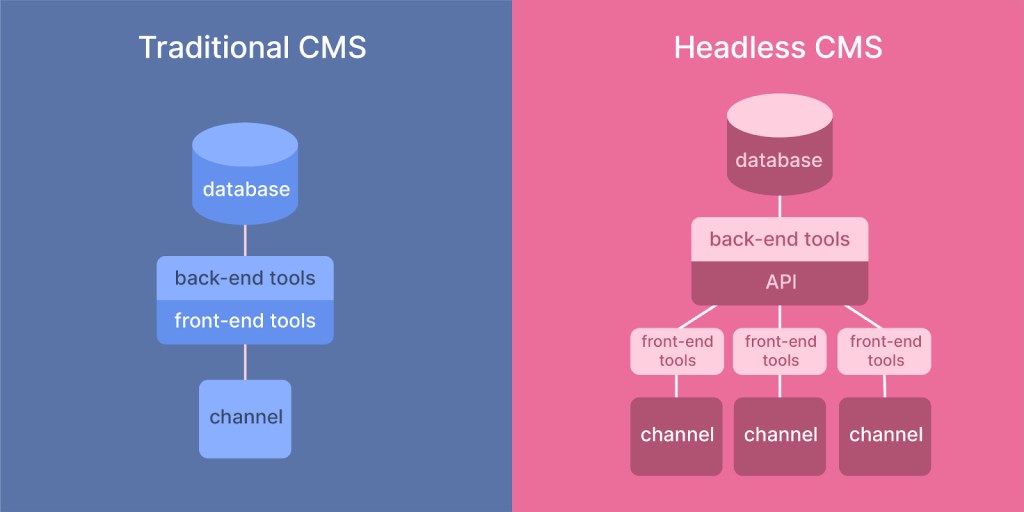
For most publishers migrating from Arc XP, traditional (coupled) WordPress is the right choice. Here's why:
- Traditional WordPress: Content management and front-end delivery in one system. Faster to implement, lower cost, easier for editorial teams. Best for: most publisher migrations. WordPress VIP optimizes this architecture for enterprise performance.
- Headless WordPress: WordPress as content backend, with a separate front-end (Next.js, Astro, or similar). More complex, higher cost, but offers maximum flexibility for multi-channel delivery. Best for: organizations with strong JavaScript teams who need to serve content across web, mobile apps, and other channels from a single source.
3.2 Multisite vs Single Site
- Single site: One WordPress installation for your primary property. Simplest to manage, fastest to implement.
- WordPress Multisite: One installation managing multiple sites. Ideal if you have multiple brands, regional editions, or content verticals that share infrastructure but have separate identities.
- Multiple single sites: Separate WordPress installations for each property. Maximum isolation but higher management overhead.
Match your WordPress architecture to your current Arc XP site structure. If you run 3+ sites on Arc XP, Multisite is usually the right choice.
Here's a complete video walkthrough on how to setup WordPress multisite with its best practices:
3.3 User Roles and Workflow Configuration
Map Arc XP roles to WordPress:
- Arc XP Admin → WordPress Administrator
- Arc XP Editor → WordPress Editor
- Arc XP Author/Reporter → WordPress Author
- Arc XP Contributor → WordPress Contributor
- Arc XP Subscriber → WordPress Subscriber
For more granular permissions matching Arc XP's role-based access, use the Members plugin or User Role Editor to create custom roles that match your editorial governance requirements.
3.4 Custom Gutenberg Blocks Development
This is where you replace Arc XP's PageBuilder components with WordPress equivalents, and it's often the most creative part of the migration. Start by auditing all PageBuilder components currently in use and ranking them by frequency. In most Arc XP implementations, 10-15 components account for 80% of page usage.
Build custom Gutenberg blocks for those high-frequency components first. Create block patterns - pre-configured combinations of blocks - for common page layouts like article pages, section fronts, and landing pages. Then test extensively with your editorial team before the migration begins. Editors need to feel comfortable building pages with the new blocks before they're expected to do it under deadline pressure.
The shift from PageBuilder to Gutenberg is usually well-received by editorial teams. Gutenberg gives them more direct control over layout without filing developer tickets, which is one of the primary frustrations we hear from Arc XP editorial teams.
3.5 Essential Plugin Stack for Publishers
Core plugins for a publisher migrating from Arc XP:
- SEO: Yoast SEO or Rank Math (metadata, sitemaps, schema markup)
- Performance: WP Rocket or W3 Total Cache (caching, optimization)
- Security: Wordfence or Sucuri (firewall, malware scanning)
- Editorial workflow: PublishPress or Edit Flow (editorial calendar, approval chains)
- Collaboration: Multicollab (real-time collaborative editing)
- Media management: Enhanced Media Library or Flavor (asset organization)
- Advertising: Advanced Ads or Ad Inserter (ad placement management)
- Analytics: MonsterInsights or Site Kit (Google Analytics integration)
- Redirects: Redirection or Rank Math (301 redirect management)
When selecting plugins, prioritize those with regular updates, strong support teams, large user bases, and proven track records with enterprise implementations.
Step 4: Migration Execution and Launch
Now comes the exciting part—actually migrating your content and launching your new WordPress site. This phase requires careful coordination and thorough testing to ensure everything works perfectly.
4.1 Content Export from Arc XP
This is the most technically challenging phase of an Arc XP migration:
- Build custom export scripts that handle the 30-request-per-minute rate limit with exponential backoff and retry logic
- Export in priority order: Start with your highest-traffic content, most recent articles, and critical pages
- Validate every export batch: Compare source article count to exported count, check for truncated content, missing images, and broken references
- Transform ANS to WordPress format: Build a transformation layer that converts ANS JSON to WordPress import format (WXR or direct database import via WP-CLI)
- Handle content elements: Map ANS content_elements (text, header, image, video, raw_html, list, quote) to WordPress Gutenberg blocks
- Preserve metadata: Publish dates, author attribution, taxonomy assignments, SEO metadata, social sharing data
Now comes the exciting part—actually migrating your content and launching your new WordPress site. This phase requires careful coordination and thorough testing to ensure everything works perfectly.
4.2 Media and Digital Asset Migration
Arc XP serves images through authenticated URLs tied to your account. The moment your Arc XP account is cancelled, every image in every article returns a 403 error. This makes media migration time-sensitive and non-negotiable.
Download all images from Photo Center while your account is still active, preserving captions, alt text, credits, and the relationships between images and articles. Upload them to the WordPress media library and update every image reference across all your migrated content. For sites with hundreds of thousands of images, this is a significant engineering and infrastructure task - plan for it explicitly rather than treating it as an afterthought.
Use the migration as an opportunity to optimize. Convert images to modern formats like WebP, generate responsive sizes, and compress appropriately. This can meaningfully improve your Core Web Vitals scores on WordPress compared to your Arc XP baseline.
Video migration is essentially a separate project within the project. Videos need to move from Video Center to a new hosting platform (JW Player, Brightcove, Vimeo, or Cloudflare Stream), and every video embed reference across your content needs to be updated. Budget 4-8 weeks specifically for video migration on sites with significant video libraries.
4.3 Subscriber and Identity Migration
If you use Arc XP's subscription and identity system, this is the phase that requires the most careful planning - not because it's technically the hardest, but because it directly impacts revenue and customer experience.
Export everything you can: names, email addresses, subscription status, billing history, and any custom user data. Then accept the constraint you can't work around: Arc XP does not export password hashes. Every subscriber will need to reset their password on the new system.
The key to minimizing churn is communication and UX design. Build a branded, seamless password reset page on the new WordPress site. Send pre-migration notification emails explaining what's happening and why. Have customer support capacity ready for the first two weeks, because confused subscribers who can't log in will either call for help or cancel.
Test the process with a small cohort of 100-500 subscribers before rolling it out to your full base. Measure the password reset completion rate, identify friction points, and refine the flow. Then monitor re-authentication rates daily during the full migration, intervening quickly if churn exceeds your 5-15% projection.
4.4 URL Mapping and SEO Preservation
Your current site has years of SEO value built into its URLs, metadata, and internal link structure. Protecting that value during migration is non-negotiable.
Start by mapping every URL from Arc XP to its WordPress equivalent using your Screaming Frog crawl data. Where possible, preserve the URL structure exactly - matching Arc XP's URL patterns in WordPress dramatically reduces redirect complexity and SEO risk. Where URLs must change, implement 301 redirects for every single changed URL.
Migrate all metadata: title tags, meta descriptions, Open Graph tags, Twitter cards, and structured data. Submit updated sitemaps to Google Search Console immediately after launch. Then monitor Search Console daily for the first 30 days to catch crawl errors, indexing issues, and unexpected traffic drops before they compound into serious organic traffic losses.
4.5 Pre-Launch Testing and QA
Testing an enterprise CMS migration requires structured QA across six dimensions.
- First, content validation: spot-check 5-10% of migrated content across all content types, verifying formatting, images, links, and metadata accuracy.
- Second, cross-browser testing across Chrome, Firefox, Safari, and Edge on both desktop and mobile.
- Third, performance testing: run load tests to confirm your WordPress environment handles expected traffic levels.
- Fourth, SEO auditing to verify redirects, sitemaps, and robots.txt configuration.
- Fifth, workflow testing where your editorial team publishes, edits, and schedules content through the new WordPress workflows under realistic conditions.
- And sixth, integration testing to confirm that all third-party services - analytics, advertising, email, CRM - are working correctly.
Don't skip or compress QA to hit a deadline. The bugs you catch in staging cost 10x less to fix than the ones you catch in production after launch.
4.6 Go-Live Strategy and Monitoring
We recommend a phased go-live approach:
- Phase 1: Launch a single section or content vertical on WordPress while keeping the rest on Arc XP. Validate performance, SEO, and editorial workflows in production.
- Phase 2: Migrate additional sections once Phase 1 is stable (typically 2-4 weeks after initial launch).
- Phase 3: Full cutover once all sections are validated. Update DNS, finalize redirects, and decommission Arc XP.
During go-live, monitor: page load times, error rates (4xx, 5xx), search indexing, traffic levels versus baseline, subscriber login success rates, and ad revenue.
Step 5: Post-Migration Optimization and Team Training
Your migration is complete, but the work doesn't stop there. Post-migration optimization and team training are crucial for maximizing your WordPress investment.
5.1 Performance Optimization
Once your site is live on WordPress, the first priority is performance tuning. Configure your caching layers - page cache, object cache (Redis or Memcached), and CDN - for optimal response times. Optimize images with lazy loading and modern format delivery. Review and optimize database queries, especially for any custom content types or complex taxonomy queries you've migrated from Arc XP.
Set up continuous performance monitoring using New Relic, Datadog, or your hosting provider's built-in tools. Establish performance baselines during the first week and set alerts for any degradation. Compare your WordPress Core Web Vitals scores against the pre-migration baseline you captured - you should see improvements in most metrics, and any regressions should be investigated immediately.
5.2 Team Training
Expect a temporary productivity dip as your editorial team adjusts to WordPress: approximately 40% slower in month one, 20% in month two, before the new workflows become natural. Budget for this. It's a real cost that most migration plans ignore.
Structure training by role. Content editors need hands-on time with the Gutenberg block editor, publishing workflows, and media management. Editorial leads need to master the editorial calendar, approval processes, and workflow management tools. Developers need to understand WordPress development practices, deployment workflows, and plugin management. Administrators need training on user management, security practices, and performance monitoring.
Create role-specific documentation and screen recordings that your team can reference independently. Identify team "champions" - editors who pick up WordPress quickly and can support colleagues during the transition. This peer-support model is consistently more effective than top-down training for editorial teams.
5.3 Long-Term Success Strategy
Migration is the beginning, not the end. Schedule a 90-day post-migration review to assess performance against your baseline, identify optimization opportunities, and gather structured feedback from your editorial team about what's working and what needs improvement.
Establish ongoing cadences: regular content performance reviews, quarterly WordPress core and plugin updates (tested in staging first), and clear escalation paths for technical issues. Build an internal WordPress knowledge base that grows over time, so your team's platform expertise becomes an organizational asset rather than tribal knowledge held by a few individuals.
Step 6: Ongoing Maintenance and Monitoring
Congratulations! Your migration is complete, and your team is trained on the new WordPress platform. Now comes an equally important phase: ensuring your website stays secure, up-to-date, and performs optimally over time.
Unlike Arc XP, WordPress maintenance is straightforward and cost-effective. However, enterprise sites still require systematic attention to maintain peak performance and security.
6.1 WordPress Update Management
WordPress core, themes, and plugins release updates regularly - for features, performance, and security. Establish a disciplined update process: test updates in staging before applying to production, monitor security advisories, and apply critical security patches promptly.
If you're on WordPress VIP, you benefit from automatic core updates and proactive security patching that often addresses vulnerabilities before they're publicly disclosed.
6.2 Performance and Security Monitoring
Continuous monitoring is essential for any enterprise publisher site. Set up automated monitoring for uptime, response times, and error rates. Run regular security scans and vulnerability assessments. Review access logs for suspicious activity and maintain tested backup and restore procedures. The goal is to catch issues before they impact your audience, not after.
6.3 Maintenance Service Options
Three models for ongoing WordPress maintenance:
- In-house: Build internal WordPress expertise. Lowest ongoing cost but requires hiring and training.
- Agency retainer: Dedicated hours from a WordPress agency for updates, monitoring, and feature development.
- Managed services: Comprehensive outsourced maintenance including updates, monitoring, security, and performance optimization.
At Multidots, we offer all three models as a WordPress VIP Gold Partner with specific experience in supporting publishers who've migrated from enterprise CMS platforms.
Ready to Explore Your Options?
At Multidots, we've successfully migrated over 300 enterprise websites to WordPress, including organizations moving from Arc XP, AEM, Sitecore, Drupal, and other enterprise CMS platforms.
As a WordPress VIP Gold Partner, we specialize in enterprise WordPress development and offer a proven migration methodology that protects your content, SEO equity, editorial workflows, and subscriber relationships throughout the transition.
If you're evaluating an Arc XP migration and want straight answers based on real enterprise migration experience, not a sales pitch, schedule a conversation with our migration experts. We'll walk you through what makes sense for your specific situation, including realistic timelines, costs, and what the transition actually looks like.
Frequently Asked Questions
Looking for quick answers or want to take this guide with you? We've got you covered with these helpful resources.
-
12-40+ weeks depending on complexity. Simple migrations (primarily articles, under 25,000 pieces of content) take 12-18 weeks. Moderate migrations (custom components, large media libraries) take 18-28 weeks. Complex migrations (video libraries, subscriptions, multi-site) take 28-40+ weeks.
-
Yes, and we recommend it. Run both systems simultaneously during the migration period, launching sections on WordPress progressively while keeping the rest on Arc XP. This reduces risk and allows you to validate each phase before proceeding.
-
Authenticated image URLs will return 403 errors, meaning all images in your content will break. Complete all content and media export before cancelling your Arc XP contract. We recommend maintaining your Arc XP account for at least 30 days after full WordPress launch as a safety net.
-
Yes. Stories map to WordPress posts, galleries to gallery blocks or custom post types, and videos to custom post types with external video hosting. The ANS content model’s elements (text, headers, images, videos, lists, quotes, raw HTML) all have direct Gutenberg block equivalents.
-
Video migration is a migration-within-a-migration. Videos need to move to a dedicated hosting platform (JW Player, Brightcove, Vimeo, or Cloudflare Stream). This involves downloading video files, migrating metadata, setting up the new platform, and updating every video embed across your content. Budget 4-8 weeks for video migration specifically.
-
Custom engineering. We build export pipelines with rate limit handling, exponential backoff, retry logic, batch processing, and the ability to resume from failure points. For large sites, we may also coordinate with Arc XP’s team to negotiate temporary rate limit increases during the migration window.
-
For most publishers, traditional WordPress on enterprise hosting (VIP, WP Engine, or Pantheon) is the right choice. It’s faster to implement, simpler to maintain, and gives editorial teams the most control. Consider headless WordPress only if you need to serve content across multiple channels (web, mobile apps, digital signage) from a single source and have strong JavaScript development capabilities.
-
Arc XP’s identity system does not allow password hash export. Plan for a forced password reset for all subscribers. The key is communication and UX: pre-migration emails, a seamless branded reset flow, customer support capacity, and close monitoring of re-authentication rates. Expect 5-15% churn, which can be minimized with excellent execution.
-
Arc XP’s real-time content delivery via its CDN and View API is replicated by WordPress VIP’s global CDN with sub-200ms Time to First Byte. For real-time collaborative editing, Multicollab provides Google Docs-style simultaneous editing in WordPress. For real-time content updates, WordPress supports server-sent events, WebSockets via plugins, and automatic cache invalidation on publish.
Feel free to schedule a quick call with our migration expert.
Contact Us