Manage Content Across WordPress Multisite Networks with a Centralized Plugin
Manage, update, and sync content across WordPress multisite networks from a single central site with full control.

Table of Contents
Key Takeaways
- Manage content for all subsites from one central WordPress site.
- Sync posts, pages, taxonomies, and media only where needed.
- Keep content consistent across your multisite network.
- Save time by avoiding repeated manual updates on each site.
New Plugin Alert!
Managing content on a WordPress multisite network can be difficult. You often need to update the same content on many subsites, which takes time and can lead to mistakes.
Centralized Content Management by Multidots is a WordPress plugin built for multisite networks where content needs to stay consistent across multiple websites.
Instead of updating the same content again and again on each subsite, this plugin lets you create and manage content from one central site and then sync it to selected subsites. This makes it easier to manage large networks and reduces the risk of outdated or inconsistent information.
Centralized Content Management
What the Centralized Content Management Plugin Does
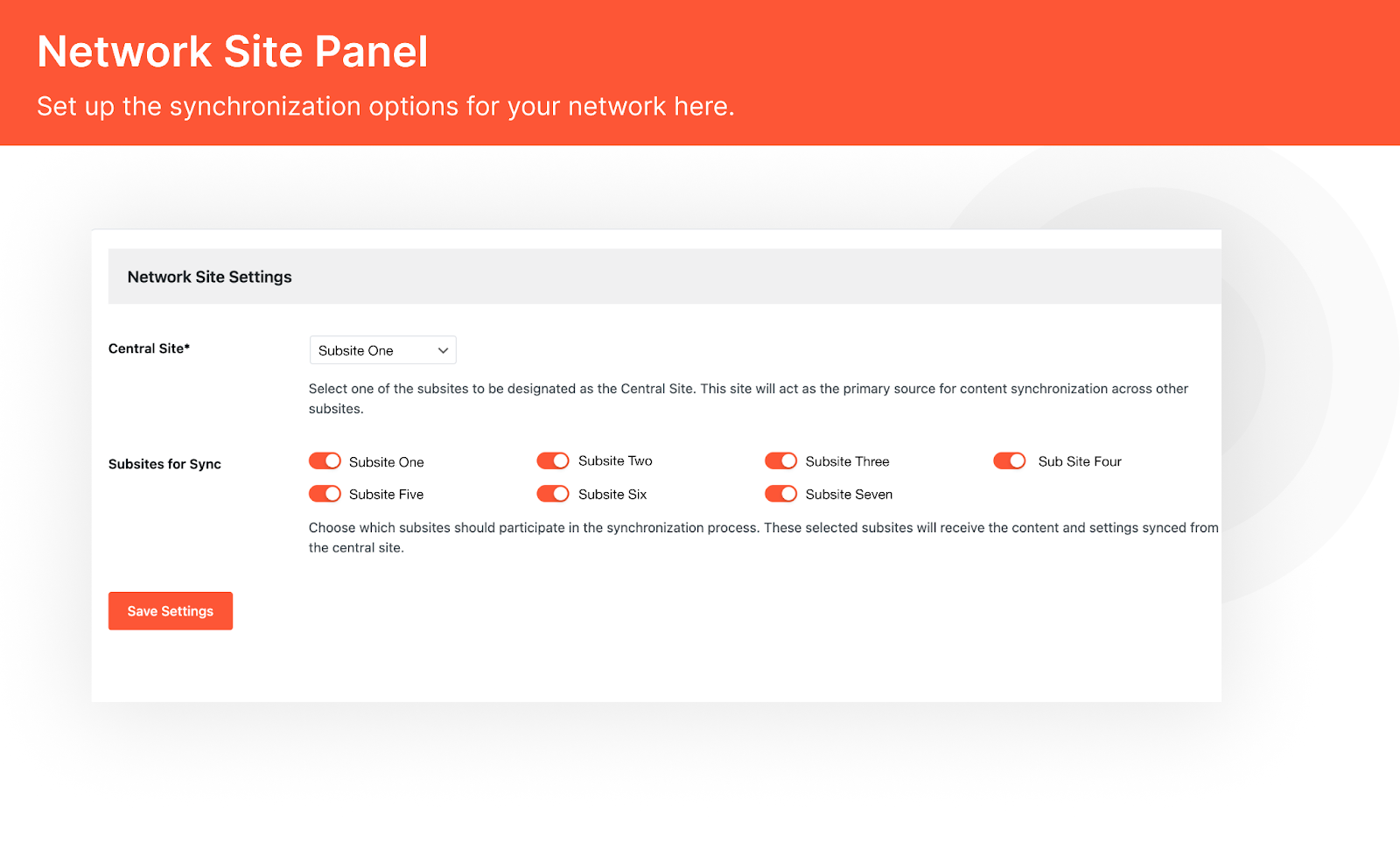
Centralized Content Management is built for WordPress multisite networks. It allows you to choose one site as the central site. Content created on this site can then be shared with other subsites based on your settings.
With this plugin, you can:
- Create and update content from one central dashboard
- Sync content only to selected subsites
- Control which content types are shared
- Keep the same content across your network
- Reduce duplicate work
Who Should Use This Plugin?
Centralized Content Management is useful for anyone running a WordPress multisite network, including:
- Publishers managing multiple websites
- Companies running regional or brand sites
- Universities or institutions with many subsites
- Agencies managing multisite client setups
- Any team that needs the same content across sites
If you want better control and less manual work, this plugin is a good fit.
Plugin Structure and Network Settings
The plugin works from the Network Admin dashboard and makes content syncing clear and predictable.
Network Site Panel
Here’s everything you can accomplish with this plugin:
1. Sync Only the Subsites You Need
Not every subsite needs the same content. That is why the plugin supports selective site synchronization.
You can enable syncing for specific subsites and leave others untouched. This makes it easy to manage regional sites, brand variations, or department-based subsites within the same network.
Each subsite can be included or excluded with simple toggle controls.
2. Control What Content Gets Synced
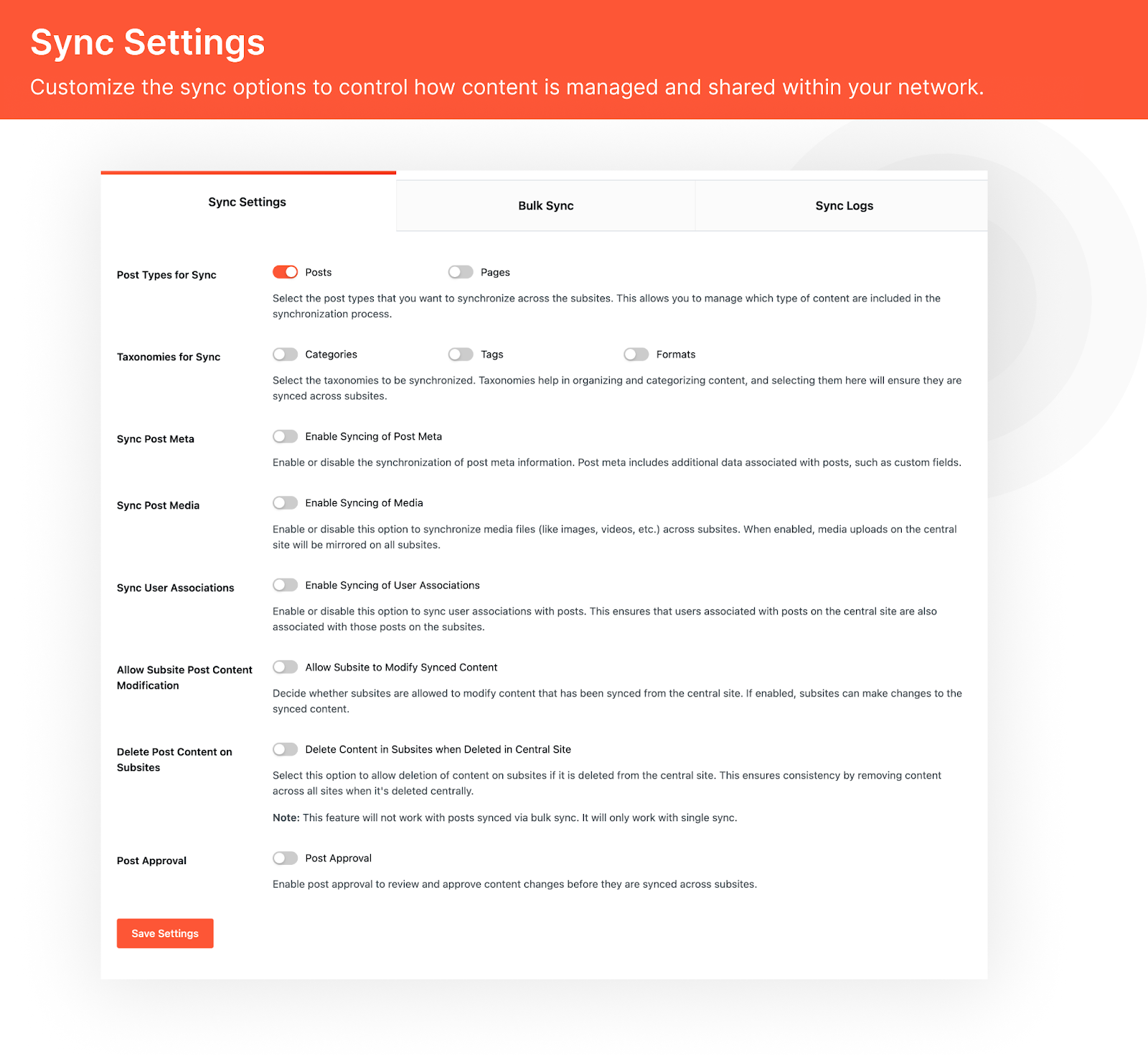
Centralized Content Management supports multiple content types, so you are not limited to just posts.
You can choose to sync:
- Posts and pages
- Categories, tags, and other taxonomies
- Media files such as images
Sync Settings
This gives you clear control over how much content is shared across the network.
3. Manage Media and Post Relationships
When media syncing is enabled, files uploaded on the central site can be mirrored across selected subsites. This helps keep images and assets consistent and avoids repeated uploads.
You can also sync user associations, so authors and editors remain linked correctly when content is shared across sites.
4. Decide Who Can Edit Synced Content
The plugin allows you to control whether subsites can modify synced content.
If this option is enabled, subsites can make their own edits after syncing. If disabled, the content remains locked and fully controlled by the central site. This is useful when strict content consistency is required.
You can also choose whether content should be deleted on subsites when it is deleted from the central site. This helps keep the network clean and aligned.
5. Bulk Sync and Sync Logs
For larger updates, the plugin supports bulk syncing, allowing you to push multiple pieces of content at once.
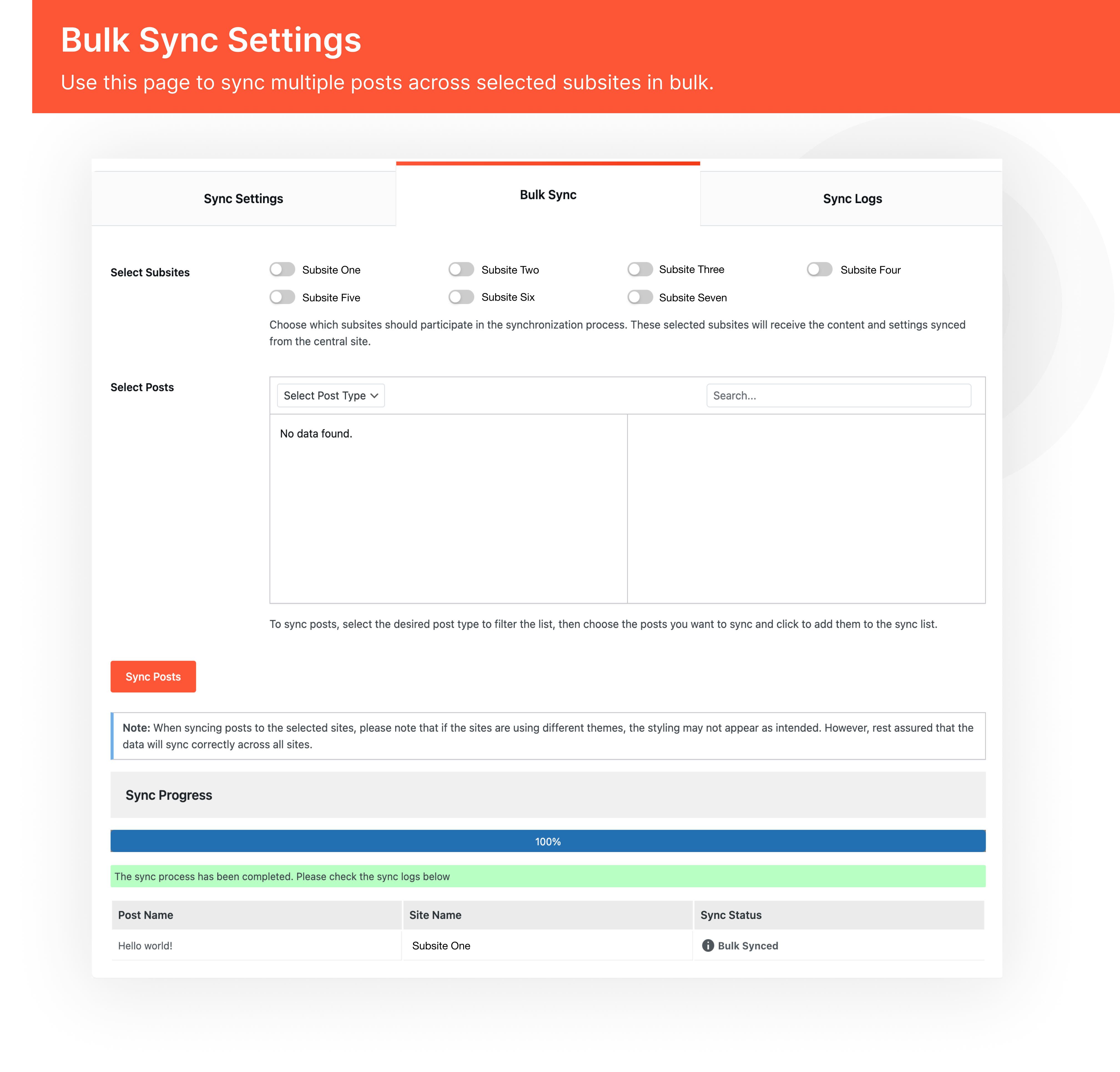
Bulk Sync Settings
To keep everything transparent, the plugin includes sync logs. These logs show when content was synced, where it was sent, and whether it was a manual or bulk action.
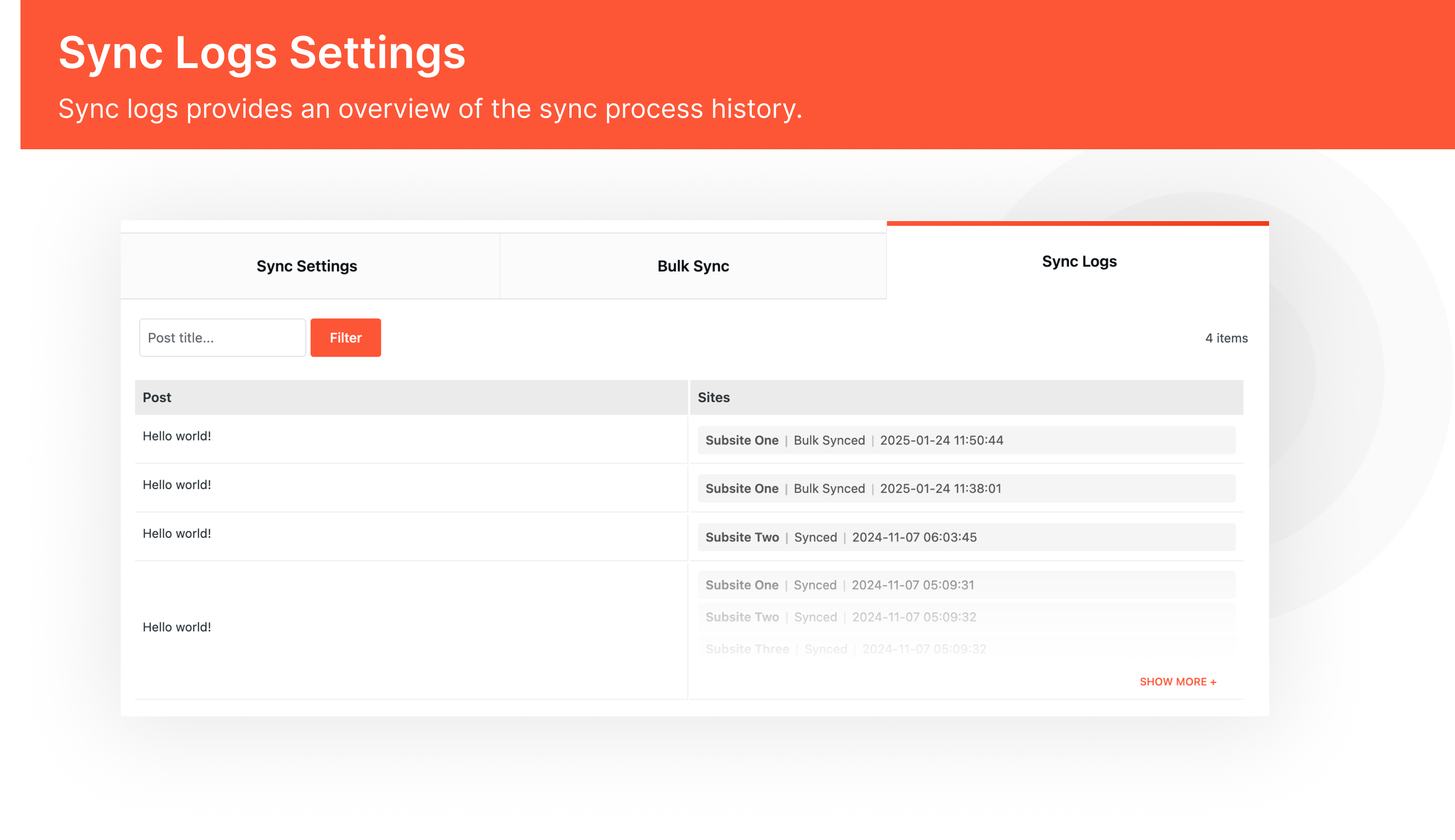
Sync Logs Settings
If you manage more than one site under a multisite setup and want better control over shared content, this plugin fits naturally into your workflow.
Installation and Setup
Getting started with Centralized Content Management is simple:
- Install the plugin from the WordPress Plugin Directory or upload it manually to
/wp-content/plugins/ - Activate the plugin from the Plugins menu
- Open the Network Admin dashboard
- Go to CCM Settings
- Select a central site
- Choose which content types and subsites should be synced
Once configured, you can start managing and syncing content right away.
Summary
Centralized Content Management simplifies how content is handled across WordPress multisite networks.
By allowing you to manage content from one central site and selectively sync it to other subsites, the plugin reduces repetitive work and helps maintain consistency across your network. With clear controls, flexible sync rules, and built-in logs, it provides a practical solution for real-world multisite content management.
If you want better control over multisite content without complex workflows, Centralized Content Management is a reliable and efficient choice.
Check out the plugin now.
FAQs
-
Centralized Content Management is a WordPress plugin that lets you manage content from one central site and sync it to selected subsites in a multisite network. It helps reduce duplicate work and keeps content consistent across sites.
-
Yes. This plugin is designed specifically for WordPress multisite networks and works from the Network Admin dashboard. It will not work on single-site WordPress installations.
-
From the Network Admin settings, you can select exactly which subsites should receive content from the central site. You can include or exclude subsites at any time.
-
Yes. Syncing is selective, not forced. You can choose specific subsites for each content type and leave others untouched.
-
You can sync:
- Posts
- Pages
- Categories and tags
- Media files
You can enable or disable each content type based on your needs.
-
If syncing is enabled, updates made on the central site can be automatically or manually pushed to the selected subsites, depending on your settings.
-
The plugin gives you the option to also delete that content from subsites where it was synced. This helps keep the network clean and consistent.
-
Yes, but this is optional. You can choose whether subsites are allowed to edit synced content or whether all edits must happen on the central site.
-
Yes. When media syncing is enabled, images and other media uploaded on the central site can be synced to selected subsites.
-
No content is overwritten automatically unless you explicitly sync it. The plugin is designed to avoid accidental overwrites and only applies changes based on your sync rules.
-
Yes. The plugin supports bulk syncing, which is useful when setting up a new network or pushing large updates.
-
Yes. The plugin includes sync logs that show what content was synced, when it was synced, and which subsites received it.
-
Yes. The plugin is built to support both small and large multisite networks, including enterprise and publishing setups.
-
The plugin is designed to work with most WordPress plugins. However, for complex setups, it is recommended to test in a staging environment first.
-
Yes. Centralized Content Management is available for free and licensed under GPL v2 or later.
Schedule a consultation call and discuss your migration requirements.
Contact Us