
The contentful-to-sanity CLI offers a way to handle export, schema conversion, and asset transfer in one go, with a single command, which is genuinely impressive. Unfortunately, that’s also only about half the migration.
Because once the CLI’s had its moment, the real work begins: restructuring rich text into PortableText, rewriting GraphQL queries in GROQ, reconnecting localization, and making sure valuable SEO signals don’t disappear during the move.
Most migration guides stop after the CLI step. This one doesn’t. We’ll walk through both phases, so engineering managers, technical leads, and developers can properly scope the full project before diving in – instead of discovering the manual workload halfway through with a thousand-yard stare and a rapidly expanding Jira board.
Why Teams Move to Sanity Content Lake
The migration isn’t just a tooling swap. Content Lake runs on a different content architecture, and understanding what those changes are day to day is where the real value starts to show up.
Here’s what teams tend to notice first:
- Real-time collaboration: Multiple editors can work in the same document simultaneously, with live changes visible across sessions and no forced document locking to manage.
- Structured content reuse: Content lives as data rather than pages, allowing you to create a single piece of content and reference it anywhere across your front-end
- PortableText flexibility: You’re in control of rendering. Instead of being tied to fixed HTML output, PortableText lets you define exactly how each block type appears in every context.
- Leaner data fetching: GROQ lets you request only the fields you actually need, resulting in smaller payloads and cleaner API responses on content-heavy sites.
Assess Your Contentful Setup First
The content model audit is a step many teams skip, and soon come to regret immensely. It tells you whether the CLI will handle your migration cleanly, where custom scripts are lurking, and how much manual cleanup work is waiting to ambush the timeline before a single command even runs.
Contentful vs. Sanity Content Models
The two platforms use different terminology for roughly similar concepts, so before anyone touches tooling, get clear on what maps to what:
| Contentful | Sanity |
|---|---|
| Content type | Document type |
| Rich text | PortableText |
| Entry | Document |
| Asset | Asset |
| Locale | Document-level locale |
| GraphQL | GROQ |
To be clear, these are starting points rather than exact equivalents. Rich text to PortableText is a structural transformation, not some simple copy-paste exercise. Plus locales work differently too: Contentful manages them at the space level, while Sanity handles them at the document level, which changes how localized content is stored and queried. This is why it’s best to treat schema migration as redesign work, and avoid things getting messy later.
How to Audit Your Contentful Space
Run this audit before the CLI:
- Review the Content model and Content sections in Contentful to identify content types, entry volume, reusable components, and deeply nested relationships before running the migration.
- Map deeply nested references – multi-level reference chains often need custom scripts beyond the standard export process.
- Identify non-standard marketplace plugins – anything extending Contentful’s default behavior will need a Sanity replacement or rebuild.
- Document custom apps, webhooks, and integrations – none of these transfer automatically, so replacements need mapping before go-live.
Your Pre-migration Readiness Checklist
Before running anything, here’s what you need to have checked off:
- Content model audit completed and schema redesign decisions documented.
- API credentials gathered: Space ID (Settings → General), CDA token (Settings → API Keys), CMA token (Settings → API Keys → Content management tokens).
- Clean Sanity v3 Studio initialized.
- Production dataset created in Sanity.
- Locale strategy decided and documented.
- Custom Contentful apps and integrations inventoried with a replacement plan.
Sanity API tokens scoped to the minimum permissions (never admin in app code), Contentful roles mapped to Sanity equivalents, @sanity/workflow configured if a structured publish workflow exists, and a documented Contentful decommissioning plan ready for post-launch.
Choosing Between CLI and a Custom Script
The contentful-to-sanity CLI handles straightforward migrations surprisingly well… until it doesn’t. And discovering you’re dealing with a “this absolutely needs a custom script” migration halfway through is a deeply avoidable form of suffering.
The good news is that a quick audit usually tells you which path you’re on before things catch fire.
When the CLI Works and Doesn’t
Use the CLI when:
- Content types use standard Contentful field types (text, number, boolean, reference, asset).
- References are shallow (one or two levels deep).
- No non-standard marketplace plugins are in use.
- Localization follows the standard Contentful locale structure.
- Schema can transfer as-is without structural redesign.
Use a custom script when:
- Nested references exceed two levels or form circular patterns.
- Non-standard field types or custom UI extensions are present.
- Localization is complex or requires restructuring at the document level.
- Schema redesign decisions made during the audit change how content types should be stored in Sanity.
The custom route typically starts with a full Contentful space export, followed by a Node.js transformation into NDJSON. Ironically, the data conversion is rarely the painful part. The real time sink is schema design, so plan accordingly.
How to Run the CLI Migration
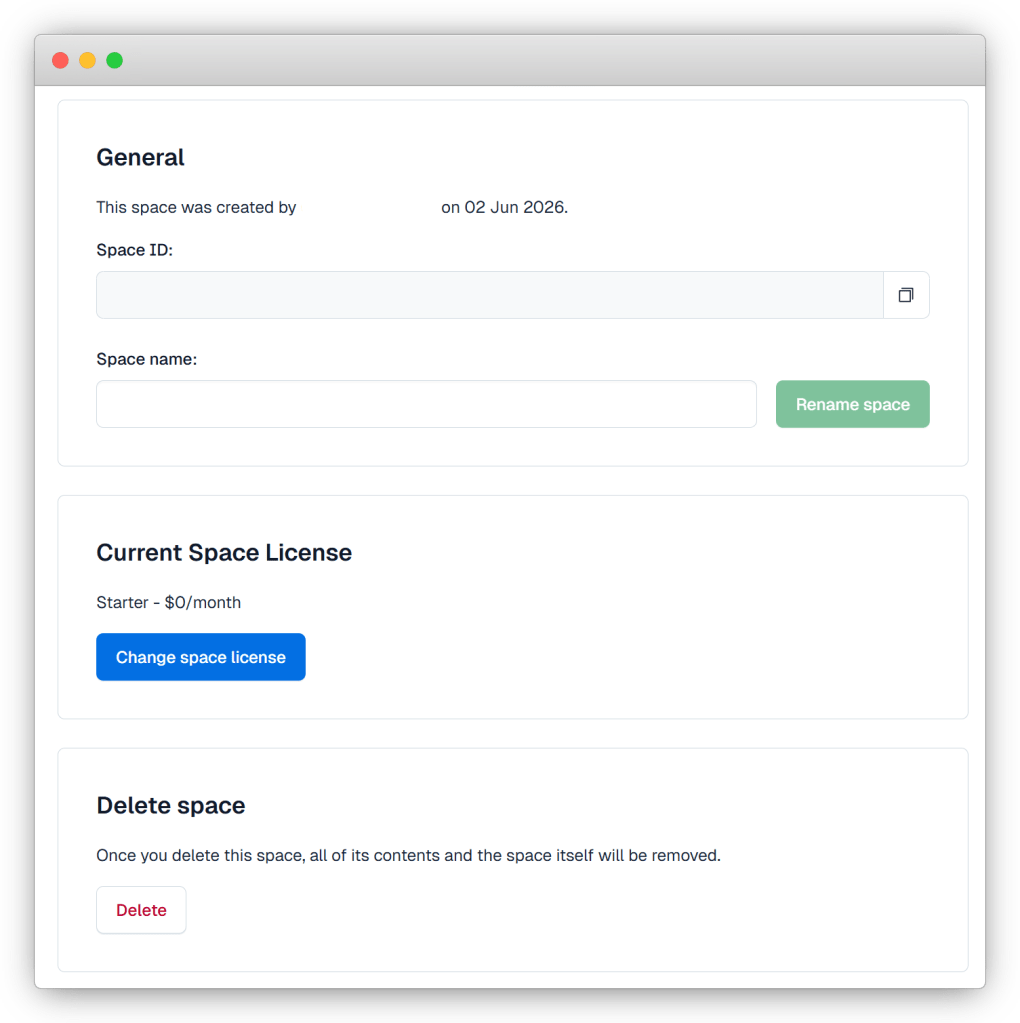
Step 1 – Gather credentials: Retrieve your Space ID from Settings → General, your CDA token from Settings → API Keys, and your CMA token from Settings → API Keys → Content management tokens.
Step 2 – Initialize a clean Sanity v3 Studio
Shell

npm create sanity@latest --template clean
Step 3 – Run the migration
Shell

npx contentful-to-sanity@latest \
  -s <space-id> \
  -t <management-token> \
  -a <access-token> \
  ./migrate
Step 4 – Review the outputs. The CLI generates four files in the output directory:
contentful.json– full space export.contentful.published.json– published entries only.dataset.ndjson– Sanity-formatted dataset ready for import.schema.ts– generated Sanity schema.
Step 5 – Import the dataset
Shell

npx sanity dataset import dataset.ndjson production
Step 6 – Swap the schema import. In sanity.config.ts, replace the default schemaTypes import with the generated schema.ts. And yes, the Studio is usable before the import finishes. Schema and content load independently, so you don’t have to sit there staring at a progress bar questioning your life choices.
Post-import validation checklist:
dataset.ndjsonexists and is non-empty.- Document counts in Sanity match entry counts from the Contentful audit.
schema.tsloads in Studio without type errors.- Sample documents render correctly in the Studio desk view.
- Asset URLs are not hardcoded to Contentful CDN endpoints (these break post-migration).
- No required fields have migrated empty, and all reference fields resolve to documents, not raw _ref IDs.
If outputs start looking incomplete, malformed, or vaguely cursed at any stage, that’s your cue to pivot to a custom script. Patching a half-broken CLI migration by hand almost always takes longer than restarting properly.
Work After the CLI Finishes
A successful CLI migration doesn’t mean the migration is actually done. PortableText conversion, GROQ rewrites, and localization are where timelines usually unravel and invisible bugs start breeding. The official Sanity docs do a solid job covering the import itself, including outlining the steps to be taken using their migration plugin. What they don’t cover is everything that breaks afterward.
Converting Rich Text to PortableText
Contentful rich text and Sanity PortableText are structurally incompatible. Swapping the renderer is the easy part – replace documentToReactComponents with <PortableText> from @portabletext/react. The real work starts with component mapping.
Every block type and mark type needs explicit handling:
- Block types: images, code blocks, headings (H1–H6), blockquotes, and ordered and unordered lists.
- Mark types: links, strong, em, inline code, and any custom marks from your Contentful setup.
And here’s the fun part: unmapped block types fail silently. No console errors or dramatic crashes. Content just… disappears. Miss a blockquote or code block mapping, and it simply won’t render. This is one of the most common post-migration bugs, and usually only gets caught through painstaking audits comparing rendered pages against source content.
Rewriting GraphQL Queries in GROQ
Contentful’s GraphQL API resolves content references automatically. GROQ absolutely does not. Unless you explicitly resolve references with the -> operator, you’ll get raw reference IDs back instead of usable content.
Which means your frontend suddenly starts displaying document IDs, and everyone assumes the migration corrupted the data.
A direct comparison makes the difference obvious:
graphql
# Contentful GraphQL
{
  blogPost(id: "abc123") {
    title
    author {
      name
    }
  }
}
groq
// Sanity GROQ
*[_type == "blogPost" && _id == "abc123"][0] {
  title,
  author-> {
    name
  }
}
The -> operator on author tells GROQ to resolve the reference and return the referenced document’s fields. Without it, you get {_ref: "author-id"}.
Sanity does offer GraphQL as an alternative if your team wants to avoid rewriting queries. The catch is every schema change requires a redeploy. During post-migration stabilization – when schema tweaks happen constantly – that gets tedious pretty quickly.
What the CLI Misses on Localization
Contentful handles localization at the field level, meaning a single entry can contain values for multiple locales. Sanity supports both field-level localization and document-level localization via the @sanity/document-internationalization plugin.
Unfortunately, PortableText has opinions.
Sanity does not recommend field-level localization for PortableText-heavy content because it can create attribute-count and maintainability issues. Any multilingual rich text content has to use document-level localization instead, where each locale exists as its own document. So if your Contentful setup includes localized rich text fields, your architecture decision has effectively already been made for you.
One more wrinkle: the CLI’s i18n support is still experimental. So, the localization structure should be treated as manual implementation work in your migration scope, rather than something you can safely automate and forget about.
Frontend Migration Considerations
CMS migrations rarely happen in isolation. By the time a team moves from Contentful to Sanity, the frontend is often changing too – whether that’s a Next.js upgrade, a new rendering approach, or an overhauled image pipeline.
The guidance below focuses specifically on Next.js, because that’s where most Sanity migrations end up.
Next.js integration – Sanity offers first-class support for Next.js, including Visual Editing and live preview through Draft Mode and the Presentation plugin. It’s one of the smoother integration experiences in the headless CMS world. Editors can view draft content in its real page context without needing a separate preview environment, which removes a lot of the usual back-and-forth.
Preview mode – Getting preview working properly comes down to three pieces: a token-authenticated Sanity client that can read draft documents, a /api/draft route that sets the Draft Mode cookie, and separate query logic for published and draft content.
It’s tempting to use a single client for everything, but that usually leads to inconsistent preview behavior. Keeping those contexts separate is the approach that tends to hold up once the site is live.
Caching – Sanity’s CDN is excellent at caching published content. During the post-launch stabilization period, though, when editors are checking pages and fixing the inevitable small issues, speed can become a nuisance. Configure cache bypasses so changes appear immediately rather than waiting for CDN expiry.
For ISR revalidation, connect Sanity webhooks to Next.js revalidatePath or revalidateTag calls. That way, page freshness stays automatic instead of relying on someone remembering to refresh it manually.
Image optimization – The recommended setup is Sanity’s image pipeline, paired with the urlFor() builder and Next.js’s <Image> component.
Before launch, run a final sweep for any lingering ctfassets.net URLs. Hardcoded Contentful asset references will return 404s after migration, and they’re notorious for staying hidden until cutover day.
Rendering strategy – If the site uses SSG or ISR, make sure Sanity publishes webhooks trigger revalidation before go-live.
This is one of those jobs that often gets pushed into the “we’ll sort it later” pile. It shouldn’t. Without it, editors can publish content, refresh the live site, and wonder why nothing changed. The update won’t appear until the revalidation window expires or someone triggers it manually.
Protecting SEO Post-Migration
A migration can import content flawlessly and still torpedo your rankings the second it goes live. Miss redirects, scramble metadata, break slug queries, and Google starts treating your shiny new setup like a crime scene. The teams that hold rankings post-launch are usually the ones that obsess over redirect coverage and metadata preservation before anyone touches the publish button.
Before go-live, audit every metadata field: title tags, descriptions, canonical URLs, Open Graph tags, and any structured data tied to Contentful field names. Regenerate sitemaps once the new schema is live. And here’s one Sanity quirk that trips teams up constantly: slugs are stored as objects, not strings. If your GROQ queries use slug instead of slug.current, you’ll get the object back instead of the actual URL segment. Not ideal.
Six Things That Break Post-Launch
- Hardcoded Contentful asset URLs return 404s. Find and replace all
images.ctfassets.netreferences with Sanity CDN URLs during post-import validation. - Slug queries missing
.currentreturn objects instead of strings. Update all GROQ slug queries to useslug.current. - Unmapped PortableText block types render blank with no error. Audit rendered output against source content – don’t rely on the console to surface missing mappings.
- Internal links pointing to old Contentful preview URLs break silently. Search the codebase for preview URL patterns before launch.
- Structured data referencing old field names throws validation errors. Update all JSON-LD schemas to reflect new Sanity field names.
- Internal links and asset URLs were not audited before launch. Crawl staging with a tool like Screaming Frog to catch broken Contentful preview URLs and any remaining ctfassets.net references in one pass.
The Post-Launch Audit
- Document counts in Sanity match Contentful entry counts for every content type.
- Sample documents confirm no fields migrated to empty.
- Rendered pages load assets from the Sanity CDN.
- Search Console is monitored for crawl errors during the first four weeks post-launch.
- Rendered pages pass a baseline accessibility audit (heading hierarchy, alt text, keyboard navigation).
For high-traffic sites, Multidots applies phased traffic switching as a hard gate: route a small percentage first, monitor for errors, then scale up once things are stable.
Pre-Launch Readiness Checklist
Work through every item below before traffic moves to the new platform:
Content and data:
- Document counts in Sanity match Contentful entry counts per content type.
- No required fields have migrated empty.
- All reference fields resolve to documents, not raw _ref IDs.
- PortableText block and mark type mappings confirmed for every type in use.
Assets:
- All assets serve from Sanity CDN, no remaining images.ctfassets.net URLs.
- Image alt text is populated across migrated documents.
- No broken asset references in any document.
Frontend:
- All GROQ queries use slug.current, not slug.
- Draft mode and preview routes tested with editor credentials.
- ISR revalidation webhooks configured and tested.
- Caching headers confirmed for public vs. authenticated traffic.
SEO:
- Every old Contentful URL maps to a validated redirect.
- Canonical tags, title tags, and meta descriptions match or improve on originals.
- Sitemaps regenerated and submitted to Search Console.
- JSON-LD structured data updated to reflect new Sanity field names.
Realistic Migration Timelines
Technical complexity decides the development effort. Organizational complexity decides the calendar. Most enterprise teams plan for the first and underestimate the second – which is why migrations that looked beautifully straightforward in scoping somehow end up living in Jira for the next fiscal year.
Timeline by Project Size
- Small (fewer than 10 content types, no localization, standard fields): days of active development.
- Medium (10–30 content types, single locale, moderate reference depth): two to six weeks.
- Large (30+ content types, multi-locale, custom plugins, complex PortableText, integration rebuilds): several months of development time.
What pushes a project from one bracket into another is usually GROQ query volume, PortableText complexity, localization restructuring, and the number of integrations that need rebuilding from scratch.
Why Enterprise Timelines Stretch and Cost More
The real schedule killers usually aren’t technical. Vendor exit periods, security reviews, finance approvals, and integration rebuilds all move at organizational speed. From Multidots’ experience across hundreds of enterprise CMS migrations, these are the factors that consistently stretch delivery timelines well beyond the original development estimate.
There’s also the overlap cost problem. During migration, both platforms run in parallel. Contentful’s Lite plan costs $300/month, so every week of delay means paying for Contentful while Sanity is already up and running. Sanity’s free tier softens the blow on one side, but Contentful keeps billing until the space is formally decommissioned.
Keep Contentful live until the post-launch validation window closes, export a Sanity dataset snapshot immediately after import (sanity dataset export), and define your error rate thresholds before go-live. Rolling back under pressure without a pre-agreed runbook is how small issues become incidents.
When to Bring in a Partner
DIY is viable when: the content model is straightforward, content types are limited, localization isn’t involved, and the developer is already comfortable with GROQ and PortableText.
A partner makes sense when: content types creep past 20, multi-locale support enters the picture, zero-downtime becomes essential, editorial workflows need to stay intact during cutover, or organizational complexity starts looking like the biggest migration risk in the room.
Enterprise-Scale Migration with Multidots
Once content model complexity, multi-locale requirements, or zero-downtime expectations enter the picture, DIY migrations have a habit of turning into “how did we end up here?” projects. That’s where Multidots comes in.
Multidots is an official Sanity Agency Partner with certified developers and 1000+ CMS migrations completed, including projects moving from Contentful. Which means the edge cases covered in this guide – PortableText mapping gaps, localization restructuring, GROQ reference resolution, SEO preservation during cutover – aren’t nasty surprises discovered halfway through a migration. For us, they’re familiar ground.
From content audit to zero-downtime launch
Managed migrations follow a structured process that most DIY teams, understandably, try to compress until something breaks later:
Week one – Discovery: Content model audits uncover hidden dependencies, nested reference patterns, and integration rebuild requirements before migration tooling even starts. Scope gets validated against actual complexity instead of optimistic assumptions, saving time in the long run.
Schema design: Content types are rebuilt for Sanity’s document model rather than awkwardly transplanted from Contentful. PortableText mapping, localization strategy, and slug conventions are finalized before migration execution begins.
Migration execution: The audit determines whether the project follows a CLI or custom-script path. Asset transfer, dataset import, and schema deployment all run through staged validation checkpoints.
SEO protection: Redirect mapping, metadata audits, canonical validation, and sitemap regeneration are completed before traffic moves across.
Zero-downtime cutover: Traffic is shifted in phases, with a controlled percentage routed to the new platform first. Full go-live happens only after the validation window confirms stability.
For teams planning a Contentful-to-Sanity migration, contact Multidots to discuss your content model and timeline.
Run Your Pre-Migration Checklist Today
The checklist in this guide covers the essentials: credentials gathered, content models audited, schema decisions documented, and CLI path confirmed. Simple enough on paper.
But migrations have a habit of getting creative. Suddenly, you’re dealing with non-standard content models, multi-locale restructuring, zero-downtime requirements, and approval chains capable of turning a six-week project into a six-month saga.
If your audit reveals complexity beyond the CLI route, book a scoping call with Multidots. Bring your content type count, locale setup, and timeline constraints, and that’s usually enough to scope the project accurately in a single conversation.