
Choosing the right CMS for your business is a bit like picking a new team member. You want something (or someone) flexible, powerful, and a perfect fit for your team’s needs.
In the world of content management systems, WordPress is like the experienced all-rounder who’s been on the scene forever, while Sanity is the innovative headless CMS with specialized capabilities for modern web architectures. Let’s dive into what makes each of them stand out, and perhaps find the best match for your squad.
What Sanity Offers?
Sanity is a headless, API-first CMS that manages content as structured data and delivers it to any channel, device, or front end. It separates the back-end content store from the presentation layer, so your developers build the experience while your editors work in a dedicated studio. For a fuller primer on the platform, see our Sanity CMS overview.
Key Features
Sanity’s feature set centers on structured content, real-time collaboration, and developer control – a flexible foundation for custom digital experiences rather than an off-the-shelf website builder.
- Real-Time Collaboration – Multiple team members edit the same document simultaneously in Sanity Studio, Google Docs-style, which suits distributed editorial teams.
- Structured Content and GROQ – Content is stored as data and queried through GROQ, Sanity’s own query language, so the same content can power many outputs.
- Multi-Channel Delivery via APIs – One content source feeds your website, mobile apps, and other touchpoints through APIs, rather than being locked to a single site.
- AI Assist – Sanity includes AI Assist, a built-in toolkit for generating and transforming content directly within Sanity Studio.
- Custom Schemas and Developer Control – Teams define their own content models and build the front end on modern frameworks such as React or Next.js.
Cost and Pricing
Sanity runs on a subscription model that scales with usage, starting free for small teams and moving to custom agreements for large organizations.
- Free Tier – Covers small teams and early-stage projects, with support for a limited number of users.
- Team Plan – A paid tier starting from roughly $99 per month for growing teams that need more seats and usage.
- Enterprise – Custom pricing for high-volume, large-scale implementations with bespoke requirements.
Use Cases and Industries
Sanity fits organizations that need custom, content-rich applications delivered across multiple channels, especially those with in-house or partner development resources.
- Enterprise Web Applications – Complex, data-driven sites and products that need a tailored content model.
- Media and Publishing – High-volume editorial operations that publish across web, app, and syndication.
- Multi-Brand Platforms – Organizations managing several brands or sites from one structured content source.
- eCommerce with a Custom Frontend – Stores that pair a headless storefront with a bespoke shopping experience.
Teams weighing headless options usually shortlist more than one platform – our Sanity vs Contentful comparison covers how it stacks up against the other main API-first contender.
What WordPress Offers?
WordPress is an open-source CMS that runs a large share of the web, pairing a familiar editing experience with a vast ecosystem of themes and plugins. It gives marketing and editorial teams the independence to publish and manage content without leaning on developers for routine changes.
Key Features
WordPress combines an accessible editor with deep extensibility, which is why it scales from a single blog to global enterprise sites.
- Gutenberg Block Editor – A visual, block-based editor that lets non-technical teams build and update pages directly.
- Plugin Ecosystem – Tens of thousands of plugins add features – from SEO to forms to analytics – without custom development.
- WooCommerce – A native eCommerce option for product listings, checkout, and payments, fully customizable.
- Theme Library – A large catalog of themes and block-based templates for getting a professional site live quickly.
- WordPress VIP – Enterprise-grade managed hosting and infrastructure for high-traffic, mission-critical sites.
Cost and Pricing
WordPress software is free; your costs sit in hosting, premium add-ons, and any custom development, which keeps total ownership predictable.
- Open-Source Core – The CMS itself is free to download and use.
- Hosting – Ranges from low-cost shared plans to enterprise managed hosting; verify current enterprise hosting and WordPress VIP figures before publish.
- Premium Plugins and Themes – Optional paid extensions, typically billed annually.
- WordPress VIP – Custom enterprise pricing for managed, high-scale deployments.
Use Cases and Industries
- WordPress suits teams that want to publish quickly, manage content in-house, and tap a large support ecosystem.
- Large-Scale Publishing and Media – High-volume content operations with frequent updates.
- Global Enterprise Marketing – Multi-region marketing sites managed by non-developer teams.
- eCommerce – Online stores built on WooCommerce and its extensions.
- Content-Heavy and Blog Sites – Sites where editorial velocity and ease of use matter most.
Sanity vs WordPress Overview
At its core, Sanity is a fully customizable, headless CMS built for real-time collaboration. It’s designed to deliver content as data over APIs for any channel, device, or product. In contrast, WordPress is known for its ease of use, versatility, and extensive plugin ecosystem. WordPress powers everything from blogs to full-fledged enterprise websites.
WordPress vs Sanity: Understanding the Differences
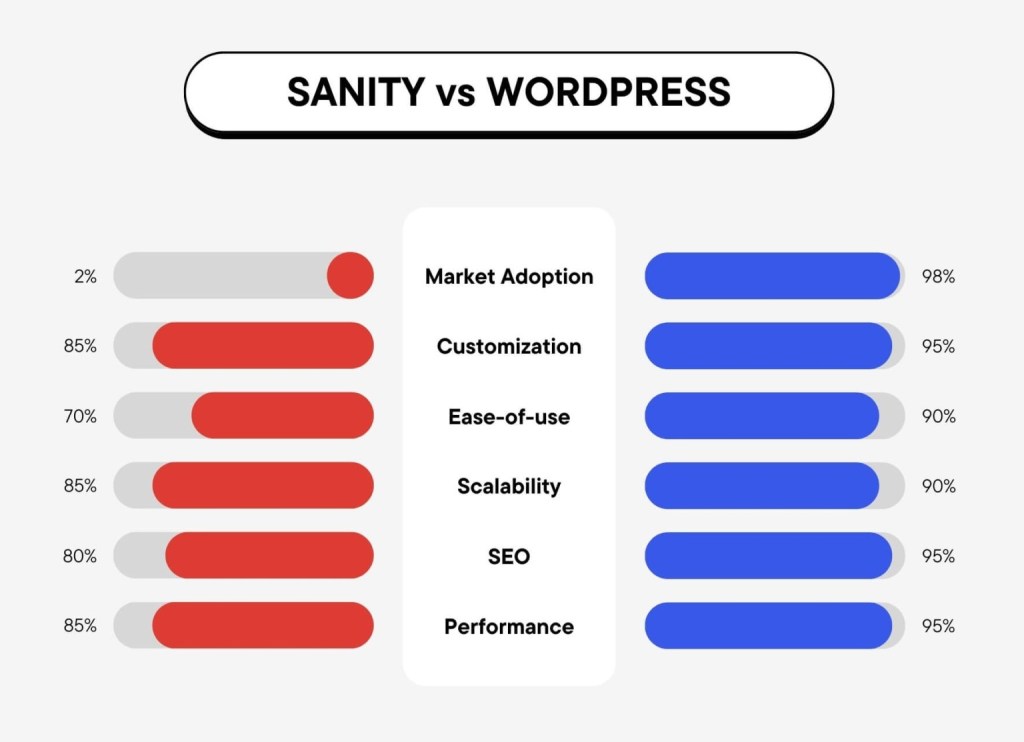
Both platforms serve different needs: Sanity offers cutting-edge, headless capabilities ideal for projects with unique or evolving requirements, while WordPress provides scalability paired with simplicity and a vast support network. Its extensive theme and plugin library make starting and growing your website accessible to everyone, not just developers. For businesses seeking a balance of power, flexibility, and user-friendliness, WordPress often stands out as the go-to choice.
The Qualities of an Ideal Enterprise CMS Solution
For a business, particularly an enterprise, settling on a CMS isn’t just about publishing content. You need a powerhouse – a platform that’s secure, customizable, and scales as you grow. Here’s what to look for:
- Ease of Use: It should be easy for your team to create, edit, and publish content without calling IT for help every time.
- Flexibility: Can it grow with your business? Your CMS should adapt to your needs, not the other way around.
- Security: With cyber threats on the rise, a secure platform is non-negotiable.
- Support and Community: When you hit a bump, it’s essential to have a support system, whether through official channels or a large community.
- Integrations: Your CMS should play well with other systems (e.g., CRM, e-commerce, etc.), allowing for a seamless workflow.
- Performance: Your website’s speed affects user experience and SEO. A good CMS helps keep your site fast.
- SEO-Friendly: It should include features or plugins to help optimize your site for search engines.
In our next sections, we’ll see how Sanity and WordPress measure up using these metrics.
Quick Comparison of Sanity vs WordPress
Let’s briefly compare the two CMS platforms across key aspects:
| WordPress | Sanity | |
|---|---|---|
| Type of CMS | Complete CMS | Headless CMS |
| Market Adoption | Widely adopted with large community support | Emerging preference among web developers |
| Performance and Scalability | High performance capable of scaling to billions of page views | Designed for real-time updates and high scalability |
| Security | Top-tier security with FedRAMP authorization | Custom security settings, requires setup |
| Ease of Use | Familiar and easy for digital teams | Customizable but with a steeper learning curve |
| Developer Experience | Extensive APIs and integrated workflows | Developer-first with flexible content structures |
| Content Creation and Management | Efficient publishing with Gutenberg editor | Highly customizable, may need developer support |
| Design and Customization | Supports block-based themes and design imports | Offers extensive design flexibility |
| Cost Efficiency | Low total ownership cost | Customizable platform offering potential cost savings |
| ROI and Business Agility | Build once, reuse components, and ensure design consistency | Promotes efficient workflows through customization |
| SEO and Performance | Optimized for SEO and high web performance | Depends on implementation specifics for SEO boost |
| Support and Community | Robust ecosystem of plugins and strong community support | Good developer support, growing ecosystem |
Open-Source vs. Closed-Source Systems: WordPress and Sanity
When evaluating CMS options, the type of system, open-source like WordPress or closed-source like Sanity, plays a critical role in defining flexibility, cost, and control over your digital environment.
WordPress boasts unmatched flexibility due to its open-source nature, allowing extensive customization and broad community support. This platform is ideal for those who require adaptability and ongoing improvements with a vast selection of tools powered by a global community.
Sanity, on the other hand, operates on a closed-source, subscription-based model. This provides users with reliability and professional support, albeit at a recurring cost. The closed environment might limit some aspects of customization and depend on the provider for updates and feature improvements.
Evaluating these aspects will help you identify which system best fits your organizational goals, balancing the immediate benefits of a closed-source system with the long-term flexibility of an open-source approach.
Sanity vs WordPress: Full Comparison
When selecting a CMS for your enterprise, it’s vital to consider how each option stacks up in various critical areas. Here, we’ll examine the significant differences between Sanity and WordPress.
1. Ease-of-use and Setup Process
Sanity prides itself on being a headless CMS that separates the backend from the frontend. This means you have to build your presentation layer from scratch or integrate it with a pre-existing system.
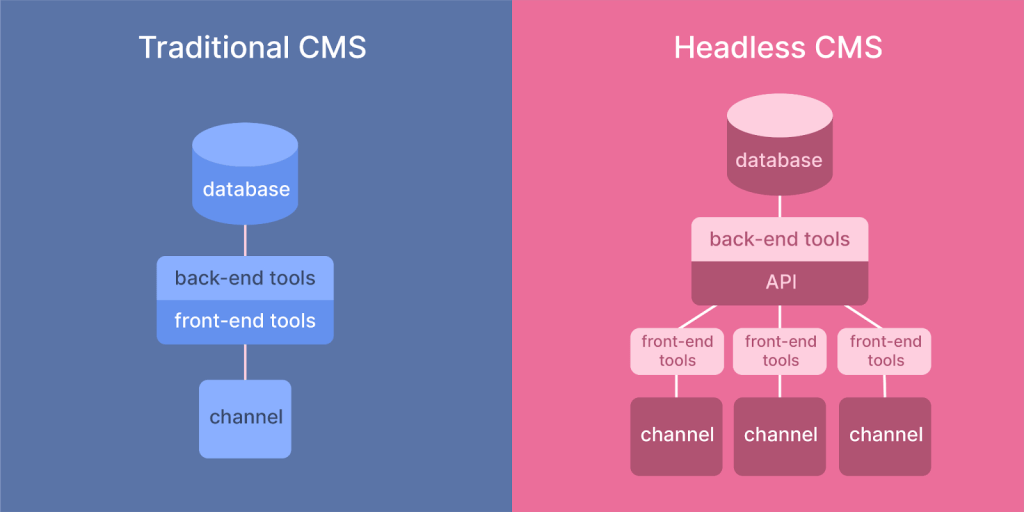
Its setup may involve a learning curve for teams unfamiliar with this approach and requires command-line interaction for initialization. However, it offers a real-time, collaborative studio for content management that’s intuitive once in place.
In contrast, WordPress prioritizes ease-of-use with a more traditional CMS approach. It provides a straightforward setup process, enabling your business to get your website up and running swiftly.
With a user-friendly interface that includes a rich visual editor and the ability to manage content effortlessly, WordPress is designed for convenience and accessibility. Both platforms serve different needs: Sanity excels when you need maximum flexibility and real-time collaboration, while WordPress prioritizes quick setup and immediate usability.
2. Customization
Sanity offers immense flexibility for customization, as you can tailor your backend to your exact needs. This allows for a unique fit for specialized business requirements. The trade-off is that it typically demands professional development skills, meaning additional time and resources might be required to shape the platform to your enterprise’s specific demands.
WordPress also offers a high degree of customization, but with a difference. Thanks to a vast selection of themes and a powerful templating engine, non-developers can visually tailor their website with fewer technical hurdles.
For enterprises, this means you can often launch a customized site more quickly with WordPress than with Sanity. However, Sanity’s approach offers unparalleled customization depth for businesses with specific technical requirements and development resources.
3. Mobile Friendliness
Mobile responsiveness is crucial for modern businesses. Sanity, being API-driven, allows complete control over how content is presented on different devices. Your developers will have the freedom to design a tailored mobile experience, which can be advantageous for businesses with specific mobile strategy goals.
WordPress acknowledges the mobile-centric world with a responsive admin panel and themes. Most WordPress themes come with a mobile-responsive design as a standard feature. With WordPress, ensuring your site looks good on tablets and smartphones is straightforward, which can be less daunting for businesses wanting to appeal to mobile users quickly and efficiently.
Both platforms support mobile responsiveness effectively. WordPress’s wide selection of mobile-responsive themes makes it easier for businesses to achieve a professional mobile presence quickly, while Sanity’s API-driven approach allows for completely custom mobile experiences tailored to specific user journeys and brand requirements.
4. Team Management
Collaboration is key in enterprise settings. Sanity shines in this space with features like real-time collaborative editing and fine-grained access control. The platform lets multiple team members work on the same document simultaneously, seeing each other’s changes as they happen. This is particularly helpful for geographically dispersed teams.
WordPress, while not originally built for real-time collaboration, has made great strides with its block editor (Gutenberg), and plugins that enhance teamwork. User roles and capabilities are built into WordPress, making team management and permission assignments straightforward and robust.
So while Sanity provides excellent tools for real-time collaboration, WordPress’s ecosystem, including plugins for team management, offers a robust and user-friendly solution for managing a team’s digital content efforts efficiently.
5. Plugins and Extensions
Extensibility can significantly enhance a CMS’s functionality. Sanity offers plugins, but the ecosystem is considerably smaller when compared to WordPress. Most of the extensions for Sanity are geared towards developers who wish to extend the platform’s capabilities.
In contrast, WordPress boasts a vast repository of plugins, with tens of thousands available for nearly any feature your enterprise might require.
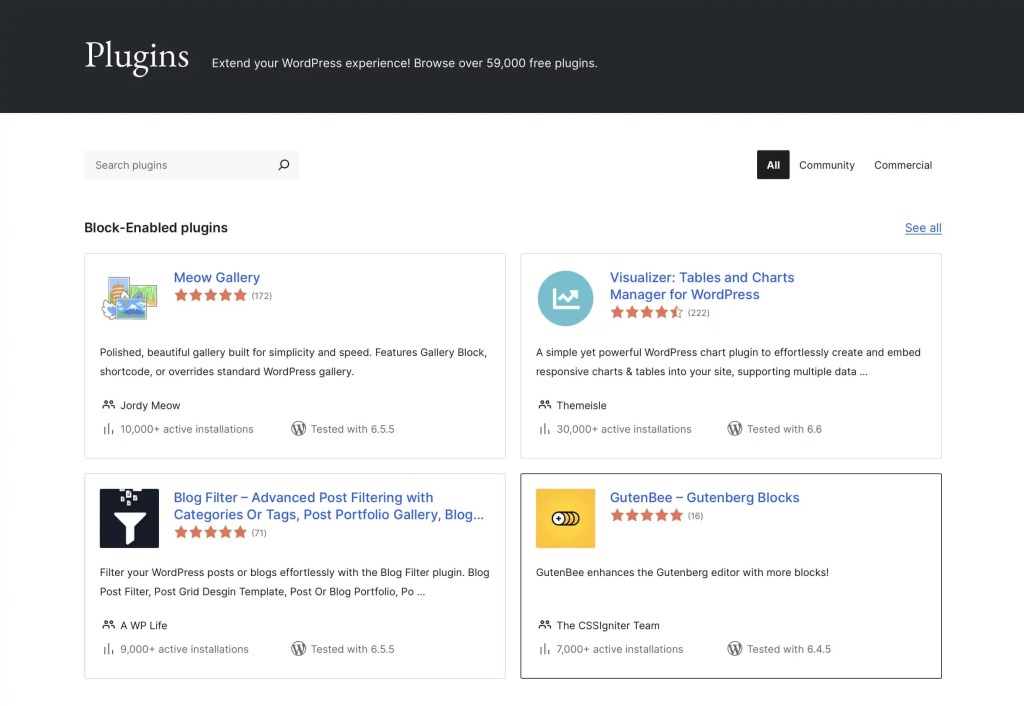
This extensive library enables WordPress to cater to a wide array of business needs without the need to develop custom solutions from scratch.
WordPress’s extensive plugin library offers immediate solutions for most business needs, while Sanity’s focused ecosystem provides developer-centric tools for building custom solutions. The choice depends on whether your business prioritizes ready-made solutions or custom-built functionality.
6. Integrations with Third-Party Services
Sanity offers APIs that facilitate synergies with a wide range of third-party services, from e-commerce platforms to customer relationship management (CRM) tools.
However, the integration process in Sanity is primarily developer-driven, requiring bespoke development to connect and synchronize with these external services.
Conversely, WordPress excels in third-party integrations, supported by a vast array of plugins designed for this purpose. Whether you’re looking to integrate social media, SEO tools, payment gateways, or email marketing services, WordPress likely has several plugin options available.
WordPress simplifies integrations through its vast plugin ecosystem, making it ideal for businesses seeking quick, out-of-the-box connections. Sanity’s API-first approach offers more flexible, custom integrations for businesses with specific technical requirements and development resources.
7. Security
Security is a top priority for any enterprise. Sanity provides flexible security configurations that can be tailored to enterprise requirements, with the headless architecture offering inherent security benefits by separating content management from content delivery. Being a headless CMS, the separation of the content management system and content delivery allows for a more secure architecture by minimizing the attack surface.
WordPress, while inherently secure, is a more frequent target for hackers due to its popularity. WordPress continuously updates its software to fix vulnerabilities, and there are numerous security plugins available to enhance protection.
Nevertheless, the nature of WordPress means that maintaining security requires regular updates and vigilance, especially with third-party plugins and themes.
Finally, both CMSs offer strong security features; however, WordPress’s mature and widespread use equips it with a vast amount of resources and community input for maintaining security, making it a reliable choice for businesses concerned about safeguarding their web presence.
8. Performance Optimization
Performance optimization in Sanity is largely controlled by how the development team structures the application and content delivery.
Being headless, Sanity allows for operations like asset optimization and lazy loading to be custom-implemented, enabling highly optimized and fast-loading web experiences.
In contrast, WordPress offers a range of plugins designed to optimize site performance, including caching, image optimization, and script minification.
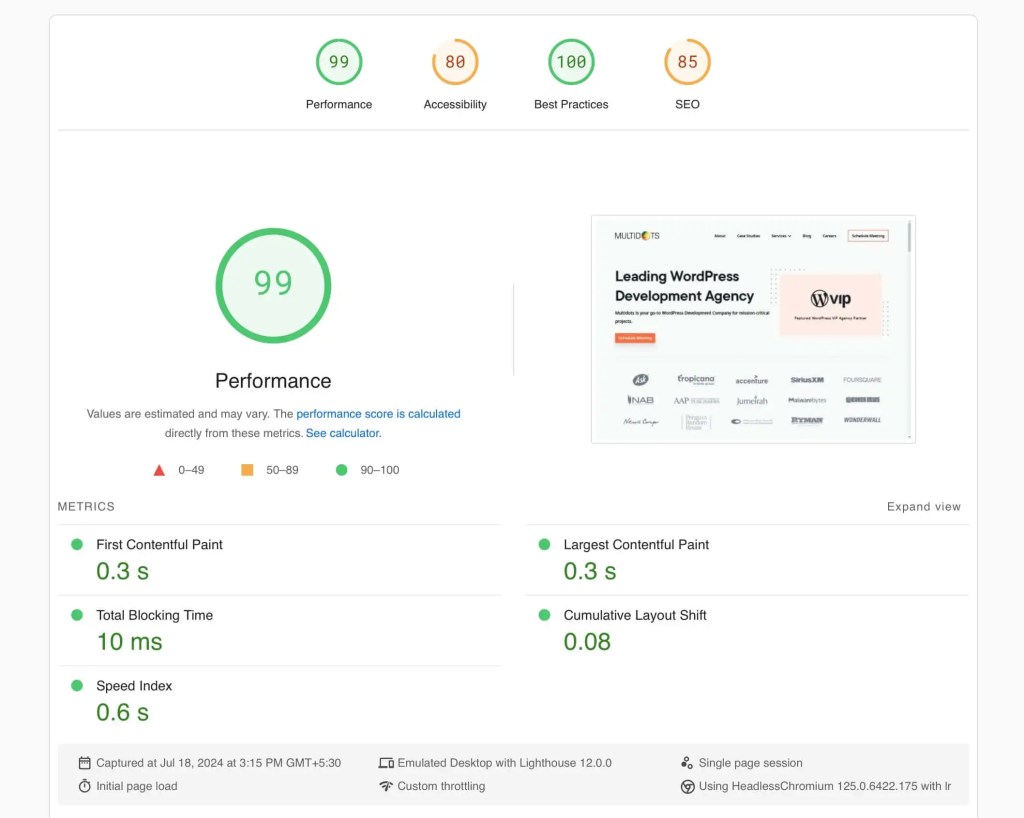
While WordPress provides a solid foundation for good performance, achieving optimal speeds often involves configuring multiple plugins and occasionally custom development work.
Both platforms offer excellent performance capabilities. Sanity provides fine-grained control over performance optimization through custom implementation, ideal for high-performance applications. WordPress offers proven scalability solutions with extensive optimization tools, making it reliable for businesses seeking performance with ease of management.
9. E-commerce Functionality
Sanity supports e-commerce through API integrations with third-party platforms, enabling businesses to create highly customized e-commerce experiences. While this approach requires development expertise, it offers unparalleled flexibility for unique business requirements.
WordPress, with the help of WooCommerce and other e-commerce plugins, offers a more out-of-the-box solution for setting up an online store.
WooCommerce provides a comprehensive set of e-commerce features, including product listings, cart, checkout, payment processing, and more, all while being highly customizable.
This ease of setting up and managing an online store makes WordPress a go-to choice for enterprises looking to sell online with minimal fuss.
10. Pre-made Themes and Templates
Sanity provides a selection of project templates, which can serve as starting points for various web applications, including personal websites with integrated content editing, agency websites, blogs, and e-commerce stores.
But the templates are fairly limited in their capability, and businesses are required to design their user interface from the ground up or utilize third-party frameworks, which can necessitate considerable investments in design and development expertise.
WordPress, on the other hand, provides a massive repository of pre-made themes and templates.
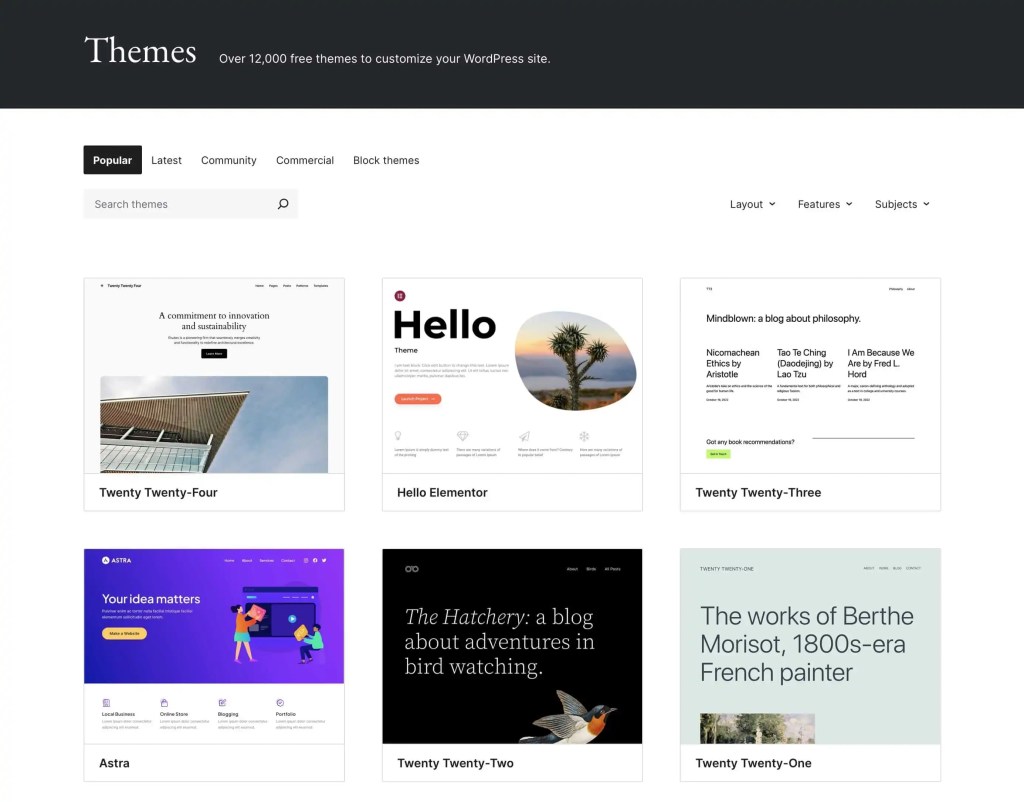
These resources enable businesses to quickly establish a professional web presence.
While WordPress excels in ready-made design options, Sanity’s approach allows for completely custom user interfaces built from the ground up, offering unlimited design possibilities for brands requiring unique, tailored experiences that stand out from template-based websites.
Which CMS is Best for SEO?
SEO is the bread and butter of online visibility for any business. A CMS that effortlessly blends with your SEO strategies is worth its weight in gold.
WordPress, with its myriad SEO plugins like Yoast SEO, provides a straightforward and effective way to optimize your content. These tools guide you through readability checks, keyword optimization, and offer real-time insights so your content can shine on search engines. WordPress’s popularity also means that its SEO capabilities are well-tested in various industries, giving a slight edge in adapting to SEO trends.
Sanity, being a headless CMS, provides the flexibility to implement custom SEO strategies through its API-first architecture. While this requires more technical implementation, it allows for highly optimized, data-driven SEO approaches tailored to specific business needs.
Now, remember that your website’s ranking in search engines isn’t just about the CMS—it’s also about the content quality, website design, and user experience.
Which CMS Offers a Lower Ownership Cost?
The total cost of owning a CMS goes beyond the initial setup; it includes ongoing maintenance, customizations, training, and support.
WordPress makes a strong case for affordability. It’s open-source and free to use; you only pay for hosting, themes, and premium plugins. Moreover, thanks to its ease of use, the onboarding process is often less expensive in terms of both time and money.
In contrast, Sanity operates on a pay-as-you-go pricing model, which can climb as your usage scales. Being a headless CMS, the front-end presentation layer is separate, which can lead to increased development costs for businesses aiming for a custom look and functionality tailored to their specific needs.
For enterprises mindful of their budgets, WordPress generally presents a lower total cost of ownership, thanks to its widespread community support and plethora of free resources.
Sanity as an Alternative to WordPress
For teams already comfortable on WordPress, Sanity offers a different way of working: content as structured data, delivered through APIs, with the front end built to your exact specification. It earns its place when a single website is no longer the whole story.
Choose Sanity if:
- You need custom, structured content models rather than page templates.
- You publish across multiple channels and devices, not just one website.
- Your team works in modern frameworks like React, Vue, or Next.js.
- You’re building complex, data-driven applications.
- You’re migrating to a React or Next.js front end and want the CMS to match.
- Your editorial team works in real time, with several people in the same content at once.
Success Stories
Enterprise brands such as Brex and Skims use Sanity to manage complex, content-rich experiences at scale. As a recognized Sanity implementation partner – Multidots has delivered Sanity builds and migrations for clients moving to a headless setup.
For a wider view of the headless market, our guide to alternatives to Sanity CMS compares the main options side by side.
WordPress as an Alternative to Sanity
For teams considering Sanity, WordPress stays in the running when speed, editorial independence, and a proven ecosystem matter more than a fully custom architecture.
WordPress makes sense if:
- Non-technical teams need to publish and update independently, without developer support.
- You want to be live quickly on proven, well-supported infrastructure.
- You’re running a high-volume publishing or enterprise marketing operation.
- Predictable, managed hosting costs matter more than usage-based scaling.
Success Stories
Multidots has migrated and scaled enterprise WordPress for some of the most demanding publishers and brands, including Ask Media Group – with 11 sites and more than 10 million monthly visitors, migrated with zero downtime.
Can WordPress be Used for Enterprise-Level Business?
Absolutely, WordPress isn’t just for blogging or small businesses. It’s a powerhouse that’s scalable enough to support enterprise-level websites. Big brands like Salesforce and Meta have harnessed WordPress for its easy-to-use interface, flexibility, and vast community support.
Enterprises can benefit from its extensive selection of plugins for SEO, security, and social media integration, making it adaptable to various business needs. Furthermore, with a robust hosting service (like WordPress VIP) and the right set of tools, WordPress can handle significant traffic and content loads that large businesses demand.
Additionally, the availability of professional WordPress design and development services means that your enterprise can have a premier-quality website with a tailored strategy for growth. The balance of user-friendliness, extendibility, and a dedicated community makes WordPress a wise choice for businesses planning to scale and evolve with the digital landscape.
Can Sanity be Used for Enterprise-Level Business?
Sanity is specifically designed with enterprise needs in mind. Its headless architecture, real-time collaboration features, and robust API capabilities make it an excellent choice for large-scale, complex digital ecosystems. Organizations like Brex, Skims, and other brands have successfully implemented Sanity for their enterprise-level content management needs.
Enterprises benefit from Sanity’s flexible content modeling, developer-friendly APIs, and ability to serve content across multiple channels and touchpoints. The platform’s modern architecture supports complex editorial workflows, real-time collaboration, and custom integrations that large organizations require. With proper implementation and development expertise, Sanity can handle significant content volumes and complex use cases that enterprise businesses demand.
Final Verdict: Which CMS is Right for Your Business?
Choosing between Sanity and WordPress can influence the way your enterprise connects with its audience. Sanity is like a blank canvas; it can be molded to fit any enterprise’s specific desires, especially if those needs include handling complex, data-driven content. And because it’s headless, Sanity can push content beyond websites to apps, digital displays, and more.
WordPress, on the other hand, offers a vast ecosystem of themes and plugins, which accelerates the development process and allows quick scaling. It’s ideal if your business values simplicity, a short learning curve, and a vast community for support.
For enterprises looking for tried-and-true solutions that can be easily managed and customized, WordPress tends to be the go-to choice. For enterprises requiring highly bespoke, data-intensive experiences with omnichannel content delivery, Sanity provides the architectural flexibility needed, though it requires dedicated development resources to fully realize its potential.
How Multidots Can Help?
Multidots is an enterprise CMS solution provider specializing in complex, high-scale implementations, migrations, and integrations across multiple platforms.
Whichever direction you choose, our team can guide platform selection, migration – including WordPress to Sanity or Sanity to WordPress – and performance optimization. Talk to our Sanity development team or explore our full CMS services.
FAQs
WordPress is a traditional, open-source CMS known for its extensive plugin system, themes, and a significant user community. It’s user-friendly and easily adaptable for various website projects. Sanity, however, is a headless CMS designed for structured content that can be delivered across multiple platforms. Sanity offers a customizable editor and real-time collaboration but requires extensive technical knowledge for setup and customization.
"Better" is subjective and depends on the project requirements. While WordPress is excellent for a vast range of websites, other CMS like Drupal, Joomla, or headless CMS like Contentful or Sanity may suit specific needs better, such as complex, multi-channel content strategies or when you require extensive customization without relying on plugins.
Sanity itself is not an out-of-the-box SEO solution but because it allows for customized content models and API-driven content delivery, it can be optimized for SEO quite effectively when paired with the right tools and practices. The flexibility to manage and deliver content as needed can potentially lead to better SEO performance.
Use Sanity CMS if you are looking for a flexible, efficient way to manage content that is not tied to a specific front-end or platform. Its capability for real-time collaboration and its customizable editor can greatly enhance content workflows, especially for content-centric applications that require a headless architecture to push content to multiple screens and devices.